The Tool Desk
Outbyte PC Repair FREEClear out junk files and repair common Windows errorsFree Scan →Outbyte Driver Updater FREEScan for outdated or missing drivers - takes under a minuteDriver Scan →Specifiction is reader-supported. When you buy through links on our site, we may earn an affiliate commission. As an Amazon Associate I earn from qualifying purchases. Learn more
For AI grid-based beat making in 2026, Songen is the strongest all-rounder when you use an iPhone, iPad, or Mac and want a complete editable loop. Baza Drums is the better choice for desktop producers who want detailed MIDI drum control inside a DAW. CedarGrooveNET is the clearest free option for turning an existing drum recording into a grid-editable MIDI pattern or extending it in a defined style.
These apps suit a specific workflow: generate or transcribe a pattern, inspect it on a step grid or piano roll, change individual notes and sections, then export MIDI or audio for finishing elsewhere. That matters when you need control over timing, velocity, swing, sound selection, and arrangement rather than a finished audio track that cannot be rearranged.
As an Amazon Associate I earn from qualifying purchases.
Do these 3 things before closing this tab:
1Fix the driver behind crashes, sound loss and screen glitches2Repair Windows errors before they cause bigger problems3Scan for outdated or missing drivers - takes under a minuteQuick Comparison
| Rank | App | Best Fit | Output | Price And Limits |
|---|---|---|---|---|
| 1 | Songen | Complete editable beats on Apple devices | MIDI, lossless WAV, separate stems | Free tier: 100 generated loops per day and one free export; Premium unlocks unlimited generating and exports |
| 2 | Baza Drums | Detailed desktop AI drum programming | MIDI | €59 one-time purchase; Windows and macOS; VST3, AU and legacy VST2 where supported |
| 3 | CedarGrooveNET | Free drum transcription and continuation | Standard MIDI files | Free; clips up to 6 minutes and 100 MB uploads; no account, subscription or credit card |
What Makes A Grid-Based AI Beat App Useful?
A grid gives you a visible map of musical time. You can see where a kick, snare, hi-hat, bass note, chord or lead phrase lands, then move or remove it without rebuilding the whole beat. AI is most useful when it supplies a coherent starting pattern or continuation while leaving the notes editable.
The practical questions are therefore different from those for text-to-song generators. Check whether the app creates separate parts, whether its output remains MIDI, whether you can regenerate one instrument without losing the rest, and whether it exports audio or stems for a final mix. Also check device support before committing: the three tools below cover different workflows.
Shopping ad

- Take Control of Your Performance – Essential performance controls are a single button-press away: stop, solo, mute, record arm and set your levels, pans and sends. Using Launchpad X is a simple as it gets, no drivers to install, just plug and perform
- Dynamic and Expressive Playing – Large RGB velocity- and pressure-sensitive pads give you a perfect reflection of your Ableton Live or Logic Pro session, matching colors from the session window to your Launchpad X
- Our Deepest Ableton Live Integration – Quickly launch clips and scenes, access mixer, device, and transport controls, and quantize, duplicate and double, all without touching your mouse. Capture MIDI makes sure you never lose an idea
- Make It Yours with Four Custom Modes – Go deeper with Launchpad X and use Novation Components to customize MIDI mappings, and control almost anything; four custom modes mean you can design how this essential grid controller works for you
- Dynamic Note & Scale Modes – Effortlessly play in-key basslines, melodies, chords and leads. Launchpad X even knows when you’re drumming and shows your drum rack on the grid. Easily explore, build, and play complex chords straight from the grid
1. Songen — Best Complete Editable Beat Workflow
Songen combines AI loop generation with a piano roll and song arrangement. It generates lead, chord, bass and drum MIDI loops together in a chosen style, then lets you refine the parts track by track and section by section. Its piano roll understands the active chord and guides note choices, which is useful when you want to change a generated phrase while keeping it musically related to the harmony.
Songen is the most complete fit here when your beat needs more than drums. A practical workflow is to generate a full loop, mute or edit one part, regenerate a section that feels repetitive, and finish individual notes in the piano roll. You can then export MIDI for another instrument, lossless WAV audio for a direct bounce, or separate stems for mixing.
Windows Errors? Fix Them Before They Spread
Repair common Windows errors and clear accumulated junk for a smoother, more stable PC - no reinstall needed.Free scan · no reinstallCrashes, No Sound, or Screen Glitches?
Random freezes, missing sound and display glitches usually trace back to one bad driver. Find and replace yours safely.Free scan · under a minuteShopping ad

- Seamless performances made easy - 64 vibrant RGB pads give you a perfect reflection of your Ableton Live session, making it easier than ever to see your clips. Know exactly which clips you are triggering for a seamless performance
- The perfect companion for Ableton Live - Quickly launch clips and scenes at the press of a button with our exceptional Ableton Live Integration. Stop, Solo, and Mute controls make it easier/more tactile to control performances right from Launchpad Mini
- Full of customization for your needs - Novation Components is a tool to help you customize your Launchpad Mini. With three Custom Modes, edit mappings and control anything MIDI easily
- Anytime. Anywhere. Launchpad Mini’s slim, lightweight design means it’ll fit into any setup, so that you have the control you need at all times. The bus-powered hardware is perfect for when you’re travelling around and need to save space
- Get started easily - It’s never been easier to get started. Download all the software you want with step-by-step video guides to get you set up and making music in minutes through Novation's interactive on boarding
The free tier provides 100 generated loops per day and one free export. Premium unlocks unlimited generating and exports. Songen is available on iPhone and iPad through the App Store and on Mac through the Mac App Store; there is no Android or Windows version.
Songen states that its generated beats are royalty-free and that you fully own what you make, including the ability to sell, license or release them without clearance, attribution or extra fees. That statement applies to Songen’s terms; review the current vendor terms for any project involving third-party material or collaborators.
Shopping ad

- ⚠️ CRITICAL REMINDER – This is a MIDI controller, not a self-contained instrument. It does not produce sound on its own. To compose and hear music, you must connect it to a PC, Mac, tablet, or smartphone and use DAW software (e.g., GarageBand, Ableton Live, FL Studio) with virtual instruments or samplers loaded.
- [64 Velocity-Sensitive RGB Pads for Unlimited Creativity] - Featuring a massive 8x8 grid of 64 large, responsive RGB backlit pads, this midi pad controller delivers professional-grade performance with 4 adjustable velocity curves for nuanced dynamic control. Customize each pad's color to match your workflow—perfect for finger drumming, sample triggering, and clip launching in any DAW.
- [Beginner-Friendly "Easy Mode" + Intuitive Editor Software] - Jump right in with the built-in "Easy Mode"—a visual, drag-and-drop experience that makes music creation accessible for everyone. The companion software lets you import audio, edit samples, assign them to pads, and even design custom light shows by painting directly on the pad grid, turning your ideas into beats in no time.
- [5 Modes for Every Skill Level] - Switch seamlessly between Easy, Drum, Key, User, and Custom modes to adapt to any scenario. Use Key Mode to play chords across 4 octaves with a single finger, or dive into Custom Mode for deep MIDI mapping and parameter adjustments—ideal for producers, DJs, and performers alike.
- [Plug-and-Play & Mobile-Ready with Full Connectivity] - Simply connect via USB-C to PC/Mac, or use an OTG cable (not included) to connect to iPhone/iPad/android for on-the-go production(DAW software required). The 3.5mm MIDI output (with included 5-pin adapter) allows integration with external synths and hardware. USB powered, driver-free, and comes with a protective carrying pouch—your studio, anywhere.
2. Baza Drums — Best For Deep Desktop Drum Control
Baza Drums is a desktop AI MIDI drum-pattern generator for Windows and macOS. It uses style-inspired models including House, Breakbeat and Hybrid, then exposes controls that are valuable when a generated groove is close but not usable yet.
Its grid-oriented controls include Swing, a Length setting with a maximum of 32 steps, and Shift for offsetting an instrument pattern. You can regenerate individual instruments, lock parts, mute them, and adjust density, velocity and shift. Parallel and Beam variations provide alternate pattern directions, while MIDI drag-and-drop, file export, DAW routing and external hardware support make the result practical in a production setup.
What’s actually slowing this PC down?
Pick the symptom - the matching free tool is one click away.
Shopping ad

- Our Deepest Ableton Live Integration – Quickly launch clips and scenes, access mixer, device, and transport controls, and quantize, duplicate and double, all without touching your mouse. Capture MIDI makes sure you never lose an idea
- Dynamic and Expressive Playing – Large RGB velocity- and pressure-sensitive pads give you a perfect reflection of your Ableton Live or Logic Pro session, matching colors from the session window to your Launchpad Pro
- Powerful Four-track, 32-step Sequencer – Create tracks with Launchpad Pro's sequencer, featuring eight-note polyphony, pattern chaining and scenes to create and trigger longer sequences. Transform your patterns on the fly with probability/mutation
- Dynamic Note & Scale Modes – Effortlessly play in-key basslines, melodies, chords and leads. Launchpad Pro even knows when you’re drumming and shows your drum rack on the grid. Easily explore, build, and play complex chords straight from the grid
- Control MIDI-compatible Hardware, Software, Or Both – Tailor Launchpad Pro to your setup. Use Custom Modes to send MIDI commands to software/hardware simultaneously. Hook Launchpad Pro up to an all-hardware rig using MIDI In, Out and Out 2/Thru ports
A focused workflow is to choose a style-inspired model, set the step length, add swing, then regenerate only the kick or hi-hat while locking the parts you want to keep. Drag the MIDI into your DAW and use your own drum instruments or sampler for sound design. Because Baza Drums outputs MIDI rather than audio, you retain control over processing but must supply the sounds yourself.
The listed purchase price is €59.00 as a one-time product. No free plan is listed. VST3 and AU are supported, with legacy VST2 support only where the host is compatible. Before releasing music made with the generated patterns, check Baza’s current terms for commercial use and any restrictions on included models or content.
Shopping ad
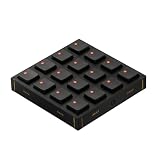
- Expressive Hall Effect Control: Features 16 velocity- and pressure-sensitive MX Gateron Hall effect switches that provide nuanced input for finger drumming and sample triggering. The switches are hot-swappable (by removing the front panel) to suit your tactile preferences.
- Dynamic RGB Feedback: Each button is equipped with a fully configurable RGB LED, allowing you to adjust brightness, assign custom colors, or add pulsing animations via the Grid Editor. The default keycaps feature cutouts for maximum visibility and are interchangeable to fit your workflow.
- Modular Magnetic System: Built with an innovative magnetic interface that allows the module to connect seamlessly in any direction with other Grid controllers. The fiberglass front panel features a new textured finish for improved grip and durability during rigorous daily use.
- Deep Customization: Beyond standard MIDI control, the BU16 supports HID keyboard, mouse, and game control modes. Use the Grid Editor to program complex macros using LUA code, or configure buttons for momentary, two-step, and three-step toggles.
- Universal Compatibility: Plug-and-play operation via high-speed USB-C. Compatible with Mac OS, Windows, Linux, and mobile platforms, making it an ideal controller for DAWs (Ableton Live), VJ software, or creative productivity apps (Adobe Creative Cloud).
3. CedarGrooveNET — Best Free Drum Transcription And Continuation
CedarGrooveNET is a focused free web tool for drum work. Upload a WAV, MP3, AIFF or FLAC drum loop and it transcribes the performance to MIDI. You can then draw, edit and style the pattern on a grid, or ask its continuation model to extend what you supplied.
The continuation workflow is unusually specific: CedarGrooveNET offers Drum & Bass, House and Rock, with 10 sub-styles in each category. Its encoder-decoder LSTM model was trained on thousands of drum patterns and generates continuations from the input pattern. That makes it useful when you already have a rhythmic idea in audio and want editable MIDI variations rather than a new full instrumental arrangement.
Quick wins for a faster PC:
Clear out junk files and repair common Windows errorsFree Scan →Scan for outdated or missing drivers - takes under a minuteDriver Scan →For example, upload a recorded drum loop, correct any grid notes that need adjustment, choose a sub-style, and generate a continuation. Export the resulting Standard MIDI file to your DAW, then choose the drum sounds and effects there. CedarGrooveNET exports MIDI rather than audio, provides no separate audio stems, and is limited to drum patterns: it cannot transcribe piano, guitar, bass, vocals or melody, and it will not turn a full song into MIDI.
The free plan accepts audio clips up to 6 minutes and uploads up to 100 MB. It works in a browser and has a macOS desktop deployment, with no account, subscription or credit card required. The supplied information does not establish commercial licensing, ownership or consent rules for uploaded recordings, so check CedarGrooveNET’s current terms before distributing a beat. Obtain permission for recordings or performances you do not own.
How To Choose For Your Grid-Based Beat Workflow
- Choose Songen if you want lead, chord, bass and drum parts together, with piano-roll editing and MIDI, WAV and stem exports on Apple devices.
- Choose Baza Drums if drums are the priority and you want per-instrument regeneration, swing, step-length and DAW routing on Windows or macOS.
- Choose CedarGrooveNET if you have a drum recording to transcribe, want a free browser workflow, or need style-specific drum continuations in Drum & Bass, House or Rock.
For any unsupported genre, device, export format or licensing scenario, check the vendor’s current site before building a project around it. The key distinction is output: Songen can provide audio and stems as well as MIDI, while Baza Drums and CedarGrooveNET leave sound selection to your own instruments or sampler.




