Specifiction is reader-supported. When you buy through links on our site, we may earn an affiliate commission. As an Amazon Associate I earn from qualifying purchases. Learn more
For a quick karaoke instrumental, start with Vocal Remover AI or StemRoller. For a vocal you want to remix or study in more detail, choose a splitter with more stem options, such as Fadr, Moises, LALAL.AI, or PhonicMind. If you need to turn down a lead singer while keeping backing vocals, AI Karaoke Video Creator specifically describes that option. These tools work from recorded audio; none of the supplied details establishes prompt-based vocal removal.
Choose The Kind Of Vocal Edit You Need
“Remove vocals” and “isolate vocals” are opposite goals. Removing vocals aims for an instrumental backing track; isolating them gives you an acapella-like vocal stem. Both are forms of source separation, so results depend on what is mixed into the original recording. Where a product describes a particular output, that establishes what it offers, not how clean a result will sound on every song.
As an Amazon Associate I earn from qualifying purchases.
What’s actually slowing this PC down?
Pick the symptom - the matching free tool is one click away.
- For karaoke or practice: remove the lead vocal and keep the instrumental. If the recording has backing singers, check whether the tool can separate them or whether it removes vocals together.
- For remixing or vocal study: extract the vocal stem, then listen for instruments or effects that remain in it. Pick a tool that offers the stem detail and export workflow you need.
- For reducing only the lead voice: choose a product that explicitly supports keeping backing vocals. A standard vocal-versus-instrumental split does not establish that capability.
Best AI Vocal Removal And Isolation Tools At A Glance
| Tool | Best Fit | Access And Price Information | Vocal Workflow |
|---|---|---|---|
| Vocal Remover AI | Quick browser removal | Web; free tier. Free limit details vary in the supplied information; check the vendor site. | Vocal and instrumental tracks |
| StemRoller | Free desktop splitting | Free, open-source; Windows and macOS | Four stems, including vocals |
| Fadr | Free separation and remix workflows | Basic free; Plus $10/month or $100/year | Vocals and other stems |
| Moises | Working across devices | Free tier; up to 5 uploads/month and 5-minute files | Vocal and instrument separation |
| LALAL.AI | Power users and integrations | Free previews; paid Lite listed at $7.50/month billed annually | Vocal removal and broader stems |
| Music Separator | Phone-based separation | One free separation/week; weekly plan $3.99/week | Vocals and instrumentals |
| TuneStems | Choosing export formats up front | Free to try for tracks up to 5 minutes; $5.90 Starter Pack is a one-time payment | Vocal and multi-stem options |
| PhonicMind | Detailed vocal categories | Paid; Sing is $9.99/month and has no downloads | Lead and backing vocals, with other stem classes |
| StemConsole | Interactive web mixing | Free plan: 5 splits/month; Pro $6.99/month or $49/year | Vocal and multi-stem separation |
| Vocly | Android separation on device | Free with ads; Pro pricing not stated | Vocals, drums, bass, and other |
| zplane PEEL STEMS 2 | Live control inside a DAW | Paid; price not stated | Four stems, including vocals |
| AI Karaoke Video Creator | Reducing lead vocals in karaoke videos | $149 perpetual license; 10-day license $29 | Reduce lead voice, optionally keep backing vocals |
| Spleeter | Self-hosted batch workflows | Free, open source | Two-, four-, or five-stem modes |
Ranked Picks
1. Vocal Remover AI For A Fast Browser Result
This is the most direct starting point when the job is simply to make an instrumental or extract a vocal from an uploaded recording. Its supplied details cover audio and video uploads, browser previews, and WAV or MP3 downloads. The vendor describes a daily free allowance and claims over 95% accuracy; treat that accuracy figure as the vendor’s claim, not a guarantee for your track. Check the site for current upload limits and output details.
Workflow: upload a permitted audio or video file, preview both separated tracks, and download the one you need. For karaoke, listen through a chorus and a quieter verse before relying on the backing track; artifacts can be more noticeable in exposed passages.
Shopping ad
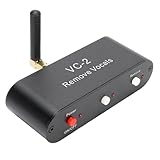
- WORKING PRINCIPLE: The karaoke real time voice canceller is compatible with 3.5mm AUX input and output to eliminate or reduce the original sound in stereo songs, and the equipment uses hardware circuits and software algorithms to eliminate the original sound in songs to the greatest extent
- COMPATIBLE WITH ANY MUSIC PLAYER: The VC-2 karaoke vocal remover works seamlessly with any app on your phone or computer to let you enjoy your favorite music
- MULTIPLE FEATURES: Karaoke real time vocal removal device is a multi functional Bluetooth receiver adapter that is suitable for speakers and karaoke machines
- BLUETOOTH RECEPTION: The VC2 Karaoke vocal remover features Bluetooth compatible reception, supports wired and Bluetooth compatible inputs, and can be used as a Bluetooth compatible receiver. Bluetooth compatible version for 5.0, with an external antenna, receiving distance up to tens of meters
- ADJUSTABLE LEVELS: The Karaoke stereo vocal removal device supports voice cancellation levels 100 percent, 75%, and 0%, and maintains 0%, 25%, and 100 percent
2. StemRoller For A Free Desktop Split
StemRoller is a straightforward choice if you want a free, open-source desktop tool and four outputs are enough. Its four-way split includes vocals, drums, bass, and everything else; it also describes making karaoke and vocal tracks. It has no batch processing, so it is less suited to a large folder of songs.
Workflow: make the split, audition the vocal and accompaniment separately, then keep the accompaniment for practice or the vocal for a remix draft. Check the project’s current setup instructions before installing.
3. Fadr For Separation That Feeds A Remix
Fadr fits when vocal removal is one step in a larger remix workflow. The directory lists separation for vocals and other instruments, plus MIDI, chord, key, and tempo detection; its supplied details say Basic includes unlimited stems and MP3 downloads. WAV downloads, individual drum separation, and the Stems Plugin are among the Plus additions. Check the vendor’s site for the current feature and plan details.
Workflow: separate the vocal from a song, then bring the result into a remix or DJ workflow. If a lossless vocal file matters, verify the plan before starting; the supplied pricing information lists Plus at $10/month or $100/year.
4. Moises For A Multi-Device Music Workflow
Moises is a strong fit if you move between a browser, computer, and phone. Its supplied details list web, desktop, iOS, Android, and API access, and separation targets include vocals and instruments. The free tier is capped at five uploads per month and files up to five minutes, with some separation options requiring a paid plan.
Shopping ad
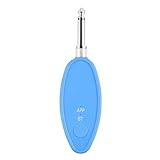
- Real-Time AI Vocal Removal:Experience studio-quality accompaniment in seconds. Our advanced AI algorithm accurately isolates and removes vocals from any song playing on your phone, delivering pristine instrumentals for karaoke or practice.
- 10-Level Precision Adjustment & APP Control:Unleash your inner superstar with precise vocal elimination from 10% to 100%. Remotely fine-tune the level via the dedicated app to find the perfect balance for any song, from subtle backing tracks to pure instrumentals.
- Universal Compatibility w/ Karaoke Machines & Speakers:Seamlessly connect to any system via dual 6.5mm or 3.5mm audio interfaces. Stream music wirelessly through Bluetooth 5.2. The ultimate bridge between your phone and professional karaoke setups—no more endless searching for official accompaniments.
- 6-Hour Long Battery & Type-C Fast Charging:Powered by a reliable 400mAh battery for up to 6 hours of uninterrupted singing. The integrated Type-C port ensures quick recharging, keeping the music playing at parties, gatherings, or wherever you go.
- The Perfect Gift for Music Lovers:Compact, lightweight, and incredibly easy to use. EASTROCK Vocal Remover is the ideal gift for family, friends, and any music or karaoke enthusiast, turning every gathering into an unforgettable celebration.
Workflow: use a short section to decide whether you need the vocal or the instrumental, then check that the separation option you want is available on your plan before processing a full-length file. Supported export formats include MP3, WAV, FLAC, M4A, and OGG; confirm which are available to your account.
The Tool Desk
Outbyte PC Repair FREEClear out junk files and repair common Windows errorsFree Scan →Outbyte Driver Updater FREEScan for outdated or missing drivers - takes under a minuteDriver Scan →5. LALAL.AI For More Stem Choices
LALAL.AI is aimed at users who want more than a two-way vocal split. Its listed stem choices include vocals, instruments, drums, bass, guitars, and piano; it also offers previews, batch processing on paid plans, and desktop, mobile, VST3, and API access. Its free Starter plan provides previews but not full result downloads. The listed $7.50/month Lite rate is billed annually.
Workflow: preview the vocal separation first, then decide whether another stem or batch processing is worth paying for. If you plan to work in a DAW, check the vendor’s current platform and plugin requirements before choosing a plan.
6. Music Separator For Phone-Based Practice
Music Separator focuses on separating vocals and instrumentals with playback controls, export, lyrics, job history, and sharing. The supplied details list iOS and Android. Its free allowance is one vocal separation per week; paid options include a $3.99 weekly plan and a $24.99 yearly plan. Check the vendor’s site for current plan terms.
Workflow: separate a song, adjust playback speed or pitch while practicing, and export or share the stem if your plan permits. The directory lists those controls but does not establish which exports are available on each plan.
Shopping ad
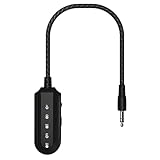
- 【AI Vocal Remover】This AI vocal remover is powered by a millisecond-level AI chip and intelligent AI audio analysis technology. Its core advantage lies in its vocal removal function—it accurately identifies and isolates vocal tracks in audio, effectively blocking them by reducing their volume. It instantly transforms the original song playing on your phone into an accompanying instrumental, providing a fast and efficient process with pristine sound quality.
- 【3-Level Mode】The portable vocal remover offers three vocal levels: 100% (original vocals), 25% (lead vocals), and 0% (pure accompaniment). The 100% mode is for enjoying and learning from the original vocals; the 25% mode acts as a personal vocal coach, helping you smoothly transition to independent singing; and the 0% mode eliminates the original vocals with a single click, providing the perfect accompaniment for karaoke or recording.
- 【Compatible with any Speakers and Karaoke Machines】This AI vocal canceller is easy to connect. It quickly pairs with your phone's Bluetooth, eliminating the need for a cable. Plug it into the karaoke machine's 3.5mm audio input (or AUX port) to activate the function in two steps. It's compatible with all speakers and karaoke machines with a 3.5mm AUX port, eliminating the worry of buying something and not being able to use it, and easily expanding audio usage scenarios.
- 【360mAh Large-Capacity Battery】This portable vocal remover is quick and easy to charge thanks to its Type-C fast charging port, so you don't have to wait too long – it can be fully charged in just 30-40 minutes. Once fully charged, the battery lasts up to 6 hours. Whether you're practicing singing, attending an outdoor party, or using it for extended periods, you don't have to worry about power outages. The battery life is sufficient to support multiple daily scenarios.
- 【CD-quality high-definition sound】This vocal eliminator can output CD-level high-definition sound quality. Not only does it not damage audio details when eliminating vocals, it can also accurately restore the texture of instruments and melody levels in the music. Whether it is the heaviness of the bass or the transparency of the treble, it can be clearly presented, making the accompaniment sound delicate and full, almost indistinguishable from the original sound quality.
7. TuneStems For Format Choice Before Separation
TuneStems lets users choose MP3, WAV, FLAC, or M4A before separation, and the supplied details describe vocal, single-instrument, and multi-stem modes. It is web-only, and its pricing has multiple credit packs and subscription tiers. Free use is described for tracks up to five minutes; the $5.90 Starter Pack is a one-time purchase for 500 credits.
Workflow: choose the output format to match the next step in your project, then preview the returned stems before downloading. The vendor states 100% commercial use; read its current terms for the exact scope and conditions.
8. PhonicMind For Lead And Backing Vocal Separation
PhonicMind is one to consider when you specifically want lead and backing vocals handled as distinct categories. Its supplied details list those categories alongside drums, percussion, bass, and other instruments, with up to 16 stem classes recognized and up to 8 usable stems delivered depending on the song and conversion tier. It is web-based and has no free plan. The $9.99/month Sing plan offers playback but no downloads; separation and export depth vary by plan.
Workflow: preview the separation and compare plans before paying, especially if downloadable stems are essential. Do not assume every song will return every listed stem.
Free tools Windows power users keep installed
One-click scans. No signup required.
9. StemConsole For Trying A Stem Mix In The Browser
StemConsole combines separation with a live web mixer. Its free plan includes five splits per month, and the supplied details describe free vocal, drum, and bass isolation; guitar and piano are listed with Pro. A single $1.99 credit unlocks Full Separation on one song and does not expire, while Pro is listed at $6.99/month or $49/year.
Shopping ad

- Vocal Control: The karaoke vocal eliminator allows users to easily switchover between various vocal modes, adjusting between full vocals and reduced vocals, providing flexibility when singing along with favorite tracks.
- Background Vocal Balance: This device features selectable vocal modes, enabling you to balance the artist's sound and background vocals, making it easier to practice or enjoy karaoke sessions.
- Bluetooth Connectivity: With built in Bluetooth 5.3, this karaoke vocal eliminator offers seamless wireless audio connection. The blue status indicator light shows when a connection is successful.
- Audio Output Options: Equipped with a standard 3.5mm audio output jack, users can conveniently connect compatible audio devices for a simple wired audio setup, enhancing the karaoke experience.
- User Friendly Controls: Featuring dedicated power and mode selection controls, the device ensures straightforward operation, while the Type C charging port and charging indicator light offer convenient daily use.
Workflow: use the mixer to shape a vocal-free backing track or adjust the balance, then bounce a custom mix. It has no batch processing or integrations, so check whether a browser-only workflow suits your project.
10. Vocly For On-Device Android Separation
Vocly is an Android-only option whose supplied details say imported files stay on the device during separation. It provides vocals, drums, bass, and other stems, plus batch queues, pitch controls, karaoke mode, and stem history. The free plan is ad-supported; Pro unlocks the HQ model, unlimited separations, and video export. Its price is not established here, so check the vendor’s site.
Workflow: separate a track, use karaoke mode for practice, or queue files when processing several songs. Confirm the available export formats and plan terms before relying on a specific output.
Quick wins for a faster PC:
Clear out junk files and repair common Windows errorsFree Scan →Fix the driver behind crashes, sound loss and screen glitchesFind Drivers →11. zplane PEEL STEMS 2 For Real-Time DAW Control
PEEL STEMS 2 is a plugin for controlling stems within a compatible DAW. It separates drums, bass, vocals, and other audio in real time, with VST3, AU, and AAX formats for Windows and macOS. The supplied details list 245 ms of DAW-compensated latency at 44.1 kHz, so this workflow is worth evaluating against your session’s timing needs. Price is not stated; check the vendor’s site.
Workflow: load the plugin in a compatible DAW, route the vocal stem for adjustment, and assess timing in the actual session before committing the result to a mix.
Shopping ad

- [Best Combination, Perfect Karaoke Party]--Use the ECHOMUSSY mini karaoke machine and ECHOMUSSY wireless microphone to turn on your speakers and make your home party more exciting
- [Professional AI Vocal Remover]--ECHOMUSSYAI Vocal Remover adapts one smart AI chip with high-speed processing capacity, it has three smart modes to help you remove the vocal: 0% (Accompaniment Mode), 25% (Leading Mode), 100% (Original Mode)
- [Make Your Wired Speaker Become Your Personal Stage]--Having a good sound quality speaker doesn’t know how to use it? How about connecting it with ECHOMUSSYmini karaoke machine to play? Just need to plug in the device with the Aux jack on the speaker, turn on the device's power, and choose the mode you want, then start the party right away!
- [Get Your Wire Away]--Does you speaker always hard to move? Limited by the wire, can only stat one place to connect with TV or audio system? Now you just need a power plug, and connect ECHOMUSSYvocal remover, you could place it anywhere you want. Enjoy the music everywhere
- [Why Us]--ECHOMUSSYvocal processor designed with mini body which has light weight, easy to carry. Smart AI chip can perfectly remove vocal, present the crystal accompaniment for you. Compare to a expensive, huge, and heavy karaoke machine with bad sound quality, vocal processor is a better choice for you home party or karaoke
12. AI Karaoke Video Creator For Reducing The Lead Voice
This Windows 10 and Windows 11 karaoke video maker specifically describes using AI Vocal Remover to reduce the lead voice while optionally keeping backing vocals. That makes it a closer fit for a lead-vocal reduction than a conventional vocal-versus-instrumental split. The vendor lists a $149 perpetual license with one year of free updates and a $29 10-day license.
Workflow: import the karaoke video project and reduce the lead voice, then check how the backing vocals sit in the resulting mix. The supplied details do not establish a standalone audio-only workflow.
Recommended Free Tools
13. Spleeter For Developers Processing Their Own Files
Spleeter is a free, open-source option for readers comfortable with code and command-line setup. It offers two-stem vocal/accompaniment separation, four-stem separation, and a five-stem mode that adds piano. It can be installed with pip or used with Docker, and supports batch processing. The supplied GPU speed figure is 100 times faster than real time for four-stem files; actual performance depends on the machine and setup.
Workflow: install and run the model on a copy of your audio, then inspect the vocal or accompaniment output before using it elsewhere. Spleeter is self-hosted; the supplied details do not describe a packaged web or desktop application.
Independent reader supportYour contribution helps us test, update, and keep practical guides available for everyone.Use Separated Vocals And Backing Tracks Responsibly
Before uploading or processing a recording, make sure you have permission to use the audio and any identifiable voice in it. Separation does not grant rights to the original recording or extracted voice. Check the chosen platform’s current terms for uploads, storage, downloads, and any commercial use; the supplied product details do not establish a common rights policy across these services. TuneStems states 100% commercial use, but its terms should be checked for scope and conditions.
If you plan to publish a karaoke track, remix, or isolated vocal, check the applicable platform terms and the rights that apply to your source recording and voice. For tool-specific format, device, or plan details not listed above, verify them with the vendor before building a workflow around them.




