Specifiction is reader-supported. When you buy through links on our site, we may earn an affiliate commission. As an Amazon Associate I earn from qualifying purchases. Learn more
For isolating a recorded singer from a finished song, start with Fadr or Moises for flexible stem separation, Vocal Remover AI for a simple browser workflow, and StemRoller for a free desktop option. These tools work on uploaded music; the supplied information does not establish live microphone voice isolation. Choose based on whether you need just vocal and instrumental tracks, more instrument stems, or a particular device workflow.
What To Look For In A Music Voice Isolator
A vocal is mixed with instruments, effects, backing vocals, and room or production sound. Separation can therefore leave instrumental bleed or artifacts; no source here establishes a guaranteed clean result for every song. For karaoke, practice, remixing, or sampling, listen to a preview when available and check whether the tool exports the format your next step needs.
As an Amazon Associate I earn from qualifying purchases.
Use an uploaded song as the source, then select vocal isolation or vocal-and-instrument separation. If you need to rebalance a mix, choose a tool that separates additional instruments. If you need to process music inside a DAW or on a phone, check the specific product below. These are workflow examples, not prompts: the listed tools are described as separators rather than text-prompt generators.
Best AI Voice Isolator Tools For Music
1. Fadr — Best Overall For Flexible Stem Separation
Fadr is a strong starting point when the job may grow beyond removing a lead vocal. It separates vocals and other instruments, and its listed tools include MIDI, chord, key, and tempo detection plus remix features. Fadr Basic includes unlimited stems, remixes, and DJ sets with MP3 downloads; Plus adds 18 stem types, WAV downloads, a DAW Stems Plugin, and API access. Plus is listed at $10 per month or $100 per year. The directory says Basic does not include the 18 stem types listed for Plus.
Shopping ad

- 【Eliminate Noise Interference】 Moukey Microphone Isolation Shield has REFLECTIVE & FILTER & ABSORBING layers, the inner layer is made of high-density acoustic foam that eliminates audio wave bounces back and interference effectively, works well to reduce ambient sound and give you clean recordings.
- 【Easy to Use】 Only take minutes to unfold this recording sound shield, which can be fixed on a desktop or tabletop for live broadcast, and also can be mounted to a microphone stand for your professional recording. Suitable for daily work, personal creation, recording studio, radio station.
- 【Foldable & Adjustable】 Our vocal isolation shield is composed of 5 panels, and the foldable design allows you to be very flexible whether you are storing or carrying it out. It is easy to adjust the arch design, enables angle adjustments for optimal sound insulation ensures the highest quality recordings.
- 【Enduring & Safety】 The back panel of our sound shield is constructed out of strong and enduring ABS material to ensure sturdiness, and long lasting performance. The support points of the acoustic panel are of the non-slip design, so there is no need to worry about tipping over with a light touch.
- 【Universal & Compatible】 Metal 3/8 conversion 5/8 nuts are provided, which are compatible with most microphone stands and shock mounts. No more worry about compatibility.
Workflow: separate a song, audition the vocal and instrumental results, then use additional stems if you need to rebalance a backing part. Check Fadr’s site for current details and whether its output suits your intended use.
2. Moises — Best For Musicians Working Across Devices
Moises separates vocals, drums, bass, guitar, keys, and more. It offers a web app, desktop software, iPhone, iPad, Android, and API access, making it a practical pick if you move between a computer and a phone. Its free plan allows up to five uploads per month, with files up to five minutes and limited separation options. Paid plans add options; check the vendor’s site for current plan details.
Do these 3 things before closing this tab:
1Scan for outdated or missing drivers - takes under a minute2Clear out junk files and repair common Windows errors3Fix the driver behind crashes, sound loss and screen glitchesWorkflow: upload a practice track, isolate the vocal or other parts you need, and listen to the separated files before using them for rehearsal or editing. Supported export formats include MP3, WAV, FLAC, M4A, and OGG.
3. Vocal Remover AI — Best For A Quick Browser Separation
Vocal Remover AI is a focused browser tool for splitting uploaded audio or video into vocals and instrumental tracks. It previews results in the browser without signup and offers WAV or MP3 downloads. The directory lists uploads up to 500 MB; the vendor also advertises 120 minutes of free processing per day. The service is web-only and does not list batch processing, an API, or integrations.
Shopping ad
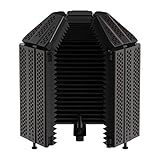
- REDUCES NOISE INTERFERENCE– The XTUGA Microphone isolation Shield has three layers that work in tandem to reduce noise while recording. It particularly relies on ⅗ reflectors with a triangular high density thickened sponge insulator material which reduces the propagation of interference sound waves and creates perfect recording conditions that result in sublime recordings
- Flexibility And Convenience– There is lots of flexibility working with the mic isolation shield with a stand as you can choose to use the 3-panel design with 2 foldable end panels, 5-panel design with 4 foldable end panels. It is easy to adjust the arch design, enables angle adjustments for optimal sound insulation and meets the recording needs of the environment hence ensures only the highest quality recordings
- SUPERIOR NOISE REDUCTION DESIGN–This portable vocal booth is designed to maximize on blockage of all sound interpretations with its compact design.It is a full package design, with a foldable top to efficiently cancel out noise interference from the environment for a noiseless,multi-layer noise cancellation structure. It reduces noise on the back and side to ensure cleaner and clearer recordings.The reflection area and the absorption area reduce noise generated by the external environments
- EASY TO USE–The microphone isolation cover is designed for easy usage as it can be disassembled separately and installed according to the recording environment.You can fox it on a desktop or microphone stand. It is suitable for use with multiple stands making it suitable for your current needs.You can adjust the height of the recording shield to fit the preferences of the personal preferences. This one are suitable for professional or vocal recordings and podcast recording studios
- QUALITY MATERIALS – The state-of-the-art recording shields are constructed from high-quality material for sturdiness and long-lasting performance. They can be used with multiple stands or microphones, you can use them on a flat surface and can be fitted on countertops and desktops
Workflow: upload a song, preview both tracks, then download the vocal or instrumental file you need. Check the vendor’s site for current limits and terms.
4. LALAL.AI — Best For Power Users And DAW Workflows
LALAL.AI separates vocals and instruments, including drums, bass, guitar, and piano. Its listed workflow options include previews, batch processing, desktop and mobile access, a VST plugin, and API access. The free Starter plan provides previews but not full result downloads; batch processing is paid. The listed $7.50 monthly Lite rate is billed annually. Check the vendor’s site for current plan and output details.
Workflow: preview the vocal split first; if you process many tracks or want separation inside a DAW, check whether a paid plan and the plugin fit your setup.
5. StemRoller — Best Free Desktop Option
StemRoller is free and open-source, with Windows and macOS desktop builds. It separates a song into vocals, drums, bass, and everything else, and can create karaoke, vocal, and stem tracks. It has no batch processing and is limited to four stem outputs; Linux is not officially supported.
Shopping ad
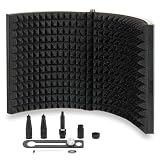
- Superior Sound: Whether for professional VO, podcasting, or laying down that new demo, this microphone isolation shield is crafted from high density acoustic sponge that actively reduces outside sound reflection and ambient noise—giving you cleaner, more focused recordings
- Stable Construction: Our superior microphone shield features multi-layered acoustic foam —including an absorbing layer, a filter, a reflective layer, plus a vented metal back plate for extra reinforcement—all working together to block unwanted noise interference and preserve vocal clarity
- Foldable & Portable: The 2 folding panels of our sound shield are easily adjustable—simply angle them for optimal sound insulation. When not in use, the shield folds flat for easy storage, so even in tight spaces your recording quality won't be compromised
- Compact: Always on the go and need a travel sized, professional-grade sound isolation solution? This lightweight, foldable design turns your mic isolation shield into a portable vocal booth that fits in bags and goes wherever you do—without sacrificing performance
- Universal Compatibility: An affordable, freestanding reflection filter built from premium quality steel for rock-solid stability. Need extra height? It's also compatible with most mic stands. A reliable microphone sound shield that delivers broadcast-quality results—without the financial reverb
Workflow: use it for a straightforward desktop split when four parts are enough. Its source information does not establish mobile or browser access.
6. PhonicMind — Best For Detailed Vocal And Instrument Categories
PhonicMind can separate lead and backing vocals when present, along with drums, percussion, bass, guitars, keys, strings, horns, and other categories. It can recognize up to 16 stem classes and deliver up to eight usable stems plus a metronome, depending on the song and conversion tier. Its web plans vary in separation and export depth; there is no free plan, desktop app, or API listed. The Sing plan is $9.99 per month and does not include downloads.
What’s actually slowing this PC down?
Pick the symptom - the matching free tool is one click away.
Workflow: consider it when separating backing vocals or instrument groups matters, and confirm that the plan you choose includes the downloads and separation depth you need.
7. TuneStems — Best For Flexible Output Packages
TuneStems offers vocal, single-instrument, six-stem, and All-In separation modes, with playable previews and individual or ZIP downloads. Its listed formats include MP3, M4A, WAV, and FLAC; advanced output formats are reserved for Premium. The service is web-only, and its pricing combines credit packs and subscriptions. The vendor says it is free to try without signup for tracks up to five minutes and advertises commercial use. Check its current terms and plan details before relying on that use.
Shopping ad

- ♪【The package contains】♪: Microphone Isolation Shield x 1, Metal Thread Adapter x 2 (Adapt most microphones), Adjustable Stand x 1 and instruction manual. (The height of the isolation shield can be adjusted freely) *NOTE: Microphone is NOT included.
- ♪【Designed for recording】♪: The inside of the microphone cover is made of absorbent cotton material, which maintains the clarity of the human voice and the instrument during recording, eliminating the interference of the audio waves and the external environment.
- ♪【Rugged & Durable】♪: Made of high-quality steel, the Microphone Isolation Shield is more rugged and scratch-resistant.
- ♪【Easy to install】♪: The Microphone Isolation Shield has steel clips on the back. Insert the steel clip into the stand and tighten the screws.The height of the stand is 182CM, and you can install the isolation shield to any height you want.
- ♪【Special recording】♪: This acoustic shield features an acoustic foam front and a vented metal back plate. If you need to record in the studio, this Microphone Isolation Shield will give you unexpected results.
Workflow: try a short track first, preview the vocal split, and select the output format before separation.
8. Music Separator — Best For Simple Phone Use
Music Separator focuses on vocal and instrumental separation and is listed for iOS and Android. Playback controls include independent stems, speed and pitch adjustment; exports, lyrics, job history, and sharing support a mobile workflow. The free tier includes one vocal separation per week. The listed weekly plan costs $3.99, so check current billing options before subscribing.
Recommended Free Tools
Workflow: separate a song on your phone, adjust playback speed or pitch for practice, then use the available export or sharing controls if needed.
9. Vocly — Best For On-Device Android Separation
Vocly is an Android app that separates vocals, drums, bass, and other into four stems, with mixing, karaoke mode, batch queues, pitch controls, and stem history. Separation happens on the phone, according to the vendor. The free plan is supported by ads; HQ models, unlimited separations, and video export require Pro. Check the vendor’s site for current Pro pricing and terms.
Shopping ad

- Eliminate Interference - The inner side of the microphone isolation shield is made of high density absorbing foam insulation that can reduce sound reflection, keep your voice and instrument sound clear and improve your studio recording effect. Dimensions: 7.48in tall and 10.8in wide.
- Portable & Foldable - The folding panel design fetures enables angle adjustments. Compact design and lightweight construction makes it easier for you to carry it around. Note:It is not suitable for Blue Yeti Microphone.
- Versatility - The microphone sound shield can be fixed on a desktop or tabletop for live broadcast, and also can be mounted to a microphone stand for your professional recording. Fits for most mic arm stand.
- Package Included - 1 x Microphone Isolation Cover, 1 x Golden Adapter 3/8 Female to 5/8 Male, 1 x Black Adapter 3/8 Female to 5/8 Male, 2 x Black Adapter 5/8 Female to 3/8 Male, 1 x Black Adapter 3/8 Female to 3/8 Male.
- Lifetime Warranty - If there is any problem with our mic isolation shield , we will be hold responsible for all losses and defects. Lifetime warranty/after-sales service is provided without any delays. Please contact us in time if any issues.
Workflow: use its four-stem mode to isolate a vocal and adjust the other parts in the mixer. This option is limited to Android.
10. StemConsole — Best For Mixing Stems In A Browser
StemConsole combines separation with a live browser mixer. Its free account includes five splits per month, including two multi-stem splits, and allows WAV and MP3 downloads. Free separation covers vocals, drums, and bass; guitar and piano require Pro. Pro is listed at $6.99 per month or $49 per year, and a single $1.99 credit unlocks full separation for one song without a subscription. It is web-only and does not list batch processing, integrations, or a public API.
Free tools Windows power users keep installed
One-click scans. No signup required.
Workflow: split a track, solo or mute parts in the mixer, then bounce a custom mix if the result works for your purpose.
Independent reader supportYour contribution helps us test, update, and keep practical guides available for everyone.Rights And Song Uploads
Isolating a vocal does not establish permission to publish, sample, remix, or commercially use the resulting audio. Get any needed consent for voices and check the source song rights and each platform’s current terms before uploading or sharing results. TuneStems advertises commercial use; that claim does not settle rights in the song or voice you supply.
How To Choose
- For a flexible free starting point with additional stem and remix tools, try Fadr Basic.
- For broad device coverage and multiple export formats, consider Moises.
- For a quick browser split, use Vocal Remover AI; for free desktop separation, consider StemRoller.
- For detailed instrument groups, compare PhonicMind, LALAL.AI, and TuneStems against the output and plan limits you need.
- For phone-first practice, choose Music Separator on iOS or Android, or Vocly on Android; for browser mixing, consider StemConsole.
Specific genre performance, compatibility with a particular recording, and results for a particular voice are not established here. Check vendor details and preview a result before building a workflow around it.




