Recommended Free Tools
Specifiction is reader-supported. When you buy through links on our site, we may earn an affiliate commission. As an Amazon Associate I earn from qualifying purchases. Learn more
Teachers can use AI to help students turn a class topic into lyrics, chords, a melody sketch, and—if appropriate—a generated song demo. Keep students in charge of the ideas and revisions: first decide what the song should teach, then draft and check the words, shape a singable musical version, and review any AI-generated audio before sharing it.
Choose A Song Goal And Classroom Boundary
Pick one clear learning goal, such as recalling key vocabulary, explaining a process, or retelling an event. Decide whether students will perform the song themselves, make a chart or recording, or listen to a generated demo. That choice determines how much audio generation the project needs.
As an Amazon Associate I earn from qualifying purchases.
For a student performance, the lyrics and melody need to be understandable and comfortable for the students who will sing them. Set the vocal range, tempo, and level of rhythmic difficulty yourself; the listed product information does not establish child-specific vocal-range guidance or classroom accommodations. Treat AI suggestions as drafts for the class to evaluate, not as verified subject matter.
Follow This Classroom Song Workflow
- Write the learning target in plain language. List the facts, terms, or ideas the song must preserve. Mark anything that must be checked against your lesson materials.
- Gather student ideas before prompting. Ask students for words, examples, and images connected to the topic. Remove personal details that should not go into an online service.
- Draft a short lyric with a structure. In RHYMEBOOK, use the available theme, mood, genre, and song-structure controls to explore a draft. Its rhyme tools cover 24 languages. Alternatively, use Songcraft for lyric writing with syllable counting and lyric dictionaries. Have students compare suggestions with their own wording and correct any inaccurate or awkward lines.
- Make the lyrics easy to sing together. Read each line aloud, check that students can pronounce it clearly, and shorten or revise lines that feel crowded. Songcraft includes chord suggestions and transposition; use those as starting points, then choose a key and melody that fit the class. Do not assume a suggested chord or lyric has been checked for age suitability.
- Build a musical sketch. Use Song Cage to work with chords, melody, lyrics, arrangement, playback, and recording. Its listed platforms include web, Windows, macOS, iOS, and Android. A teacher can guide a class in shaping a simple arrangement, but the product information does not specify classroom lesson plans or student account controls.
- Make a generated demo only if it helps. Suno can generate songs with vocals, lyrics, instrumentation, and production, and supports editing and section replacement. Give it the class-approved lyrics and a concise description of the intended mood and instrumentation. Listen critically: generated words or musical choices may need revision, and the supplied information does not establish a child-friendly mode or a particular classroom genre. Check current vendor details for any specific prompt controls you plan to rely on.
- Rehearse, revise, and check the learning. Have students perform or listen, identify words that are unclear, and compare the final lyrics with the original learning target. Correct errors before using the song as a study aid or sharing it outside class.
Choose A Tool For The Part Of The Project
| Tool | Useful Classroom Role | Documented Fit |
|---|---|---|
| RHYMEBOOK | Explore lyric drafts and rhyme choices | AI lyric generation with genre, mood, theme, and structure controls; collaboration and shared permissions |
| Songcraft | Revise lyrics and work with chords | Real-time collaboration across lyrics, chords, tabs, keys, and recordings; syllable counting and chord suggestions |
| Song Cage | Develop a song arrangement and musical sketch | Chords, melody, lyrics, arrangement, playback, and recording in one songwriting workspace |
| Suno | Create an optional full-song demo | Generates songs with vocals, lyrics, instrumentation, and production; supports editing and section replacement |
Handle Student Voices And Sharing Carefully
If students record or contribute voices, obtain the appropriate consent before recording or uploading them, and review the relevant platform terms before using or sharing the result. Check each vendor’s current terms for your intended classroom use; the supplied product information does not establish a classroom license for RHYMEBOOK, Songcraft, or Song Cage. Suno’s listed Free Plan does not include commercial rights, so check its current terms and plan details before any use or distribution that could be commercial. This is not a substitute for checking school policy or the vendors’ terms.
Quick Recap
Shopping ad

- Ample Quantity: you will receive 6 plastic hand-held tambourines, 6 colored cymbals, 6 egg-shaped maracas, 6 maracas, 6 wrist bells, and 6 castanets; The colors are varied, the quantities are plentiful, and the combinations are good enough to meet your needs
- Creative Design: plastic percussion tambourine, egg shaker, maracas, wrist bells, castanet and cymbals for kids are designed to be easy for children to hold and play, musical instruments can promote musical participation, encourage children to explore their musical creativity, and build their confidence and self-expression
- Strong and Reliable: tambourines musical instruments for kids are mainly made of quality plastic material, safe and reliable, strong and fade resistant, not easy to deform or break, you can use them with confidence
- Measurement Information: the tambourine bell measures 5.12 x 4.72 x 1.06 inches, the castanet measures 2 x 2 x 0.9 inches, the maracas for kids measure 1.6 x 1.6 x 5.1 inches, the egg shaker measures 1.6 x 2.4 x 2.4 inches, and the wrist bells measure 8.3 inches in cord length and the children's cymbal measures 5.12 x 1.18 inches, this children's tambourine set encourages both individual and group play, helping to develop social skills in young children
- Broadly Applied: rhythm toys for kids can be applied in a variety of settings, including music classes, day care centers and homes, the bright colors and playful designs of these instruments make them a fun and charming addition to a nursery, child care center or children's playroom
Shopping ad
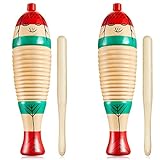
- A nice combination: you will receive a package including 2 sets of guiro instruments, containing 2 pieces of percussion guiros and 2 pieces of rhythm sticks, the quantity is sufficient to satisfy your daily use and replacement
- Long serving time: these wooden fish instruments are made of quality wood material with exquisite workmanship, smooth and no burned edges, sturdy and solid, not easy to break or deform, these small musical instruments can serve you for a long time
- Suitable sizes: the percussion guiro measures approx. 8.3 x 2.4 inches, the wood stick is about 6.5 x 0.4 inches, which is a very suitable music tool for daily use at home, school, stores and more, please confirm the size you need before purchase
- Simple operation: you just need to hold the guiro with your thumb and tap with the stick of your right hand to produce a very clear and beautiful instrument sound, which is very pleasing to the ear, these wooden musical instruments are suitable for inspiring the sense of rhythm and cultivates his musical talent, ideal tools for learning musical instruments
- Adding party favor: these wood percussion instruments can be applied in many situations, such as Christmas, New Year, wedding, bridal shower, birthday, etc., these hand instruments are also nice for adding a quaint touch to your party
Shopping ad
- Sufficient Quantity: you will receive 12 pieces of plastic handheld tambourine bells, 12 pieces of colorful cymbals, 12 pieces of egg shakers, 12 pieces of maracas, 12 pieces of wrist bells and 12 pieces of castanets in multiple colors, the sufficient quantity and good combination are enough to meet your use needs
- Creative Design: plastic percussion tambourine, egg shaker, maracas, wrist bells, castanet and cymbals for kids are designed to be easy for children to hold and play, kids musical instruments can promote musical participation, encourage children to explore their musical creativity, and build their confidence and self expression
- Strong and Reliable: tambourines musical instruments for kids are mainly made of quality plastic material, safe and reliable, strong and fade resistant, not easy to deform or break, you can use them with confidence
- Measurement Information: the tambourine bell measures 5.12 x 4.72 x 1.06 inches, the castanet measures 2 x 2 x 0.9 inches, the maracas for kids measure 1.6 x 1.6 x 5.1 inches, the egg shaker measures 1.6 x 2.4 x 2.4 inches, and the wrist bells measure 8.3 inches in cord length and the children's cymbal measures 5.12 x 1.18 inches, this children's tambourine set encourages both individual and group play, helping to develop social skills in young children
- Broadly Applied: rhythm toys for kids can be applied in a variety of settings, including music classes, day care centers and homes, the bright colors and playful designs of these instruments make them a fun and charming addition to nursery, child care center or children's playroom
Shopping ad

- Egg Shake Set: You will get 3 styles and 5 colors of shaker musical Instruments, 20 wrist bells, 20 egg shakers and 20 shaker sand hammers. The egg shaker measures 2.2 x 1.6 x 1.6 inches, the hammers is 5.1 x 1.5 x 1.5 inches, the wrist bell band measures 8.2 inches in length. Sufficient quantity to play and learn with your kids together or replace these instruments at any time.
- Safe and Durable Material: Made of high quality plastic filled with mini iron balls, egg and sand hammer shaker are non toxic, tasteless, light and reliable, no burrs, safe and comfortable for you and your children to hold. The wristband of jingle bell is made of nylon material, which is durable and not easy to break.
- Stylish Design: The bright color of the percussion toy can attract the baby's attention and bring them more fun. Adjustable wristband size is suitable for children and adults. While shaking together, the sound is loud and the egg shaker set can train and practice your baby's hearing and eyesight, helping kids find a sense of rhythm.
- Wide Uses: These basic shaker musical instruments for kids are perfect for family gatherings, classroom, reunion, band, party and even outdoors. You can also create art on an egg shaker and make Easter eggs with your kids, making the egg shaker serving as decorations or party favors for Easter, Christmas and birthdays. But not for children under 3 years.
- Ideal Gift: It is a ideal early learning toys gift for kids, such as rhythm training for children, or school classroom music, which encourages them to participate in music activities or DIY drawing on an egg shaker, cultivating their hand eye coordination and motor skills. A fun and simple way to learn the basic rhythm.
Shopping ad
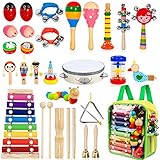
- [A Complete Kids Musical Instrument Set] - Including 33pcs 18 types shaking, tapping, beating and blowing instruments. Better way to start music than with a percussion set for preschoolers. Great and creative birthday gift for kids, boys, girls and toddlers.
- [Nontoxic and High Quality Materials] - Made of high quality non-toxic material, safe and reliable for little children. These instruments are made with lead free paint. Cpc Certified / Astm Certified.
- [Educational Musical Toys] - Various musical instruments provide a wide range of beautiful sounds keep time with the songs. It helps children to experiment with sounds, beat and rhythm.
- [Easy to Clean and Storage] - Comes with high quality clear compact backpack, convenient for your precious ones to collect toys, easy to carry when going out. Anywhere you can find a musical class.
- [Best After-sales Service] - All of our products are thoroughly tested before we ship them out to you. If it does not suit you for any reason, please contact us, we will take care of it in 12 hours!
Keep The Project Manageable
- Start with one verse and a chorus, then add sections only if the lesson needs them.
- Save the student-written version separately from AI suggestions so the class can see what changed.
- Use generated audio as one draft to discuss, rather than treating it as the authoritative version of the lesson.
- Check the vendors’ sites for current pricing, account requirements, classroom controls, and any specific export or sharing need; those details are not established here.
Product prices and availability are accurate as of the date/time indicated and are subject to change. Any price and availability information displayed on Amazon at the time of purchase will apply.




