Free tools Windows power users keep installed
One-click scans. No signup required.
Specifiction is reader-supported. When you buy through links on our site, we may earn an affiliate commission. As an Amazon Associate I earn from qualifying purchases. Learn more
For free AI background music you can actually place in a video, start with Soundverse AI Beat Maker for complete instrumentals or Eleven Music for an instrumental generation option. Suno is another free song-making option, but its Free Plan does not include commercial rights or stem separation. Before using any generated track, check the tool’s current terms for your video and audience.
Choose A Free Tool That Fits Video Background Music
Background music usually needs to sit behind speech or action rather than take over the scene. Try prompts that specify instrumental music, a restrained role, and the mood or pacing you want. The listed product details do not establish particular genre controls, so check each vendor’s site if you need a specific genre or sound.


As an Amazon Associate I earn from qualifying purchases.
| Tool | What Its Free Option Establishes | Fit For A Video Background Track |
|---|---|---|
| Soundverse AI Beat Maker | Free Tier starts with 1,000 tokens upon signup. The tool generates complete instrumentals and exports WAV mixes, stems, and MIDI. | Strong fit when you want an instrumental and may edit its parts. The free tier’s usage rights are not stated here; check the vendor’s terms before publishing. |
| Eleven Music | Free plan includes 10,000 credits per month. It can generate instrumental tracks, but the free plan is limited to personal use and browse-only Marketplace access. | Consider it for personal video projects. Whether your planned video use is covered depends on the current terms; check them before publishing. |
| Suno | Free Plan includes 50 credits per day. Suno generates songs with vocals, lyrics, instrumentation, and production; its Free Plan does not include commercial rights or stem separation. | Can be explored for a free music draft, but the listed details do not establish an instrumental-only option on the Free Plan. Check the terms and track controls before relying on it as video background music. |
Make A Track That Stays In The Background
Use a prompt that describes the track’s job in the video, then add a mood and pacing. Keep genre requests broad unless the vendor confirms that it supports the specific style you need.
- For narration: “Instrumental background music for a calm explainer video, gentle pace, restrained arrangement, leave room for spoken narration.”
- For a travel montage: “Instrumental music for a scenic travel montage, warm and hopeful mood, steady pace, supports the visuals without dominating them.”
- For a product walkthrough: “Instrumental background music for a clear product walkthrough, light and focused mood, even pacing, unobtrusive behind speech.”
These are prompt examples, not confirmed genre presets or guaranteed output. If a tool produces vocals or a track that competes with speech, revise the prompt to ask for an instrumental and a more restrained background role.
Shopping ad
Generate, Review, And Place The Music
- Pick the tool: Use Soundverse for its documented complete-instrumental generation, or Eleven Music if its free plan’s personal-use limit fits your project. Treat Suno as a draft option until you confirm that its controls and terms fit your use.
- Describe the video’s need: Write a prompt from the examples above, naming the scene, mood, pace, and instrumental background role. Check the vendor’s site for any genre or style requirement not established here.
- Listen against the visuals: Review the generated track with your video, especially under dialogue. Keep a version only if it supports the scene and leaves the foreground clear.
- Export and edit: Soundverse lists WAV mix, stem, and MIDI exports. Eleven Music lists stems and MP3/WAV exports, but its free plan is browse-only for Marketplace access; check what export access applies to your generated track. Suno’s Free Plan does not include stem separation. Confirm the available export before building your edit around it.
- Check permission before publishing: Read the current plan terms for your specific video use, including whether it is personal or commercial and where you will post it. The stated free-plan limits do not establish broad video publishing rights for Soundverse; Eleven Music’s free plan is personal use only, and Suno’s Free Plan excludes commercial rights.
Check Rights And Practical Limits Before You Publish
Free access to a generator does not by itself establish permission for every video use. Terms can depend on the plan and use, so verify them on the vendor’s site before publishing, especially for monetized or client work. If your project uses a voice, cover, or sample, check that you have consent where needed and that the platform’s terms allow that use.
For a free workflow, Soundverse has the clearest stated fit for making complete instrumentals, while Eleven Music explicitly offers instrumental generation with a personal-use-only free plan. Suno offers daily free credits, but its free commercial-rights exclusion makes it a poor choice for a video you plan to monetize.
What’s actually slowing this PC down?
Pick the symptom - the matching free tool is one click away.
Quick Recap
Shopping ad
Shopping ad
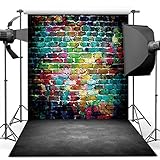
- 🎨 Street Art Vibes – Features a vivid graffiti brick wall paired with a realistic concrete floor, creating an edgy, urban look for photoshoots and events.
- 🧱 Durable Vinyl Material – Made from non-reflective, lightweight vinyl. Not washable, but can be wiped clean. Suitable for indoor use.
- 📸 Perfect Size for Shoots – 5x7ft (150x210cm) ideal for portraits, dance shoots, music-themed events, or room decor.
- 🎤 Ideal for Teen & Adult Themes – Great for hip hop parties, street fashion shoots, rap music videos, or grunge-style decorations.
- 🛠️ Easy to Hang – Foldable and lightweight, can be fixed with clips, tape, or backdrop stand (not included).
Shopping ad

- ❤ Size:7x5FT
- ❤ Material:Upgraded Polyester fabric, ironed, washable and no-fade.
- ❤ Color:Color saturation high and fastness. Non-reflection, it makes shooting effect more real and more colorful.
- ❤ Application:Applicable occasions include video and photoshoot background, festival, party, birthday, graduation, room wall hanging background decoration. Can also be used indoor tapestry, outdoor banner, etc.
- ❤ Customization:We can provide customized backdrops, customize your favorite picture, size, add text and so on. If you have any questions, please feel free to contact us, we will be committed to providing you with a better shopping experience.
Shopping ad
Product prices and availability are accurate as of the date/time indicated and are subject to change. Any price and availability information displayed on Amazon at the time of purchase will apply.




