The Tool Desk
Outbyte PC Repair FREEClear out junk files and repair common Windows errorsFree Scan →Outbyte Driver Updater FREEScan for outdated or missing drivers - takes under a minuteDriver Scan →Specifiction is reader-supported. When you buy through links on our site, we may earn an affiliate commission. As an Amazon Associate I earn from qualifying purchases. Learn more
Make a personal AI love song by writing down a few true details about your relationship, turning them into a short verse and memorable chorus, then generating and refining a vocal song with a tool that supports lyrics. The feeling comes from the specifics you provide: a shared ritual, an affectionate nickname he likes, or a small moment only the two of you would recognize.
What Makes A Love Song Feel Personal?
A romantic dedication needs clear affection and details that sound like your relationship, not interchangeable declarations. Before opening a generator, jot down:
As an Amazon Associate I earn from qualifying purchases.
- One memory with a concrete setting or action.
- Two qualities you love about him, expressed through examples.
- A phrase you actually say to each other, if it is appropriate to share.
- The occasion and the feeling you want the song to leave him with.
Choose details you are comfortable putting into an online service. Avoid private information that does not need to appear in the lyrics.
How To Write Lyrics Before Generating
- Pick one message. For example: “I feel at home with you,” or “I’m grateful we found each other.” Keep the song centered on that thought.
- Choose a scene. Use one real memory as the verse’s starting point. Note what happened and one sensory or emotional detail you remember.
- Draft a compact structure. Write a verse that sets the scene, a chorus that states the central message in plain language, and an optional second verse that adds another detail. A repeated chorus gives the song a recognizable center.
- Read the lines aloud. Replace phrases that feel stiff or too general. Shorter lines are easier to sing clearly; keep the words you most want him to hear in the chorus.
- Keep the tone yours. If grand declarations would sound unlike you, choose warm, playful, grateful, or understated language instead.
How To Generate And Refine The Song
- Choose a lyric-led tool. Suno, Eleven Music, SongIntent, Mureka, and Song.do list generation of complete songs with vocals or lyrics-based inputs. Their supplied descriptions do not establish a dedicated love-song genre or a particular romantic style, so check each vendor’s current interface and terms for the exact controls you need.
- Paste your lyrics or a short song brief. If the tool offers a lyrics field, use your draft. Otherwise describe the occasion, the relationship details to include, and the emotional tone without adding facts you do not want invented.
- Describe the sound with musical terms you can hear. For instance: “An intimate, warm vocal dedication for my boyfriend; gentle acoustic feel, unhurried pulse, clear lead vocal, verse that builds into a heartfelt chorus; sincere and conversational, not dramatic.” This is a prompt example, not a claim that any listed tool offers those exact genres, instruments, or controls. Check the product’s available style options and revise the prompt to match.
- Generate a draft and listen for meaning. Check that the name, key details, and emotional message are understandable, and that the song has not added a false memory or awkward lyric. If a line is wrong, edit the lyric or prompt and generate again where the product supports that workflow.
- Refine one issue at a time. If the chorus is hard to understand, simplify its wording. If the performance feels too theatrical, ask for a more natural delivery. If the arrangement overwhelms the words, ask for a simpler backing. These are prompt directions; exact editing controls vary by service.
- Save a copy and check delivery options. Downloading, export formats, and limits differ by product and plan. Confirm those details on the vendor’s site before relying on a particular file type or delivery method.
Which Tools Fit This Workflow?
These options have supplied facts relevant to lyric-led vocal songwriting. Their descriptions do not verify a dedicated romantic-song preset, specific love-song genres, or specific instruments.
Shopping ad

- [Immersive Sound Experience & Dual Connectivity] Experience unparalleled sound quality with this wireless Bluetooth speaker's 2 drivers and advanced technology that delivers powerful, well-balanced sound with minimal distortion. Connect two speakers together to create an immersive stereo sound experience and fill any room with powerful sound. Perfect for gaming, music, and movie playback
- [Tough & Weather-Resistant] Engineered to handle rough use and adverse weather conditions, this speaker features a durable design and an IPX5 rating for protection against water splashes and spills. It's an ideal choice for outdoor events, and is perfect for use at parties, at the pool, on the beach, while camping or hiking, and more
- [Long-lasting Playtime & Extended Bluetooth Connectivity] Experience extended playtime with up to 24 hours(50% Vol and light off) per charge and extended wireless range with Bluetooth 5.3, reaching up to 100 feet from your device. The multicolor lights on the speaker can also be turned off with a simple button press to save the battery and adapt to your needs. Keep in mind that the actual playtime can vary depending on volume level, audio content, and usage
- [Vibrant Light Effects] Bring a new level of excitement to your party with the dynamic multi-color light show that syncs to the beat of the music, you can easily customize the light effects to suit your preference by simply pressing the Light button. Make any gathering more memorable with these visually stunning light effects that will elevate the atmosphere
- [Everything You Need] The package includes 1 waterproof Bluetooth speaker (Item Dimensions D x W x H: 7.87"D x 2.76"W x 2.81"H, Weight: 1.28lb), 1 Type-C charging cable, and a quick start guide, all backed by lifetime technical support. The built-in microphone allows for hands-free phone calls and you can also play music from other devices using the AUX jack (not included). It's a perfect gift for men and women. It is also suitable as white elephant gifts for adult, stocking stuffers for men and women, Christmas gifts,birthday gifts, mothers day gifts,fathers day gifts,Valentine's Day,mens gifts,and various anniversary gifts for him.
| Tool | Relevant stated capability | Plan detail stated | Practical caveat |
|---|---|---|---|
| Suno | Generates songs with vocals and lyrics; supports editing and section replacement. | Free Plan; Pro is listed from $8/month. | Free Plan does not include commercial rights or stem separation. Pro limits downloads to 20 songs per month. |
| Eleven Music | Generates full songs with AI vocals or lyrics; supports section editing. | Free plan; paid from $6/month. | Free use is personal only. Commercial rights vary by plan and exclude film, TV, and studio games. |
| SongIntent | Generates complete songs from ideas or lyrics and supports line-level revisions. | Free plan; paid from $8/month. | Free plan allows one render per month, five AI assists per month, and one active project. |
| Mureka | Generates full songs from text or lyrics and supports vocal generation and extensions. | Free plan; paid from $8/month billed annually. | Mureka Studio access is reserved for the Premier plan. |
| Song.do | Generates vocal songs from prompts or lyrics and supports song extension. | Free plan; paid from $10/month billed annually. | Free usage is limited to one credit and one generation per day; it runs in a browser. |
| LyricToMelody AI | Generates melodies and sung vocal drafts from lyrics or MIDI. | Free plan; paid from $10/month billed annually. | Starter projects are retained for seven days; commercial rights are included on paid plans. |
Prices and plan details above follow the supplied directory snapshot checked September 26, 2026; check the linked vendor site for current terms and the exact features available to your account.
Independent reader supportYour contribution helps us test, update, and keep practical guides available for everyone.What To Check Before Sharing The Song
- Voice and references: Do not upload or imitate another person’s voice without their consent. Review the service’s current rules for voice use and audio references.
- Commercial use: A private gift and a public or monetized release can have different implications under a platform’s terms. Check the relevant plan and licensing terms before publishing or monetizing the track.
- Human authorship: In the United States, the Copyright Office says a work generated entirely by AI is not copyrightable, prompts alone do not make someone the author, and human-authored parts of a mixed work may be protected. Applicants registering a work with more than a minimal amount of AI-generated material must disclose it and describe the human contribution. Read the U.S. Copyright Office’s AI report information.
For a gift, the strongest finishing touch is usually a lyric that could only belong to the two of you. Keep the draft honest, make the words easy to understand, and choose a delivery format the product actually supports.
Recommended Free Tools
Quick Recap
Shopping ad

- Dual Play Modes & Premium Stereo Sound - Equipped with dual induction and Bluetooth 5.3 playback modes for flexible audio enjoyment. The innovative induction design plays music instantly once your phone is placed on the stand, no Bluetooth pairing required. Advanced Bluetooth 5.3 technology ensures stable, lag-free wireless connection. Delivering layered, high-fidelity sound with deep bass, full midtones, and crisp clear treble, this speaker creates an immersive listening experience for music, podcasts, and videos, perfect for all audio enthusiasts
- HD LED Display & Multi-Functional Clock Timer - Features a high-definition LED screen with adjustable 12/24-hour time format to fit different usage habits. Designed with two independent alarm buttons, you can set two separate alarms for work, study, or daily reminders. Built with an auto-off timing function to customize music playback duration, effectively avoiding unnecessary power waste. The clear digital display offers intuitive visual effects, serving as a practical bedside and desktop clock for daily use
- 10-Mode RGB Ambient Lighting - Upgrade your space with 10 customizable RGB light modes, including 6 static colors (red, blue, green, purple, yellow, cyan) and 4 dynamic flowing light effects. The soft, eye-friendly lighting creates a cozy, romantic, and relaxing atmosphere for bedrooms, desks, and living rooms. It perfectly matches different scenes such as leisure, work, and parties, adding a unique decorative touch to your daily space
- 360° Rotatable Anti-Slip Phone Stand - Built with a full 360° vertical rotation function, letting you freely adjust and lock your preferred viewing angle. Perfect for placement on desktops, kitchen countertops, and nightstands, it fully frees up your hands for watching videos, gaming, browsing, or making FaceTime calls. Equipped with premium anti-slip silicone pads on the bottom, back and device slot, it firmly holds your phone in place and prevents slipping, scratching and accidental drops for stable daily use
- Rechargeable Portable Speaker & Tech Gift Ideal: Take it anywhere with up to 8 hours of playtime on a full charge. The built-in emergency wired charging feature provides temporary power to your phone during unexpected low-battery moments. Stylish, practical, and packed with useful features, it makes an unforgettable birthday, Christmas, Father's Day, Valentine's Day, White Elephant, or office gift for men and women
Shopping ad
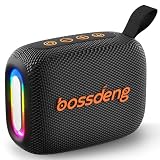
- [Immersive HD Sound & Punchy Bass] Delivers room-filling audio with rich, well-balanced sound. Equipped with advanced acoustic drivers, this compact wireless speaker outputs crisp highs and deep bass without distortion. Perfect for elevating your music, podcasts, or movies anywhere.
- [IPX5 Waterproof for Beach & Shower] Built with a rugged, weather-resistant shell and an IPX5 waterproof rating. This outdoor Bluetooth speaker easily withstands splashes, rain, and accidental spills—making it an ideal sound box for pool parties, camping, hiking, and bathroom showers.
- [10-Hour Battery & Bluetooth 5.3 Instant Pair] Enjoy up to 10 hours of non-stop playtime on a single charge. Powered by Bluetooth 5.3 technology, it ensures a stable, skips-free wireless connection up to 33 feet. Note: Features an independent one-button control to turn off the multicolor lights to maximize battery life.
- [Ultra-Portable Pocket Size with Lanyard] Weighing only 0.62 lbs and measuring 1.9"D x 4.8"W x 3.3"H, this mini speaker is small enough to pack into any bag. It features a sturdy, built-in lanyard for easy hanging on backpacks, bikes, or tents—engineered for true portability.
- [3 Audio Modes & Full Package Essentials] More than a BT speaker—supports USB drive and TF/Micro SD card playback for versatile audio sources. Package includes: 1× Waterproof Bluetooth Speaker, 1× Fast Type-C Charging Cable, and 1× User Guide.
Shopping ad

- Compact and Powerful Design: Engineered with premium craftsmanship, this portable speaker features a space-saving form measuring a mere 2.99 inches (7.6 cm) in width and length, and 4.25 inches (10.8 cm) in height. Ultra-lightweight at just 0.582 lbs (264g), it slips effortlessly into any bag. Driven by a robust 20W peak power, it delivers immersive audio with punchy bass and crisp highs, while its 15W continuous output ensures crystal-clear sound for indoor relaxation or outdoor adventures
- 【IPX5 Waterproof – Beach, Pool & Outdoor Adventures】Built for everyday outdoor fun, this portable Bluetooth speaker features IPX5 waterproof protection to handle splashes, light rain, and wet environments. Take it to the beach, pool, campsite, backyard, patio, or shower for music wherever you go. A reliable companion for travel, camping, outdoor gatherings, and weekend adventures
- 【Portable Companion – Travel, Camping & Everyday Use】At just 0.58 lbs, this compact wireless speaker easily fits into a backpack, tote, suitcase, or travel bag. The built-in lanyard makes it easy to carry or hang from a backpack, bike, hook, or shower caddy. Great for road trips, beach days, camping trips, dorm rooms, home offices, and relaxing at home
- 【Dynamic Lights – Create the Right Mood Anywhere】Dynamic LED lights add colorful visual effects to your favorite music, bringing extra energy to parties, gatherings, and everyday listening. Use it in the bedroom, dorm, backyard, patio, campsite, or party space. A fun choice for Halloween music, movie nights, sleepovers, game nights, and outdoor hangouts
- 【15W HD Sound & 15H Playtime – Music for Every Moment】Powerful 15W HD sound delivers clear, enjoyable audio for music, podcasts, games, and more. With up to 15 hours of playtime, enjoy your playlist during travel, beach trips, camping, pool days, backyard gatherings, or a relaxing night at home. Keep the music going without frequent recharging
Shopping ad

- Outdoor-Proof Speaker: Portable design with IPX7 waterproof protection to safeguard against splashes, waves, and water vapor. Get incredible sounds at home, on camping trips, or for outdoor adventures.
- 24H Non-Stop Music: With Anker's world-renowned power management technology and a 5,200mAh Li-ion battery, the soundcore 2 speaker delivers a full day of great sound.
- Powerful Sound: The speaker features 12W power with enhanced bass from dual neodymium drivers. An advanced digital signal processor ensures pounding bass and zero distortion at any volume.
- Intense Bass: Our exclusive BassUp technology and a patented spiral bass port boost low-end frequencies to make the beats hit even harder. The soundcore 2 speaker delivers vibrant audio for home theater nights, beach parties, and sitting around a campfire.
- Grab, Go, Listen: A classic design refined with simple controls and effortless portability. Easy to use and take anywhere, and supports wireless stereo pairing.
Product prices and availability are accurate as of the date/time indicated and are subject to change. Any price and availability information displayed on Amazon at the time of purchase will apply.




