PC Slower Than It Used to Be?
A free scan shows the junk files, broken settings and background clutter dragging Windows down - then fixes them in one click.Free scan · Windows 10 & 11Outdated Drivers Are Slowing You Down
One free scan finds every outdated or missing driver and matches the right update for your exact hardware.Free scan · exact hardware matchSpecifiction is reader-supported. When you buy through links on our site, we may earn an affiliate commission. As an Amazon Associate I earn from qualifying purchases. Learn more
You can use AI to sketch a post-rock track by generating an instrumental foundation, then shaping its dynamics, guitar layers, and long-form arc in a digital audio workstation (DAW). The available product details do not establish that any listed tool specifically supports post-rock, guitar-specific controls, or the slow-build structure associated with the genre. Treat the prompts below as experiments, listen critically, and check each product’s current capabilities and terms before relying on it.
What Makes A Post-Rock Prompt Different?
Post-rock usually depends on development over time: a restrained opening grows through repetition, texture, and rising intensity into a larger climax, then releases. A static loop or a track that reaches full volume immediately may miss that shape. Instrumental passages, layered guitar-like tones, spacious percussion, and clear changes in energy are useful goals to describe, but the listed tools do not confirm dedicated post-rock or guitar-generation features.
As an Amazon Associate I earn from qualifying purchases.
What’s actually slowing this PC down?
Pick the symptom - the matching free tool is one click away.
Describe musical behavior rather than relying on the genre label alone. For example: “Instrumental, slow-building post-rock arrangement; clean, reverberant guitar-like arpeggio begins alone; bass and restrained drums enter gradually; repeated motif grows denser and louder into a distorted layered climax, then falls away to a quiet ending; no vocals.” This is a prompt to try, not a guaranteed product capability.
Choose A Starting Point
| Tool | Supported workflow | Post-Rock-Specific Support |
|---|---|---|
| Suno | Generate complete songs, edit or extend sections, and export stems; available on web, iOS, and Android. | Not stated |
| Eleven Music | Generate instrumental tracks, edit sections, use genre transitions and audio references, and export stems. | Not stated |
| Soundverse AI Beat Maker | Generate complete instrumentals and export separated stems and MIDI; available on web, iOS, and Android. | Not stated |
| Beat Shaper | Make editable drums, basslines, synths, loops, and arrangements with piano-roll editing and DAW exports. | Not stated |
| Majik’s Music Studio | Generate and edit music, separate stems, and export audio; desktop apps are listed for macOS and Linux. | Not stated |
For a whole-track sketch, Suno, Eleven Music, or Soundverse describe full-song or complete-instrumental generation. For a more modular starting point, Beat Shaper describes editable musical parts and DAW exports. Majik’s Music Studio describes local processing by default and stem separation. None of these descriptions confirms control over post-rock’s characteristic form, guitar tone, or instrument choices, so check the product’s site for those specifics.
Shopping ad

- 80 preset patches and 80 user patches, enough for creating your sound library. You can save any preferred tones by simply pressing down the SAVE button.
- 8 effect modules, including 66 effect types, providing you with the most unique Mooer sound library. Simply rotate the knob above the screen and everyth
- 6 assignable expression pedal parameters which greatly improve the convenience and diversity of controlling the tone. Unique adjustable output mode setting allows you to use line out mode to still get a good tone when playing without an amp.
- By using 180 seconds looper and a drum machine which contains a variety of rhythm patterns, you can create your own music without using a computer.
- GE100 has scale and chord learning function. Just click the LESSION button to enter the scale and chord knowledge reserve interface.
Build The Track In A DAW
- Write a short arrangement map. Plan an opening, gradual build, climax, and release. Decide where drums and bass should enter and where the main motif should become denser. This is your target for judging generated material, not a feature claim about any tool.
- Generate an instrumental sketch. Try the prompt above in a tool that supports full-track or instrumental generation. If the output starts too big, revise the prompt to specify a quieter opening and a gradual increase in intensity. If you need a specific control, first confirm that the product offers it.
- Keep only useful sections. Look for a motif, texture, or transition that can anchor the arrangement. Suno lists editing, section replacement, and extensions; Eleven Music lists section editing and inpainting. Those general editing features do not establish that either product can create a particular post-rock passage on demand.
- Export parts where supported. Stem export is listed for Suno and Eleven Music, and separated stems are listed for Soundverse and Majik’s Music Studio. Beat Shaper lists stem and DAW project export options. Confirm which export formats and plan conditions apply before building a workflow around them.
- Arrange the dynamics. In your DAW, place quieter material first, add density in stages, reserve the loudest layer for the climax, and leave room for the ending to recede. These are arrangement instructions for your own DAW work; the supplied product information does not identify a specific DAW or guarantee a post-rock arrangement function.
- Refine the parts you can edit. Beat Shaper describes piano-roll editing for generated parts. Soundverse describes MIDI export for further editing. If a generated track lacks a convincing guitar part or the desired texture, add or replace it in your DAW using tools you already have; guitar-specific generation is not established for these products.
- Listen through the whole arc. Check whether the motif develops, the build has distinct stages, the peak feels earned, and the ending gives the listener space. Regenerate or rearrange sections that flatten the progression instead of treating a genre label in the prompt as proof of a suitable result.
Check Access And Rights Before You Publish
Prices and terms can change, and a paid plan’s listed features do not by themselves establish rights for every use. Check the vendor’s current site for post-rock or guitar-specific controls, supported export formats, plan limits, commercial rights, and any restrictions on using uploaded or reference audio. Use only audio and voice material you have permission to use, and follow each platform’s terms. The available product details do not establish specific consent rules for these workflows.
Quick Recap
Shopping ad

- Legendary Distortion Heritage: Used by guitarists everywhere since 1978, establishing the standard for distortion pedals
- Pioneering Sound Design: First distortion pedal from BOSS defined a bold new sound, delivering hard-edged attack and smooth sustain that's been a staple of players for generations
- Clear Hard-Edged Attack: Remains clear even at maximum distortion settings for heavy rhythms and cutting solos
- Versatile Booster Function: Works as a booster at low distortion settings for enhanced tonal flexibility
- Wide-Range Tone Control: Unique tone control offers a wide range of sound shaping possibilities
Shopping ad

- GE150 Pro Series, is designed based on MOOER’s updated GE series design language and MNRS modelling technology. Two editions: the standard mains-powered option and the GE150 Pro Li, which features a staggering 9 hours of battery life through an integrated Lithium battery. The standard GE150 Pro comes with a neutral white finish.
- More Flexibility: Four multi-purpose footswitches for browsing presets and triggering a wide range of functions. paired with an upgraded effect chain control logic, allowing guitarists to utilize all four footswitches for enhanced flexibility when switching between different patches during performance. Expression pedal that supports both parameter control and output volume control.
- Massive Tone: 200 factory preset tones, 55 classic amp preamps based on MOOER’s in-house MNRS modelling technology, 26 high-quality cabinet simulations, AMP and CAB modules now support MNRS sample files (GNR and GIR). The AMP module has 20 slots for loading samples, and the CAB module's slots have been increased to 20.
- Multi-function purposes have also been built into the pedal’s UI, once again meeting the growing control system demands of guitarists creating on the cutting-edge of music technology. The GE150 Pro pedal can be mapped to effect parameters for dynamic live control and also features a "toe tap" feature to switch the mapping "Expression" to "Volume" control mode.
- Ready to Jam: tune with precise instrument tuner, play with built-in 80-second stereo LOOPER function, built-in drum machine module with 40 drum rhythms and 10 metronome modes. Best of all, all of these rhythmic and looping features can be controlled through the four multi-purpose foot switches, ensuring that loop improvisations and backing tracks can be seamlessly integrated into both live performances and practice sessions.
Shopping ad
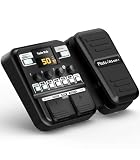
- Advanced DSP Simulation: Unlike traditional guitar effects pedals, the KMF-1 utilizes advanced DSP technology with TSAC for precise analog circuit simulation. It incorporates 512-point IR Sampling to mimic different cabinet sounds. With 32-bit signal processing, it ensures clear, dynamic sound, making it ideal for both studio recording and live performances
- More CAB & AMP Options: Equipped with 77 classic effects across 8 essential effect modules: Amplifier, Cabinet, drive, Modulation, Delay, Dynamics, Reverb, and Filter, the KMF-1 has everything you need. With its impressive collection of 18 amp models and 18 cabinet simulators, it stands out among similar products on the market
- Flex Your Music Creativity: With 50 preset patches, even beginners can start playing right away. Instantly switch tones in Memory Mode during live sets. The built-in tuner, 30s looper, and 42 drum rhythms, and AUX IN to connect your phone for playing along with backing tracks—maximizing your creative inspiration
- Customize Pro-Level Effects: The KMF-1’s Stomp Mode replicates classic single-pedal operation with 5 independent effect blocks that can be flexibly enabled and sequenced. The advanced Edit Mode allows fine-tuning of each effect parameter. Combined with a 2-in-1 expression pedal supporting 6 assignable effects, it meets your high-level playing and creative needs
- User-Friendly Design: The KMF-1 electric guitar pedal features a upgraded clear 128×32 LCD screen with real-time feedback. Intuitive controls—including knobs, buttons, and a customizable durable pedal, make switching effects easy. It supports two power modes with a battery compartment for 6 AA batteries, offering up to 2.5 hours of use, ensuring freedom to create music even outdoors
Shopping ad

- 71 EFFECTS AND 13 AMP MODELS TO EXPLORE – Explore 71 built-in effects and 13 amp models to craft everything from clean tones to high-gain distortion, perfect for practice, recording, and live play.
- LAY DOWN LOOPS IN REAL TIME – Create layered riffs with the 30-second looper, ideal for songwriting, solo practice, and live experimentation.
- A FULL BACKING BAND IN YOUR PEDAL – 68 built-in rhythm patterns give you a full backing band, helping you stay in time and make practice sessions more engaging.
- PLUG IN, PLAY, AND PRACTICE ANYWHERE – Plug in with standard guitar input, connect external audio via aux, and monitor through amp or headphones for silent practice anywhere.
- GUITAR LAB KEEPS YOUR SOUND GROWING – Download Zoom Guitar Lab (Mac/Windows) to edit patches, build your own tones, and unlock even more creative control.




