Free tools Windows power users keep installed
One-click scans. No signup required.
Specifiction is reader-supported. When you buy through links on our site, we may earn an affiliate commission. As an Amazon Associate I earn from qualifying purchases. Learn more
To send a personalized AI song, write a short lyric that includes details only the recipient will recognize, generate it with a tool that accepts lyrics, listen for mistakes, then download the finished track and send it as an audio file. Musicful supports generating songs from lyrics and editing lyrics, with MP3 and WAV downloads; Song.do supports lyrics-based songs and MP3/WAV downloads. Check each service’s current terms and availability before you start.
What Makes A Song Feel Personal?
Specific details matter more than a long list of compliments. Pick two or three memories, phrases, places, or small habits the recipient will recognize, and build the song around them. A first name can help, but a private shared reference often makes the lyric feel less generic.
As an Amazon Associate I earn from qualifying purchases.
Do these 3 things before closing this tab:
1Scan for outdated or missing drivers - takes under a minute2Repair Windows errors before they cause bigger problems3Fix the driver behind crashes, sound loss and screen glitchesDecide the occasion and the feeling before drafting: for example, a warm birthday song, a playful thank-you, or a gentle anniversary song. These are writing directions, not guaranteed genres or styles supported by either service. If you need a particular genre, language, vocal type, or musical instrument, check the product’s current options rather than assuming it can deliver that detail.
Draft Lyrics That Include Real Details
- Choose one central message. Write a sentence such as “I’m grateful you made every move to a new city feel like home.” Use that idea to keep the song focused.
- Collect three concrete details. Note a place, a shared event, and a phrase or habit. Use details you are comfortable putting into an online service.
- Arrange the lyric simply. Write a short verse that sets the scene, a chorus with the central message, and a second verse with another memory. Keep lines concise so they are easier to review when sung.
- Read it aloud. Replace details that are hard to pronounce or lines that sound unlike you. Check names and dates carefully; generated vocals may not pronounce them as intended.
Generate And Revise The Song
Musicful
- Open Musicful and start a song using your lyrics. Its listed capabilities include generating songs from lyrics and editing lyrics.
- Describe the occasion and intended feeling in the available text or style controls. The supplied product information does not establish particular genre, language, instrument, or vocal options, so confirm those in the service before relying on them.
- Generate a draft and listen through the whole song. Check that the recipient’s name and personal details are intelligible, the lyric has not changed in a way that alters the meaning, and the mood suits the occasion.
- Edit the lyric if needed and generate or revise again using the controls the service provides. The exact number of revisions or generations depends on the current plan; check the vendor’s site.
- When satisfied, download the song as MP3 or WAV, formats listed by the service.
Song.do
- Open Song.do and create a song from your lyrics or prompt. The product lists vocal, instrumental, and lyrics-based song generation.
- Include the occasion, central message, and a few personal details in the lyric or prompt. If you want a specific genre, language, instrument, or vocal style, verify that it is currently supported before generating.
- Listen to the result and check names, wording, and whether the song communicates the intended message. Use the service’s editing or extension controls if they suit the change you need; song extension is listed, but specific revision controls are not established here.
- Download the finished track as MP3 or WAV, then attach the file to a message or use your usual file-sharing method. Song.do is listed as a browser-based service, and its product information does not establish a recipient-facing sharing link.
Check The Track Before Sending
- Listen on headphones and on the device you plan to use for playback. Confirm that the opening and ending are intact and the volume is comfortable.
- Check the recipient’s name, personal references, and any sensitive details. Remove anything they would not want shared or stored with an online service.
- Play the downloaded file after saving it. Make sure it opens and that you selected the intended version.
- Send it with a brief personal note explaining why you made it. If you share a file link through another service, check that its access settings are limited to the intended recipient.
Rights, Voices, And Personal Material
Use lyrics and recordings you have permission to use. Do not imitate a real person’s voice or include another person’s recording without their consent, and check the music service’s terms for voice, sample, and commercial-use rules. The product details here do not establish all such permissions, so consult the vendor’s current terms.
Shopping ad

- HOW TO SCAN THE SPOTIFY CODE: After opening Spotify on your phone, you'll see a camera icon in the top-right corner. Tap this button and point your phone's camera at the song's barcode on the record label. Please Note that our product cannot play audio, so you'll need to use your phone to play the song
- EXCELLENT CLARITY: Acrylic has superior optical clarity that allows photos to sparkle without distortion. It provides a crystal clear viewing angle that enhances the color and detail of the image for a stunning visual effect
- CUSTOM ENGRAVING: Our acrylic photo frame offers personalized custom engraving options to add a special charm to the frame. You can have the frame engraved with a name, date or meaningful message to make it a truly unique and sentimental keepsake
- EASY MAINTENANCE: Acrylic frames are easy to clean and maintain. Simply wipe with a soft cloth and mild cleaning solution to remove dust or stains. In addition, acrylic is resistant to UV rays, reducing the risk of photos fading over time
- UNIQUE GIFTS: Personalized picture frames make thoughtful and unique gifts for special occasions. Whether it's a wedding, birthday or anniversary, a customized photo on an acrylic frame adds a personal touch that the recipient will cherish
For U.S. copyright registration, the Copyright Office says applicants must disclose and describe the human contribution when a work contains more than a minimal amount of AI-generated material. It also says prompts alone do not make someone the author and that only human-authored parts of a mixed work may be protected. Read the Copyright Office’s AI report information.
Quick Recap
Shopping ad

- ANNIVERSARY GIFT FOR YOUR PARTNER: Make this anniversary unforgettable with a personalized music song cover. Upload your favorite photo, choose a song title and artist name to create a one-of-a-kind, meaningful gift. This unique keepsake will warm their heart and fill their space with memories, showing just how much they are loved and appreciated! The perfect way to celebrate your special moments together.
- MADE IN THE USA: This valentines day, give your partner a gift that’s crafted with care right here in the USA. Using advanced UV printing technology, the design is printed onto acrylic glass, ensuring a vibrant, long-lasting, and durable finish that will endure for years to come. It’s a high-quality, meaningful gift that’s sure to make a lasting impression.
- ANNIVERSARY GIFTS FOR HIM: Click “Customize Now” to upload your favorite photo and personalize it with a song title and artist name. This unique song cover makes the perfect valentines day, anniversary, or birthday gift, allowing you to show your partner just how much they mean to you with a thoughtful and personal touch!
- ENJOY YOUR FAVORITE MUSIC: Just scan the code with your smartphone! Open Spotify, tap the camera icon in the top right corner, and grant camera access. Then, scan the song code on the plaque, and your chosen music will start playing instantly on your smartphone. Important: The plaque itself does not produce sound. An unforgettable gift for music lovers and special moments—turn memories into melodies!
- You were probably looking for " valentines gift for him ", " music glass art " , " personalized acrylic song with photo ", " music picture frame " or " 1 year anniversary gift for girlfriends ". Now you have found the perfect unique gift.
Shopping ad
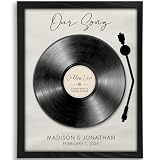
- Personalized to You: Each custom our song art print is uniquely created with your chosen song, names, and special date, turning meaningful music into a one-of-a-kind keepsake. It’s a romantic way to celebrate your love story, whether it marks your wedding song, first dance, anniversary, the day you met, or another unforgettable moment.
- Premium artwork: All art prints are printed on 270G premium matte paper with a linen embossed finish that combines crisp details with a soft, refined finish
- Unforgettable & Unique: Whether you’re celebrating a first anniversary, searching for meaningful couple gift ideas, shopping for husband gifts from wife, or looking for a romantic gift for your boyfriend, this personalized our song art print turns a special song into a lasting keepsake. It’s a beautiful way to honor your wedding song, first dance, anniversary, or any memory that deserves to be remembered forever.
- Perfect Romantic Gift: Ideal for anniversaries, weddings, Valentine’s Day, engagements, or just because, this personalized our song art print is a meaningful gift for couples that celebrates the moments and music that matter most. Thoughtful and personal, it’s a beautiful way to show how much you cherish your shared memories.
- Made in the USA: All artwork is designed and printed in North Carolina
Shopping ad
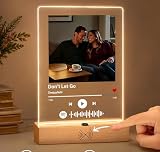
- 1. REAL MUSIC PLAYBACK — NO PHONE SCAN NEEDED Unlike ordinary Spotify code plaques, this custom music plaque features a built-in speaker and real music playback button. Simply press once to instantly hear your favorite song — no app, no scanning, no phone required. Turn memories into music you can truly feel.
- 2. PERSONALIZED PHOTO + SONG = A UNIQUE LOVE GIFT Upload your favorite photo and choose a meaningful song to create a one-of-a-kind personalized keepsake. Perfect for couples, anniversaries, birthdays, weddings, Valentine's Day, Mother's Day, or long-distance relationships.
- 3. EXCLUSIVE MOTION SENSOR NIGHT LIGHT Our plaque includes an intelligent auto-sensing LED light that automatically turns on in the dark when someone approaches. It creates a warm romantic atmosphere beside your bed, desk, or living room — a feature rarely found on Amazon.
- 4. PREMIUM ACRYLIC DISPLAY WITH MODERN DESIGN Made from crystal-clear acrylic with a minimalist wooden base, this custom music plaque blends beautifully with any room decor. Whether used as a bedside lamp, memory display, or romantic decoration, it becomes an emotional centerpiece.
- 5. MEANINGFUL GIFT THEY’LL NEVER FORGET More than just a decoration — this is a gift filled with emotion, memories, and sound. Watching someone hear “your song” instantly creates a powerful emotional reaction, making it ideal for romantic surprise gifts.
Product prices and availability are accurate as of the date/time indicated and are subject to change. Any price and availability information displayed on Amazon at the time of purchase will apply.
Quick wins for a faster PC:
Clear out junk files and repair common Windows errorsFree Scan →Scan for outdated or missing drivers - takes under a minuteDriver Scan →