Recommended Free Tools
Specifiction is reader-supported. When you buy through links on our site, we may earn an affiliate commission. As an Amazon Associate I earn from qualifying purchases. Learn more
To use AI-generated music in a Google Slides presentation, create an instrumental cue that supports the talk, download an audio file from a generator, upload it to Google Drive, then insert it on the slide where playback should begin. In Slides, select Insert → Audio, choose the Drive file, and adjust playback in the Format options sidebar. Check your account’s current Slides audio requirements and the generator’s export and usage terms before building the deck around a track.
Choose Music That Works Under A Presentation
Presentation music usually needs to sit behind speech, transitions, or a title slide. A restrained instrumental is a practical starting point: it avoids competing lyrics and leaves room for a speaker. Prompt for a clear mood and a simple arrangement rather than a full vocal song.
As an Amazon Associate I earn from qualifying purchases.
Quick wins for a faster PC:
Fix the driver behind crashes, sound loss and screen glitchesFind Drivers →Clear out junk files and repair common Windows errorsFree Scan →For example, try: “Instrumental background music for a technology presentation about a new product; calm, confident, modern, light electronic pulse, steady moderate tempo, soft synth textures, no vocals, no dramatic ending.” This is a prompt suggestion, not a claim that any named generator supports every listed control. If the tool does not offer a duration or instrumental setting, use its available prompt controls and inspect the result yourself. The supplied product information does not establish a guaranteed length, fade, loop, or Google Slides integration for these generators.
Generate And Prepare The Audio File
- Choose a generator. Use one that states it can create instrumental music and export a downloadable audio file. See the options below.
- Describe the presentation context. Name the topic, mood, and intended role, such as “quiet background under spoken narration.” Include “instrumental” or “no vocals” as a prompt request, but verify the output because a prompt is not a guarantee.
- Generate and listen through the whole track. Check that it does not contain distracting changes, unexpected vocals, or an abrupt ending. The supplied product details do not establish presentation-ready duration or automatic fade controls.
- Export a format suitable for your Slides workflow. The supplied details identify MP3/WAV export for Eleven Music and WAV mixes for Soundverse AI Beat Maker. Export formats are not stated for the other listed generators, so check the vendor’s current site before choosing one.
- Upload the file to Google Drive. Use the Google account that will present the deck, and confirm the file is accessible to that account. The supplied product details do not describe Google Drive or Slides integrations.
Insert Music In Google Slides
- Open the presentation and select the slide where the audio should start.
- Choose Insert → Audio, select the audio file from Drive, and insert it. If the file is not available, confirm it has finished uploading and that you are using the account that can access it.
- Select the audio icon on the slide. Open Format options and review the playback controls shown for your Slides account.
- Choose whether playback starts on click or automatically, if that control is available. Set the behavior for the presentation you are giving; automatic playback can be unsuitable in a room where the deck is opened before the audience is ready.
- Present the deck from the beginning and test the audio on the device and account you will use. Check volume, the slide transition where music should stop or continue, and whether the file is accessible in that presentation session.
Google Slides controls can change, and the supplied product information does not establish current Slides playback behavior or file limits. If a menu or setting differs, consult Google’s current Slides help and test the deck in the same presentation mode you plan to use.
Shopping ad

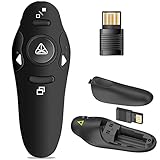
- Presentation Clicker with Laser Pointer: PowerPoint clicker controls range:98FT/30M, laser pointer range: 328FT/100M. Clicker for laptop presentations allows you to circulate through the room instead of being tied by the laptop and projector screen to make emphasis on important points
- Ergonomic Design: Wireless presentation clicker for PowerPoint presentations has an ergonomic design that makes you soft touch and comfortable to grip, and presentation pointers' buttons are big enough that you won't accidentally click the wrong one
- Plug and Play: No installation needed, no assembly or hard instructions to follow. Just plug and play. You simply plug the USB receiver into your computer and start using the laser pointer for presentations. The USB dongle slips into a slot on the PPT remote control handle when not in use
- Widely Compatible: Wireless presenter with laser pointer works with desktop and laptop computers. Presentation remote supports systems: Windows 2003, XP, Vista, 7, 8, 10, Mac OS, Linux. Wireless presenter remote supports softwares: Google Slides, MS Word, Excel, PowerPoint/PPT, etc
- Long Battery Life: Presenter remote just uses two AAA batteries(included), which is convenient because then you don't have to buy odd size batteries. Power point remote clicker is sturdy enough to throw in a briefcase or bag. Tips: Slide clicker has an on/off switch on the side to save the battery when not in use
AI Music Generators With A Supported Presentation Fit
These options are included because their supplied descriptions establish instrumental generation or instrumental-track exports. None of the supplied details establishes direct Google Slides integration, a presentation-specific genre, or guaranteed cue length.
| Tool | Why It Fits A Background Cue | Export Or Access Details Stated | Check Before Using |
|---|---|---|---|
| Eleven Music | Generates instrumental tracks as well as full songs; supports detailed editing. | MP3/WAV exports; web and API access. Free plan is personal use and browse-only Marketplace access. | Commercial rights vary by plan and exclude film, TV, and studio games. Check the terms for your presentation use and whether the available plan permits the intended export. |
| Soundverse AI Beat Maker | Generates complete instrumentals with drums, basslines, melodies, and arrangements. | WAV mixes, separated stems, and MIDI export; web, iOS, and Android. Free Tier starts with 1,000 tokens upon signup. | The supplied details do not specify the exact file format accepted by your Slides account or whether a particular plan permits your intended use. Check current pricing and license terms. |
| DeepAI Music | Its listed uses include instrumentals, soundscapes, and background music. | Web, iOS, Android, and Chrome extension; free music generation is listed. | Export format and usage rights for a particular presentation are not established here. Check the vendor’s current site before relying on a download or license. |
| Loudly | Generates full songs, and its supplied entry describes AI music generation suitable for creating a cue. | Web access; free generated tracks are limited to 30 seconds. | The entry does not specifically establish instrumental-only generation or file formats. Paid licensing rights depend on plan terms; confirm both before using it for background music. |
Check Rights And Presentation Sharing
A downloaded file is not automatically cleared for every audience or use. Review the generator’s current terms for the plan used, the intended presentation context, and whether the deck will be shared or published. If the audio includes a recognizable voice, lyrics, or material based on a reference, confirm you have the necessary consent and that the service’s terms allow that use. The supplied details do not establish a universal license for any of these generators.
Free tools Windows power users keep installed
One-click scans. No signup required.
Shopping ad

- [Presentation Clicker with Red Laser Pointer] PowerPoint clicker controls range:98FT/30M, laser pointer range: 328FT/100M. Clicker for laptop presentations allows you to circulate through the room instead of being tied by the laptop and projector screen to make emphasis on important points.
- [Wonderful Ergonomically] Wireless presentation clicker for PowerPoint presentations has a amazing ergonomic design that makes you soft touch and comfortable to grip ,and power point clicker wireless' buttons are big enough that you won't accidentally click the wrong one.
- [USB A & USB C 2 in 1 Receiver, Plug and Play] No installation needed, no assembly or hard instructions to follow. Just plug and play. You simply plug the USB receiver into your computer and start using the laser pointer for presentations. Slide clicker receiver is not only fit for devices with USB A interface, but also for devices with Type-C interface.
- [Widely Compatible] Wireless presenter clicker with laser pointer works with desktop and laptop computers. Presentation remote supports systems: Windows 2003, XP, Vista, 7, 8, 10, Mac OS, Linux. Wireless presenter remote supports softwares: Google Slides, MS Word, Excel, PowerPoint/PPT, etc.
- [Long Battery Life] Wireless clicker just uses two AAA batteries(included), which is convenient because then you don't have to buy odd size batteries. Power point remote clicker is sturdy enough to throw in a briefcase or bag. Tips: Slide clicker has an on/off switch on the side to save the battery when not in use.
Google Slides file access is a separate practical check: make sure the audio remains available to the account and audience setup used for presenting. Rehearse the deck with the actual sharing and playback arrangement before the presentation.
Quick Recap
Shopping ad
- 50FT WIRELESS REMOTE CONTROL DISTANCE & 300FT DISPLAY RANGE: Wireless presenter remote control distance range of up to 50-foot, so you can move around the room and interact with your audience. That's easy to highlight key areas of your slides. You can continue to control the slides PPT without back to computer
- PRESENTER REMOTER CONTROLLER BUTTONS: The powerpoint remote supports page backward/forward, full/black screen; One-touch keys easy to control the slideshow. You can highlight and key out the important part for your audience which is easy to be seen clearly against most background.(Not recommended for TV/LED/LCD screen)
- PLUG AND PLAY: Just plug into the wireless receiver USB, no need to install software(For mac, you may need to requires simple set-up). Note: the USB receiver store under the battery cover, never worry to lose it without using it. PACKAGE: 1xWireless Presenter remote control, 1xUltra-Slim Wireless Receiver, 1xUser Manual
- SUPPORT OPTIONS: You can use it as presentation clicker on speeching, meeting, and classroom. With page up and page down buttom, supports MS Word, Excel, PowerPoint, ACD See, website, iWork (Keynote & Numbers & Pages) etc; For MacBook on OS, plug the usb receiver into laptop, it will come out a box, and then you can select 101or104 option
- PEN SIZE: ABS plastics & Scientific ergonomic design, it is comfortable to hold the hand. The small powerpoint clicker is easy to store into any of suit pockets or can be put in a pen pocket in briefcase. Wireless Technology: 2.4 GHz; Package Include: presenter clicker with USB receiver x 1,user manual x 1. (AAA Battery Not Included)
Shopping ad

- Presenter mode, built-in Class 2 red laser pointer for presentations, intuitive touch-keys for easy slideshow control. AAA batteries required (best with Polaroid AAA batteries)
- Bright red laser light - Easy to see against most backgrounds, works as a pointer clicker for presentation and clicker for powerpoint presentations
- Up to 50-foot wireless range for freedom to move around the room
- There's no software to install. Just plug the receiver into a USB port to begin. This power point clicker wireless solution makes presentations easy, and you can store the receiver in the presentation remote after use.
- 2.4GHz RF wireless technology, built-in docking bay stores receiver for easy pack up and portability; works well as a presenter clicker wireless or computer clicker for presentations.
Shopping ad

- 【PLUG & PLAY】This presentation clicker supports page up/down, hyperlink navigation, volume control, power on/off, and full screen/black screen switching. No software or driver is required, just plug the USB receiver into your computer's USB port and you're ready to start the show (Requires one AAA battery, not included)
- 【BRIGHT RED POINTER LIGHT】This powerpoint clicker emits a bright red light that helps you clearly mark key parts of each slide so your audience can easily follow your main points. It remains clearly visible even in large conference rooms or lecture halls
- 【328FT LONG WIRELESS RANGE】This clicker for PowerPoint presentations delivers a control distance of up to 328 ft, allowing you to roam the entire hall and interact directly with your audience. Step away from the limits of a stationary podium to deliver a more dynamic presentation
- 【BROAD COMPATIBILITY】This wireless presenter remote works smoothly across different systems and software, compatible with Mac OS and Windows laptops. It supports software such as PowerPoint, Keynote, Google Slides, Excel, ACDSee, and Prezi
- 【PORTABLE SLIDE CLICKER】This presentation pointer includes a convenient clip that attaches to a notebook or pocket for easy carrying. It is a helpful tool for meetings, classrooms, training sessions, and presentations, and it is also suitable for sharing with colleagues and friends
Product prices and availability are accurate as of the date/time indicated and are subject to change. Any price and availability information displayed on Amazon at the time of purchase will apply.




