Do these 3 things before closing this tab:
1Fix the driver behind crashes, sound loss and screen glitches2Repair Windows errors before they cause bigger problems3Scan for outdated or missing drivers - takes under a minuteSpecifiction is reader-supported. When you buy through links on our site, we may earn an affiliate commission. As an Amazon Associate I earn from qualifying purchases. Learn more
Mubert is an AI music generator for creating background soundtracks matched to a requested mood, style and duration. Its clearest fit is music that supports a video, podcast, product or live stream without taking attention away from the main content. The available information establishes those broad uses, but does not establish specific genre controls, instrument choices, prompt syntax, audio formats or editing features; check Mubert’s site for the current interface and terms before planning around them.
What Mubert Is Designed To Do
Mubert describes Render as a way for content creators to generate a soundtrack tailored to the content’s mood and length. Its site also describes generating music by mood and style, and says tracks can be tailored to content. That makes the central idea straightforward: define the role the music should play, then seek a track with a suitable feel and duration.


As an Amazon Associate I earn from qualifying purchases.
Windows Errors? Fix Them Before They Spread
Repair common Windows errors and clear accumulated junk for a smoother, more stable PC - no reinstall needed.Free scan · no reinstallOutdated Drivers Are Slowing You Down
One free scan finds every outdated or missing driver and matches the right update for your exact hardware.Free scan · exact hardware matchThe site names YouTube, Tik Tok, podcasts and video as uses for royalty-free background music. It also presents original AI music for products and businesses, and describes infinite streams across more than 150 moods and themes for IRL, gaming and creator streams. These are vendor-described use cases; the available details do not specify which controls or export options are available for each one.
Where It May Fit In A Creator Workflow
Short Videos And YouTube Content
For a video, first decide whether music should feel calm, energetic, tense or warm, and note how long the section needing music lasts. Those are useful creative requirements because Mubert explicitly describes mood and duration as relevant to soundtrack generation. For example, a brief might read: “A restrained, upbeat background for a 45-second product demonstration; leave room for narration.” Treat the time and description as a brief for the desired result, not a guarantee that Mubert accepts that exact prompt format or produces a perfectly narration-safe mix. Confirm what the current generator lets you specify.
Shopping ad
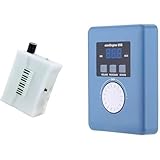
- Converts measurable surface potential into musical sound generation, enabling organic waveform expression for ambient composition, sound experiments and unique performance environments.
- Supports MIDI output to connect with synthesizers or digital workstations, expanding control over tone shaping, modulation structures and experimental sound layering.
- Responds to contact input and plant conductivity interaction, allowing dynamic trigger changes and evolving tone behavior suitable for generative audio setups and experimental music sessions.
- Supports installation work, performance atmospheres, digital audio production, looping landscapes and meditative soundscapes using plant-responsive source material.
- Portable configuration suits live rigs, production desks, sound art exhibitions, improvisational recording and signal-based sonic research.
Podcasts
For a podcast intro or transition, describe the intended mood and the segment’s duration before generating. A practical brief might be: “A reflective, gentle transition for a short interview break.” Mubert’s stated support for mood and length makes that a relevant direction, but the facts available do not establish dedicated intro or transition presets, voice-aware mixing, loop controls or audio editing. If the result needs to sit beneath speech, listen in the context of the recorded voice and check whether the available output can be adjusted to suit.
Gaming And Live Streams
Mubert describes infinite music streams in 150+ moods and themes for IRL, gaming or creator streams that need non-stop music, and calls those streams DMCA-free. For a stream, choose a mood consistent with the game or scene and consider whether continuous background sound is actually wanted during quiet moments or spoken segments. “Infinite” and “DMCA-free” are Mubert’s descriptions; the available information does not spell out how a stream is set up, which accounts or plans qualify, or what happens when music is recorded, clipped or reused elsewhere. Check the current terms for the precise use you have in mind.
Recommended Free Tools
How To Build A Useful Music Brief
A specific brief helps you judge whether generated music suits the content, even when the product’s exact input controls are not established. Write down the following before using the generator:
- Purpose: Identify the scene or content section the music will accompany.
- Mood: Pick a small number of plain-language qualities, such as calm and optimistic, rather than a long list of conflicting emotions.
- Duration: Note the length required; Mubert describes generating soundtracks to match duration.
- Style: Describe the overall feel you want. Do not assume a specific genre, instrument, tempo or vocal setting is available until you confirm it in the product.
- What must stay clear: Note speech, sound effects or other important audio that the music should not distract from. This is a listening criterion, not an established Mubert mixing feature.
For instance, a product clip might call for “confident, light background music for a concise demonstration, with narration remaining the focus.” A gaming stream might call for “continuous music with a tense, atmospheric feel.” Use these as descriptions of the result you want, then adapt them to the controls Mubert actually presents. If the generator does not expose a setting you need, do not assume a written instruction will make it available.
Independent reader supportYour contribution helps us test, update, and keep practical guides available for everyone.Free Access, Pricing And Licensing
Mubert’s homepage invites visitors to create a track for free. That establishes an advertised free creation option, but the available information does not establish a free-tier allowance, number of generations, track length cap, export quality, subscription price or which uses are covered by a free creation. Check the site for current plan details before relying on a free option for a project.
The site calls music for YouTube, Tik Tok, podcasts and video royalty-free background music, and describes product music as royalty-free. It also says that all music broadcast on *.mubert.com domains is generated by AI owned by Mubert Inc and licensed by Mubert Inc only for personal use. That personal-use statement is specific to music broadcast on those domains; it should not be treated as proof of the license for a generated download or every other use. For commercial work, publishing, monetized content or reuse across platforms, check the applicable Mubert terms and the license attached to the specific track or service. If a project involves a voice, cover or sample, confirm that you have the necessary consent and that the relevant platform terms allow the material and intended use.
Shopping ad

- AI song generator: turn a short text idea into a complete song
- Lyrics to song: paste your own words and hear them sung
- Vocals or instrumental – your choice for every track
- 14 genres: Pop, Hip-Hop, Lo-Fi, Rock, R&B, Jazz, EDM, Country & more
- 12 moods from happy and romantic to epic and mysterious
What To Verify Before Choosing Mubert
The established strengths are a focus on generated background soundtracks, mood and duration matching, named creator uses, and continuous streams for several live contexts. The information available here does not establish support for a particular genre, instrument, language, vocal style, file format, editing workflow or platform beyond the named use cases. It also does not establish generation speed, output consistency or whether a generated piece can be revised in a particular way.
Before committing a project, visit Mubert’s site and confirm the controls, output and license relevant to your content. Then judge a candidate track against the brief: does its mood suit the scene, does its length work, and can the main audio still be heard clearly? That practical check matters more than assuming that a broad description such as “AI soundtrack” guarantees a particular musical result.
Quick Recap
Product prices and availability are accurate as of the date/time indicated and are subject to change. Any price and availability information displayed on Amazon at the time of purchase will apply.




