- 1Runs onAPI, Linux, Mac, self-hosted, Web, Windows
- 2CostsFree plan
- 3Image annotationYes
- 4Text annotationYes
- 5Audio/video annotationYes
- 6Model-assisted labelingYes
- 7Review workflowYes
- 8API or SDK accessYes
Overview
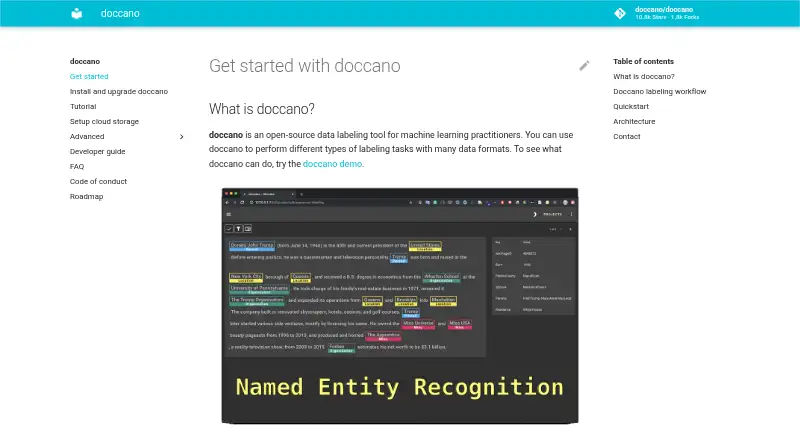
Doccano is a free, open-source data-labeling tool for machine-learning practitioners. Its supported annotation tasks include text classification, sequence labeling, and sequence-to-sequence annotation, with uses such as sentiment analysis, named entity recognition, and text summarization. Users can set up projects, import datasets, add collaborators, annotate examples, and export labeled data. REST APIs let scripts connect to Doccano for model-assisted labeling, and multiple people can work collaboratively. Installation options include pip, Docker, Docker Compose, source, or cloud deployment. The installation guide lists Linux, Windows, and macOS machines running Python 3.8 or later. SQLite 3 is the default database; PostgreSQL configuration is described, and MySQL is mentioned as an option. Imported datasets can be stored using Amazon S3 or Google Cloud Storage. The project also lists mobile and multi-language support, emoji support, and a dark theme. Integration guidance demonstrates Amazon Comprehend Sentiment Analysis and custom REST APIs for auto-labeling. One upgrade caveat is important: the installation guide warns that an upgrade using SQLite 3 can cause database loss.
Who it is for
Doccano suits machine-learning practitioners who need to create labeled datasets for tasks such as sentiment analysis, entity recognition, or summarization. Its collaborative annotation and REST API can fit teams and script-based workflows.
What is good
- Supports three listed annotation task types.
- Multiple people can annotate collaboratively.
- REST APIs support script integration.
- Installation supports Linux, Windows, and macOS.
- Imported datasets can use Amazon S3 or Google Cloud Storage.
What to know first
- SQLite 3 upgrades can cause database loss.
- Installation requires Python 3.8 or later on listed systems.
- SQLite 3 is the default database.
Verdict
Doccano covers dataset import, collaborative labeling, and export, with several installation and storage options. SQLite users should account for the stated risk of database loss during upgrades.
Doccano plans and pricing
All plansCompared on data labeling software
- Image annotation
- Yesdoccano.github.io
- Text annotation
- Yesdoccano.github.io
- Audio/video annotation
- Yesdoccano.github.io
- Model-assisted labeling
- Yesdoccano.github.io
- Review workflow
- Yesdoccano.github.io
- API or SDK access
- Yesdoccano.github.io
- Deployment
- bothdoccano.github.io
Facts
- Purpose
- Doccano is an open-source data labeling tool for machine learning practitioners.doccano.github.io · 2 Oct 2026
- Annotation tasks
- The roadmap lists text classification, sequence labeling, and sequence-to-sequence annotation as supported tasks.doccano.github.io · 2 Oct 2026
- Labeling workflow
- Users can configure a project, import datasets, add users, annotate data, and export labeled datasets.doccano.github.io · 2 Oct 2026
- REST API
- Doccano can be integrated with scripts through REST APIs for labeling data with machine learning models.doccano.github.io · 2 Oct 2026
- Web interface
- The frontend is a JavaScript web app built with Vue.js and Nuxt.js.doccano.github.io · 2 Oct 2026
- Supported systems
- The install guide says doccano can be installed on Linux, Windows, or macOS machines running Python 3.8 or later.doccano.github.io · 2 Oct 2026
- Cloud storage
- The cloud storage guide lists Amazon S3 and Google Cloud Storage for storing imported datasets.doccano.github.io · 2 Oct 2026
- Team collaboration
- The roadmap lists collaboration with multiple people as supported functionality.doccano.github.io · 2 Oct 2026
- Database options
- SQLite 3 is the default database, and the installation guide also describes PostgreSQL and mentions MySQL as an option.doccano.github.io · 2 Oct 2026
- Upgrade limitation
- The installation guide warns that upgrading can lose the database when SQLite3 is used.doccano.github.io · 2 Oct 2026
- Support
- The getting-started page directs users to the FAQ and says they can contact the author for help and feedback.doccano.github.io · 2 Oct 2026
- Use cases
- It can create labeled data for sentiment analysis, named entity recognition, and text summarization.github.com · 3 Oct 2026
- Collaboration
- Features include collaborative annotation and multi-language support.github.com · 3 Oct 2026
- Interface
- The project lists mobile support, emoji support, and a dark theme among its features.github.com · 3 Oct 2026
- API
- Doccano provides a RESTful API, and its documentation says it can be integrated with scripts through REST APIs.doccano.github.io · 3 Oct 2026
- Installation
- Doccano can be installed using pip, Docker, or Docker Compose.github.com · 3 Oct 2026
- Operating systems
- The installation guide says doccano can be installed on Linux, Windows, or macOS machines running Python 3.8 or later.doccano.github.io · 3 Oct 2026
- Integrations
- The auto-labeling guide demonstrates Amazon Comprehend Sentiment Analysis and allows users to configure a custom REST API.doccano.github.io · 3 Oct 2026
- Login integrations
- The OAuth guide describes social login via GitHub and Active Directory, and provides Okta setup instructions.doccano.github.io · 3 Oct 2026
- Data storage
- SQLite 3 is the default database; the installation guide also describes configuring PostgreSQL and other database systems.doccano.github.io · 3 Oct 2026
- Known upgrade limitation
- The installation guide warns that upgrading the package while using SQLite 3 can lose the database.doccano.github.io · 3 Oct 2026
- Project origin
- The repository citation lists the project year as 2018 and names Hiroki Nakayama and four coauthors.github.com · 3 Oct 2026
Company
- Founded
- 2018doccano.github.io · 28 Sept 2026
Best Doccano alternatives
See all 20


Where it ranks on Specifiction
Is Doccano yours?
Claim it for free: prove the domain, then correct facts, plans and screenshots. An editor reviews every change.
Sources
- doccano.github.io/doccano/· checked 2 Oct 2026
- doccano.github.io/doccano/roadmap/· checked 2 Oct 2026
- doccano.github.io/doccano/install_and_upgrade_doccano/· checked 2 Oct 2026
- doccano.github.io/doccano/setup_cloud_storage/· checked 2 Oct 2026
- github.com/doccano/doccano· checked 3 Oct 2026
- doccano.github.io/doccano/advanced/auto_labelling_config/· checked 3 Oct 2026
- doccano.github.io/doccano/advanced/oauth2_settings/· checked 3 Oct 2026