- 1Runs onAndroid, API, iOS, Linux, Mac, Web, Windows
- 2CostsFree plan · paid from $11.58/mo
- 3Circulation toolsYes
- 4Borrower portalYes
- 5MARC recordsYes
- 6Deploymentcloud
Overview
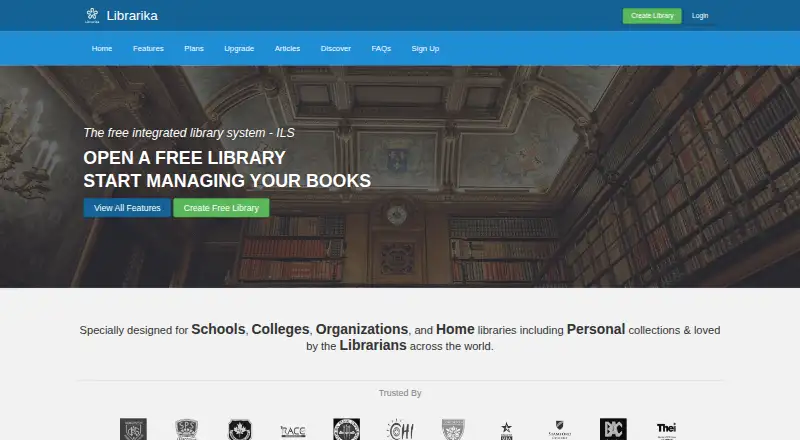
Librarika is a hosted cloud library system for cataloguing collections, managing circulation, and publishing an online public access catalog for members. Cataloguing tools include ISBN-based Smart Add, bulk import and export, and bibliographic data integration with OpenLibrary. Members can check items in and out, reserve items, and queue for checked-out materials. Libraries can manage multiple branches in one system. The feature list includes SIP2 connections for kiosks and RFID systems, SAML single sign-on with providers including Azure AD, Google, and Okta, and widgets for library websites. iOS and Android apps support catalog browsing, holds, self-service checkout, notifications, and library management. A desktop self-service kiosk app is available for Windows, macOS, and Linux, but requires a SIP2 license. The free Basic plan includes 2,000 records, unlimited patrons, staff, and check-outs, an OPAC, and email reminders. Basic Pro costs $139.00 USD per year. E-book hosting is a separate add-on, not included in plans.
Who it is for
Librarika serves schools, universities, public, corporate, and community libraries, as well as personal collections. Its branch management and member circulation tools suit organizations managing a shared catalog.
What is good
- Free Basic plan includes 2,000 records.
- Supports multiple library branches.
- Mobile apps support holds and self-service checkout.
- Offers OpenLibrary catalog data integration.
- Includes widgets for library websites.
What to know first
- Desktop kiosk app requires a SIP2 license.
- E-book storage is a separate add-on.
- Librarian manual is at a very early stage.
Specifiction review
Librarika: the full review
Librarika covers cataloguing, circulation, and member-facing catalog access in a hosted system. Check the record limits and separate SIP2 or e-book costs against your library’s needs.
Librarika is a hosted library system for organizing collections, managing lending, and giving members online catalog access. It is best suited to libraries that want those services across branches without running their own server. Its free plan is unusually open on patrons and circulation, but record caps and separately priced integrations and e-book storage can change the economics as a library grows.
Overview
Librarika brings cataloguing, circulation, and a member-facing OPAC into one cloud system. ISBN-based Smart Add, bulk import and export, and OpenLibrary bibliographic integration help with building and maintaining a catalog. Members can check items in and out, place reservations, and join a queue for checked-out items.
Multiple branches can be managed in one system, and website widgets connect library services to an existing site. The combination suits organizations that need a shared service across locations, although the record ceiling on each plan remains important even when staff and lending quotas are generous.
Key features
Member and staff access
The iOS and Android apps support catalog browsing, holds, self-service checkouts, push notifications, and library management. A desktop self-service kiosk app is also available for Windows, macOS, and Linux, but it requires a SIP2 license. SIP2 connections support kiosks and RFID systems; SAML single sign-on works with providers including Azure AD, Google, and Okta.
Security and support
Librarika uses encryption in transit, access controls, authentication, role-based permissions, monitoring, and confidentiality obligations for staff and contractors. Raynux says it handles personal information under the Australian Privacy Act and APPs, and where applicable the GDPR and UK GDPR. Primary hosting is in Amsterdam, with data potentially processed in Australia, the Netherlands, the UK, the US, Singapore, and Bangladesh.
Quick how-to videos and FAQs offer a starting point for administrators, while the librarian manual is at a very early stage. Libraries that depend on detailed documentation for rollout may need to account for that support gap.
Pricing
The free Basic plan costs 0.00 USD per free and allows 2,000 records, unlimited patrons, unlimited staff, and unlimited check-outs, with an OPAC and email reminders. It is a credible option for a small collection or personal library, and its uncapped user and checkout counts avoid common operational restrictions. The trade-off is a firm catalog ceiling and fewer controls than paid tiers.
Basic Pro costs 139.00 USD per year ($139 /yr) and raises the record limit to 5,000. It adds custom greetings, multiple color schemes, no banner ads, a hold queue, and more controls, making it the entry point for libraries that need more capacity or a more tailored member-facing catalog.
Silver costs 299.00 USD per year ($299/yr) and allows 10,000 records, with hold queue, SAML2 SSO, and SIP2 integration charged per license. Gold costs 499.00 USD per year ($499/yr), raises the cap to 15,000 records, and includes one SIP2 license alongside SAML2 SSO and a hold queue. Gold is the clearer fit for a library that needs kiosk or RFID connectivity; Silver can cost less if SIP2 is unnecessary, but its per-license charge should be factored in when it is.
E-book storage is a separate add-on rather than part of the library plans: E-Books Hosting Starter costs 249.00 USD per year ($249/yr) for 5 GB, Standard costs 499.00 USD per year ($499/yr) for 10 GB, and Premium costs 999.00 USD per year ($999/yr) for 20 GB. These costs matter for libraries planning to host digital titles, since none of the listed core tiers bundles that storage.
Platforms
Librarika runs on the web and supports Android, iOS, Linux, macOS, and Windows, with an API platform also indicated. Its hosted deployment avoids the need to operate a library server. The free desktop kiosk app spans the three major desktop systems, subject to the SIP2 license requirement.
Who it's for
Librarika targets universities, colleges, schools, public, corporate, and community libraries, as well as personal collections. Its branch management, member portal, and circulation tools make it a practical match for organizations seeking a hosted catalog and lending service. Small collections can start on the free plan; libraries approaching 2,000 records should compare the paid caps against their expected growth, and institutions needing e-book hosting or SIP2 should budget separately.
Pros and cons
- Generous free circulation: Unlimited patrons, staff, and check-outs keep user volume from forcing an upgrade, though the catalog stops at 2,000 records.
- Useful catalog workflows: ISBN-based adding, bulk operations, and OpenLibrary integration support collection setup and upkeep.
- Access beyond the desk: Member apps, online holds, website widgets, and multi-branch management support a broader service, while kiosk use depends on a SIP2 license.
- Costs can stack: Larger record limits require paid plans, SIP2 is per-license on Silver, and e-book hosting is separately priced.
- Documentation is thin: Videos and FAQs help, but the very early-stage manual may leave administrators without a mature reference.
Alternatives
For a school-focused shortlist, see School Library Management Software.
Choose SLiMS if free open-source software and self-hosting suit your library; its stated requirements include a Linux-based stack with Apache, MySQL or MariaDB, and PHP. ABCD is another free option for libraries and documentation centres.
Koha is worth considering when a free, self-installed system under GNU GPL v3 or later fits better; self-installation requires a Linux server, root access, and command-line work. Choose Surpass instead if a paid K-12 cloud plan is a better fit: its Small Library tier costs 960.00 USD per year for up to 5,000 volumes and 1,000 students.
Atriuum, Lyra, Accessit Library, and Artemis are other alternatives to compare.
Verdict
Librarika is a sound choice for libraries that want hosted cataloguing, circulation, and member access, especially when multiple branches and uncapped free-plan users matter. Its strongest reason to choose it is the breadth of core lending on the free tier; its strongest reason to look elsewhere is the record ceiling, compounded by separate SIP2 and e-book costs for libraries that need them.
Librarika plans and pricing
All plansCompared on school library management software
- Free plan
- Yeslibrarika.com
- Circulation tools
- Yeslibrarika.com
- Borrower portal
- Yeslibrarika.com
- MARC records
- Yeslibrarika.com
- Deployment
- cloudlibrarika.com
Facts
- What it does
- Librarika is a fully hosted cloud Integrated Library System for cataloguing collections, managing circulation, and publishing an OPAC for members.librarika.com · 4 Oct 2026
- Cataloguing
- Catalog tools include ISBN-based Smart Add, bulk catalog import and export, and bibliographic data integration with OpenLibrary.librarika.com · 4 Oct 2026
- Circulation
- Members can check items in and out, reserve items online, and join a hold queue for checked-out items.librarika.com · 4 Oct 2026
- Branches
- Librarika supports managing multiple library branches through one system.librarika.com · 4 Oct 2026
- Integrations
- The feature list names OpenLibrary bibliographic data integration, SIP2 connections for kiosks and RFID systems, and SAML SSO with providers including Azure AD, Google, and Okta.librarika.com · 4 Oct 2026
- Website widgets
- Librarika provides integration widgets for library websites.librarika.com · 4 Oct 2026
- Desktop kiosk
- A free desktop self-service kiosk app is available for Windows, macOS, and Linux, and requires a SIP2 license.librarika.com · 4 Oct 2026
- Mobile apps
- The site describes iOS and Android apps for browsing catalogs, placing holds, self-service checkouts, push notifications, and library management.librarika.com · 4 Oct 2026
- Security
- The current privacy policy says Librarika uses encryption in transit (TLS/SSL), access controls and authentication, role-based permissions, monitoring, and confidentiality obligations for staff and contractors.librarika.com · 4 Oct 2026
- Privacy and compliance
- Raynux says it handles personal information in line with the Australian Privacy Act and APPs and, where applicable, the GDPR and UK GDPR.librarika.com · 4 Oct 2026
- Hosting and transfers
- The privacy policy identifies primary hosting in Amsterdam, Netherlands, and says data may also be processed in Australia, the Netherlands, the UK, the US, Singapore, and Bangladesh.librarika.com · 4 Oct 2026
- Support
- Librarika offers quick how-to videos and FAQs, while its librarian manual is described as being at a very early stage.librarika.com · 4 Oct 2026
- Intended users
- Librarika says it serves universities, colleges, schools, public, corporate, and community libraries, as well as personal collections.librarika.com · 4 Oct 2026
- Company
- Librarika is operated by Raynux Pty Ltd, an Australian company based in Perth, Western Australia.librarika.com · 4 Oct 2026
Company
- Headquarters
- Perth, Western Australia, Australialibrarika.com · 28 Sept 2026
Best Librarika alternatives
See all 20

Where it ranks on Specifiction
Is Librarika yours?
Claim it for free: prove the domain, then correct facts, plans and screenshots. An editor reviews every change.
Sources
- librarika.com/spages/about· checked 4 Oct 2026
- librarika.com/spages/features· checked 4 Oct 2026
- librarika.com· checked 4 Oct 2026
- librarika.com/spages/privacy-policy-v2· checked 4 Oct 2026
- librarika.com/spages/help· checked 4 Oct 2026
- librarika.com/spages/plans· checked 4 Oct 2026