- 1Runs onAndroid, iOS, Linux, Mac, Windows
- 2CostsFree plan
- 3Supported languagesC, C++, Objective-C, Objective-C++
- 4Target platformsmacOS, iOS, tvOS, watchOS, Linux, FreeBSD, NetBSD, Windows, Android
- 5Remote debuggingYes
- 6Conditional breakpointsYes
- 7Exception breakpointsYes
- 8Time-travel debuggingNo
Overview
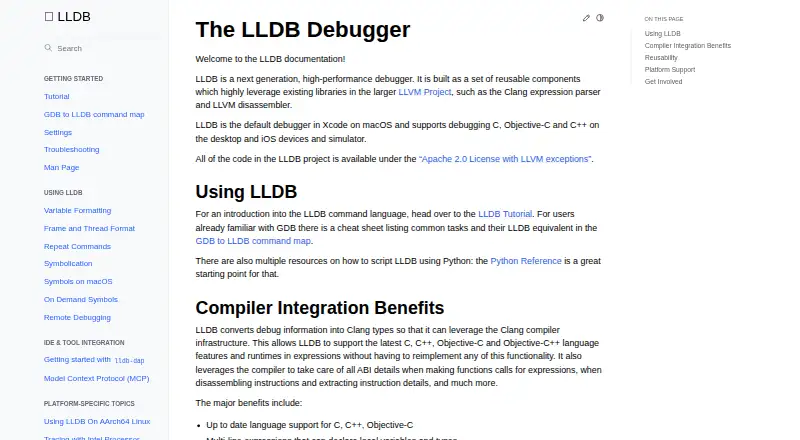
LLDB is a free debugger built from reusable components that use LLVM libraries, including Clang's expression parser and the LLVM disassembler. It is the default debugger in Xcode on macOS and supports debugging C, C++, and Objective-C on desktop and iOS devices and simulators. Its tools include breakpoints, watchpoints, process launching, and attaching to programs; remote debugging is also documented for Linux, Windows, Android, and iOS. Expression evaluation uses Clang infrastructure for current C-family language features, multiline expressions, and just-in-time evaluation where supported. Developers can use its shared-library C++ API and Python bindings for scripting, symbolication, disassembly, and inspecting object and symbol files. The lldb-dap adapter connects LLDB functionality to compatible editors and IDEs, including Visual Studio Code, Emacs, vim, and neovim. LLDB is available under the Apache 2.0 License with LLVM exceptions. Windows support remains under active development, with ARM and AArch64 described as more experimental. The lldb-dap interface documents no support for step-back, setting a variable, goto-target, or terminate requests.
Who it is for
LLDB suits developers working with C-family languages who need a debugger for desktop or supported mobile targets. Its API, Python bindings, and editor integrations may also suit users building debugger workflows or related inspection tools.
What is good
- Free and open source under Apache 2.0 with LLVM exceptions
- Default debugger in Xcode on macOS
- C++ API and Python bindings
- Supports breakpoints, watchpoints, and remote debugging
What to know first
- Windows support is under active development
- ARM and AArch64 support is more experimental
- lldb-dap lacks step-back and variable-setting requests
Specifiction review
LLDB: the full review
LLDB provides broad debugging and integration capabilities at no cost, with particular ties to LLVM and Xcode. Review the documented lldb-dap omissions and developing Windows support if those matter to your workflow.
Overview
LLDB is an open-source debugger built on reusable LLVM components, aimed at developers working in C-family languages. It is especially compelling in Xcode workflows and where its API or remote-debugging support is useful; Windows support remains a less mature fit.
Its combination of Clang-based expression evaluation, broad debugging controls and a zero-cost license makes it a capable general choice. The trade-off is that some lldb-dap operations are absent and Windows support is still developing.
Key features
Debugging and expression evaluation
LLDB supports C, C++, and Objective-C debugging on desktop and iOS devices and simulators; its expression evaluator also handles Objective-C++. Clang infrastructure lets it evaluate current language features, including multiline expressions and just-in-time evaluation where supported. That makes inspecting and experimenting with program state a natural part of its workflow, though JIT availability depends on the context.
Breakpoints, including conditional and exception breakpoints, watchpoints, process launching, and attachment cover common debugging needs. LLDB can also debug core dumps. It does not offer time-travel debugging, so developers who need to move backward through execution should look elsewhere.
APIs, scripting, and integrations
A public object-oriented C++ API is available through a shared library, alongside Python bindings. These extend LLDB beyond interactive debugging: the API can support symbolication, disassembly, and inspection of object and symbol files. The project also describes a Model Context Protocol integration.
For compatible editors and IDEs, lldb-dap exposes LLDB through the Debug Adapter Protocol. Its documented requests include function, conditional, data, and instruction breakpoints, memory reads and writes, and disassembly. It does not support step-back, variable setting, goto-target, or terminate requests. Those omissions matter when an editor workflow relies on those controls; users can obtain the binary through a toolchain, LLVM release package, system package manager, or source build.
Remote debugging and safety
LLDB documents remote debugging for Linux, Windows, Android, and iOS. It also avoids sourcing a current-directory .lldbinit file by default for security reasons, a sensible safeguard against automatically running project-directory configuration.
Pricing
LLDB is free and open source under the Apache 2.0 License with LLVM exceptions. The LLDB plan costs 0.00 USD per free and includes the debugger; there is no free trial because access does not require a paid plan. That makes it suitable for individual developers and teams alike, without a stated seat fee or free-plan quota.
Platforms
LLDB’s supported targets include macOS, iOS, tvOS, watchOS, Linux, FreeBSD, NetBSD, Windows, and Android. It is the default debugger in Xcode on macOS, a strong fit for Apple development. Windows support is under active development: basic functionality is expected to work, while ARM and AArch64 support is more experimental. Teams depending on those Windows architectures should account for that maturity gap.
Who it's for
LLDB suits developers debugging C, C++, Objective-C, or Objective-C++ who want a free debugger with programmable APIs, IDE integration, or remote-debugging options. It is particularly attractive to Xcode users and developers already working with LLVM. It is less suitable when time-travel debugging is essential, when a lldb-dap workflow needs one of its unsupported requests, or when experimental Windows architecture support is unacceptable.
Pros and cons
- Pros: No-cost access under an open-source license avoids per-seat pricing.
- Pros: Clang-based expression evaluation covers four C-family languages, with multiline expressions and JIT evaluation where supported.
- Pros: C++ and Python interfaces enable scripting and uses beyond interactive debugging, including symbolication and disassembly.
- Pros: Broad desktop and mobile targets, remote-debugging support, and Xcode integration give it reach across varied workflows.
- Cons: No time-travel debugging limits options for developers who need to revisit earlier execution states.
- Cons: lldb-dap omits step-back, variable setting, goto-target, and terminate requests, which can constrain editor-driven debugging.
- Cons: Windows support is still developing, with ARM and AArch64 described as more experimental.
Alternatives
Browse other debuggers if LLDB’s missing time-travel capability or lldb-dap request support does not fit your workflow.
- GDB is another free debugger for Linux, macOS, and Windows, under the GNU General Public License.
- FlowStorm is a free and open-source option for Linux, macOS, Windows, and self-hosted environments.
- IDA Pro is worth considering when disassembly is the priority: its free plan covers x86-32 and x86-64 disassembly and two cloud-based decompilers, while IDA Pro Essential costs 1099.00 USD.
- RenderDoc is a free, MIT-licensed option for Android, Linux, and Windows.
- Xdebug is a freemium alternative for Linux, macOS, Windows, web, and self-hosted environments.
- Delve is a free alternative for Linux, macOS, Windows, API, and self-hosted environments.
- SEGGER Ozone is a paid alternative for Linux, macOS, and Windows.
- UDB is a paid option with a free trial for Linux and extension environments.
Verdict
Choose LLDB if you need a free, extensible debugger for C-family development, particularly in Xcode or LLVM-centered workflows. Its APIs, expression evaluator, and broad target coverage are substantial strengths; look elsewhere if time-travel debugging is required, lldb-dap’s missing requests are blockers, or developing Windows support does not meet your needs.
LLDB plans and pricing
All plansCompared on debuggers
- Free plan
- Yeslldb.llvm.org
- Supported languages
- C, C++, Objective-C, Objective-C++lldb.llvm.org
- Target platforms
- macOS, iOS, tvOS, watchOS, Linux, FreeBSD, NetBSD, Windows, Androidlldb.llvm.org
- Remote debugging
- Yeslldb.llvm.org
- Conditional breakpoints
- Yeslldb.llvm.org
- Exception breakpoints
- Yeslldb.llvm.org
- Time-travel debugging
- Nolldb.llvm.org
- Core dump debugging
- Yeslldb.llvm.org
Facts
- Purpose
- LLDB is a next generation, high-performance debugger built from reusable components that use LLVM libraries such as the Clang expression parser and LLVM disassembler.lldb.llvm.org · 29 Sept 2026
- License
- The LLDB project code is available under the Apache 2.0 License with LLVM exceptions.lldb.llvm.org · 29 Sept 2026
- Xcode
- LLDB is the default debugger in Xcode on macOS.lldb.llvm.org · 29 Sept 2026
- Language support
- LLDB supports debugging C, Objective-C, and C++ on desktop and iOS devices and simulators.lldb.llvm.org · 29 Sept 2026
- Expression evaluation
- LLDB uses Clang infrastructure to evaluate current C, C++, Objective-C, and Objective-C++ language features, including multiline expressions and JIT evaluation where supported.lldb.llvm.org · 29 Sept 2026
- Reusable API
- LLDB exposes a public object-oriented C++ API through a shared library, with Python bindings also available.lldb.llvm.org · 29 Sept 2026
- Additional uses
- The LLDB API can also be used for symbolication, disassembly, and object and symbol file introspection.lldb.llvm.org · 29 Sept 2026
- Platforms
- The documentation lists macOS, iOS/tvOS/watchOS simulators and devices, Linux, FreeBSD, NetBSD, and Windows among platforms known to work.lldb.llvm.org · 29 Sept 2026
- Windows status
- Windows support is under active development; basic functionality is expected to work, while ARM and AArch64 support is described as more experimental.lldb.llvm.org · 29 Sept 2026
- IDE integration
- lldb-dap exposes LLDB functionality through the Debug Adapter Protocol for compatible editors and IDEs, including Visual Studio Code, Emacs, vim, and neovim.lldb.llvm.org · 29 Sept 2026
- Acquiring lldb-dap
- The lldb-dap binary can come from a toolchain, an LLVM release package or system package manager, or a source build.lldb.llvm.org · 29 Sept 2026
- Debug features
- lldb-dap documents support for function, conditional, data, and instruction breakpoints, memory read/write, and disassembly requests.lldb.llvm.org · 29 Sept 2026
- Notable limits
- lldb-dap documents no support for step-back, setting a variable, goto-target requests, or terminate requests.lldb.llvm.org · 29 Sept 2026
- Support and community
- The LLDB documentation directs discussions to its forum or LLVM Discord and links to bug reports and code reviews.lldb.llvm.org · 29 Sept 2026
- Languages
- LLDB supports debugging C, Objective-C, and C++ on desktop and iOS devices and simulators.lldb.llvm.org · 30 Sept 2026
- Debugging tools
- LLDB supports breakpoints, watchpoints, process launching, and attaching to programs.lldb.llvm.org · 30 Sept 2026
- API and scripting
- LLDB exposes a public C++ API through a shared library and Python script bindings, enabling scripting and uses such as symbolication and disassembly.lldb.llvm.org · 30 Sept 2026
- Other integration
- LLDB documentation describes an integration using the Model Context Protocol.lldb.llvm.org · 30 Sept 2026
- Security
- For security reasons, LLDB warns and does not source a current-directory .lldbinit file by default.lldb.llvm.org · 30 Sept 2026
- Platform support
- The project lists macOS, Linux, FreeBSD, NetBSD, and Windows support; it says Windows support is under active development and ARM and AArch64 support is more experimental.lldb.llvm.org · 30 Sept 2026
- Getting the debugger
- The lldb-dap binary can be obtained from an LLVM release package, a toolchain or package manager, or by building from source.lldb.llvm.org · 30 Sept 2026
Best LLDB alternatives
See all 20


Where it ranks on Specifiction
- Best Debuggers in 2026#1 of 27
Is LLDB yours?
Claim it for free: prove the domain, then correct facts, plans and screenshots. An editor reviews every change.
Sources
- lldb.llvm.org· checked 29 Sept 2026
- lldb.llvm.org/use/lldbdap.html· checked 29 Sept 2026
- lldb.llvm.org/use/tutorial.html· checked 30 Sept 2026
- lldb.llvm.org/use/mcp.html· checked 30 Sept 2026
- lldb.llvm.org/man/lldb.html· checked 30 Sept 2026