Tech riderRev. 22 Sept 2026
Macterm
- 1Runs onMac, self-hosted
- 2CostsNot stated by the maker
- 3Supported platformsmacOS
- 4Split panesYes
- 5Scripting APIYes
- 6SSH supportYes
5 lines stated Written from the maker's own pages: macterm.thdxg.dev
Overview
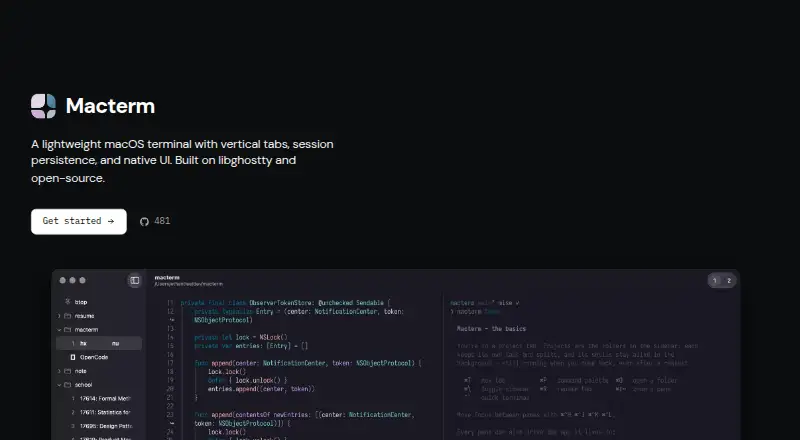
Macterm is ranked #32 of 40 in terminal emulators on Specifiction. It runs on macOS, Self-hosted.
Compared on terminal emulators
- Free plan
- Yesmacterm.thdxg.dev
- Supported platforms
- macOSmacterm.thdxg.dev
- Split panes
- Yesmacterm.thdxg.dev
- Scripting API
- Yesmacterm.thdxg.dev
- SSH support
- Yesmacterm.thdxg.dev
Facts
- Product
- Macterm is a lightweight native macOS terminal built on libghostty.macterm.thdxg.dev · 8 Oct 2026
- License
- The product is MIT licensed.macterm.thdxg.dev · 8 Oct 2026
- Minimum OS
- Macterm requires macOS 14 or later.macterm.thdxg.dev · 8 Oct 2026
- Session persistence
- Quitting detaches shells; relaunching restores sessions, scrollback, and running processes.macterm.thdxg.dev · 8 Oct 2026
- Multiplexing
- Users can split panes in any direction and move between panes by keybind or drag and drop.macterm.thdxg.dev · 8 Oct 2026
- Workspace layouts
- YAML project files can declare tabs, splits, and per-pane commands for Macterm to build when opened.macterm.thdxg.dev · 8 Oct 2026
- Remote projects
- Macterm opens directories on another machine over SSH, with persistent remote panes powered by zmx installed on the host.macterm.thdxg.dev · 8 Oct 2026
- Automation
- The bundled macterm CLI controls the running app over a local Unix socket and supports scriptable JSON output.macterm.thdxg.dev · 8 Oct 2026
- Agent support
- The CLI can print skills for coding agents to use Macterm panes and persistent workspaces.macterm.thdxg.dev · 8 Oct 2026
- Configuration compatibility
- Macterm reads existing Ghostty configuration files, including themes, fonts, palettes, and keybinds.macterm.thdxg.dev · 8 Oct 2026
- Password storage
- Macterm can save passwords to the keychain and offer autofill after Touch ID or the login password when the same prompt appears.macterm.thdxg.dev · 8 Oct 2026
- Updates
- Sparkle handles updates and verifies an EdDSA signature on each update.github.com · 8 Oct 2026
- Security boundary
- The CLI control socket is restricted to the same user by filesystem permissions and does not use token authentication.macterm.thdxg.dev · 8 Oct 2026
- Remote project limitation
- Remote projects require zmx to be preinstalled on the host; the docs say there is no upload flow yet.macterm.thdxg.dev · 8 Oct 2026
- Distribution
- Macterm is available as a Homebrew cask or as a downloadable DMG from GitHub Releases.macterm.thdxg.dev · 8 Oct 2026
- System requirement
- Macterm requires macOS 14 or later.macterm.thdxg.dev · 9 Oct 2026
- Remote project requirement
- Remote projects require SSH access and zmx installed on the host; Macterm has no zmx upload flow yet.macterm.thdxg.dev · 9 Oct 2026
- CLI access control
- The control socket is restricted to the same user through filesystem permissions, with no token authentication.macterm.thdxg.dev · 9 Oct 2026
- Password autofill
- Macterm can offer to save passwords from SSH, sudo, and other prompts to the keychain and fill them after Touch ID or the login password.github.com · 9 Oct 2026
- Installation
- The maker documents installation through Homebrew or a downloadable DMG, with Sparkle handling app updates.macterm.thdxg.dev · 9 Oct 2026
- Audience
- Macterm's CLI documentation describes automation for scripts and coding agents, including commands to create panes and run commands.macterm.thdxg.dev · 9 Oct 2026
Best Macterm alternatives
See all 20 All accessCh 01 Termalin Free planFree trialAPI from $8/mo8.0 All accessCh 02 Contour Free planLinuxMac Free to start7.5 All accessCh 03 Warp Free planLinuxMac from $20/mo7.4 All accessCh 04 gitsome Free planLinuxMac Free to start7.3 All accessCh 05 Tabby Free planLinuxMac Free to start7.2 All accessCh 06 WezTerm Free planLinuxMac Free to start7.2




Where it ranks on Specifiction
- Best Terminal Emulators in 2026#32 of 40
Is Macterm yours?
Claim it for free: prove the domain, then correct facts, plans and screenshots. An editor reviews every change.
Sources
- macterm.thdxg.dev· checked 8 Oct 2026
- macterm.thdxg.dev/docs/· checked 8 Oct 2026
- macterm.thdxg.dev/docs/remote-projects· checked 8 Oct 2026
- macterm.thdxg.dev/docs/cli· checked 8 Oct 2026
- macterm.thdxg.dev/docs/configuration· checked 8 Oct 2026
- github.com/thdxg/macterm· checked 8 Oct 2026
- macterm.thdxg.dev/docs/install· checked 8 Oct 2026