Passport Room
- 1Runs onAndroid, iOS, Web
- 2CostsFree plan
- 3Compliance validationYes
- 4Background removalYes
- 5Print layoutsmulti photo
- 6App platformsWeb, Android, iOS
- 7Country templates10 templates
Overview
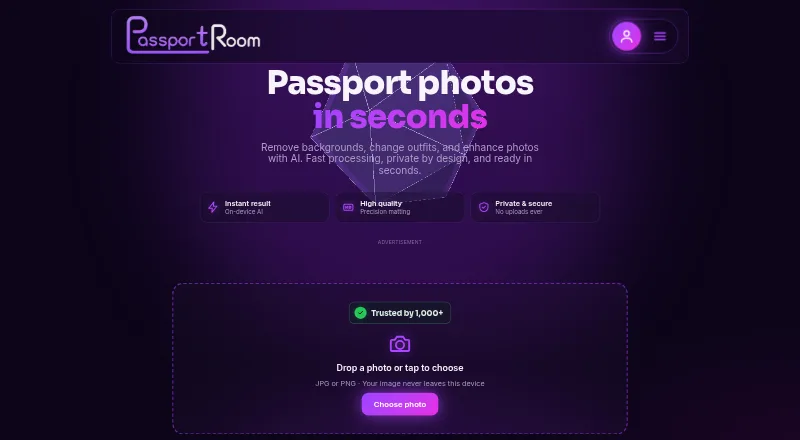
Passport Room is a browser-based studio for preparing passport and visa photos, from image adjustment through print-sheet creation. Its tools include cropping, background removal, enhancement, framing guides, zoom, rotation, background color selection, and a formal outfit overlay that users position and scale manually. Size presets cover the US, UK, Schengen/EU, India, Canada, Australia, China, and Bangladesh, with a custom-size option. Processing and export take place in the browser using WebGPU or WebAssembly; the site says photos are not uploaded to a server. Finished images can be exported as JPEG or PNG, or laid out on A4 or 4×6-inch sheets at 300 DPI. Sheets can include 4, 8, 12, or 20 copies; printing at 100% scale is recommended. It runs in desktop, Android, and iOS browsers without installation. Free use allows three finished photos daily without an account. The one-off $0.99 Pro pass gives unlimited photos and ad-free exports for 30 days. Issuing authorities determine acceptance, so users should check official requirements.
Who it is for
Passport Room suits people preparing passport or visa photos who want to edit and arrange them for printing in a browser. It covers several national photo-size presets and allows custom dimensions.
What is good
- Runs in desktop, Android, and iOS browsers without installation.
- Photos are processed locally in the browser.
- Exports JPEG and PNG images.
- Print sheets support A4 and 4×6-inch paper at 300 DPI.
- Free plan requires no account.
What to know first
- Free plan is limited to three finished photos per day.
- Pro pass lasts 30 days.
- Issuing authorities decide whether photos are accepted.
Specifiction review
Passport Room: the full review
Passport Room combines photo adjustments, size presets, and print layouts in a browser-based workflow. Check official photo requirements before relying on an exported image.
Overview
Passport Room is a browser-based tool for preparing passport and visa photos, from crop adjustments to printable sheets. It best suits people handling occasional document photos who want local processing and do-it-yourself control. Its free tier is useful for small batches, but the final acceptance decision belongs to the issuing authority.
Key features
Presets cover common document sizes for the US, UK, Schengen/EU, India, Canada, Australia, China and Bangladesh, and custom dimensions give users an option when a preset does not fit. The outfit overlay is less turnkey: users position and scale it manually, so it calls for judgment rather than providing an automatic fit.
Photos export as JPEG or PNG. Print layouts support A4 and 4×6-inch paper at 300 DPI, with sheets of 4, 8, 12 or 20 copies. The recommendation to print at 100% scale is important: printer scaling can change the physical dimensions. Background removal, cropping, enhancement and export run in the browser using WebGPU or WebAssembly. Passport Room says photos are not uploaded to a server, and its privacy policy says personal photo data is not collected, stored or sold; browser storage is used for preferences. That is a useful choice for people wary of sending identity images to a service, while local processing depends on the browser environment.
Passport Room does not determine whether a photo will be accepted. Issuing authorities set the rules, so users should check the official requirements for their document before relying on an export.
Pricing
The Free plan costs 0.00 USD per free and allows three finished photos per day, with no account required and no watermark on exports. It is a sensible fit for occasional, low-volume use, but the daily cap rules it out for larger batches.
Passport Room Pro costs 0.99 USD per once, a one-off payment for 30 days. It removes the photo limit and ads from exports, making it the practical upgrade for a short burst of higher-volume work. An account is required to buy Pro so access can be restored on another device; unlike the free tier, it is not account-free.
Platforms
Passport Room runs in a normal browser on desktop, Android and iOS, with no installation required. That flexibility suits people who want to work on a phone or computer without setting up a dedicated app.
Who it's for
Choose Passport Room if you need a straightforward way to crop and prepare occasional passport or visa photos, want print sheets, and are comfortable checking your own document rules. It is less suitable if you need a guaranteed compliance decision, a hands-off clothing fit, or enough daily throughput for a large batch on the free plan.
Pros and cons
- Pro: Browser-based local processing keeps photo handling on the device according to the service, an advantage for sensitive identity images.
- Pro: A free, no-account tier includes unwatermarked exports, making a small number of finished photos possible without a purchase.
- Pro: Multiple paper sizes and copy counts make it possible to prepare print sheets as well as individual image files.
- Con: The free plan stops at three finished photos per day, limiting batch work.
- Con: The outfit overlay needs manual positioning and scaling, which leaves users responsible for its fit.
- Con: Acceptance is determined by the issuing authority, not by Passport Room, so users must verify requirements themselves.
Alternatives
Passport Photo Maker Software is the broader directory list to compare when you want to survey more options.
Choose Cutout.Pro instead if you want a broader platform range that includes desktop systems and Linux, and are comfortable with a monthly credit plan starting at 5.00 USD per month for 80 credits. PhotoID is a mobile alternative for Android and iOS, but its free tier only processes and previews photos; downloading final images requires a subscription. MakePassportPhoto offers a free manual route with one paper-size download, while its free plan has no compliance check or background correction and is ad-supported; its Automatic (AI) option costs 2.99 USD per once.
PhotoID Studio is worth considering for Mac or Windows users who want a 30-day trial covering 100 photos and all features without a credit card; its Pro plan has annual or monthly options. Smartphone iD is the alternative to consider when verification is a priority: its digital-photo plan includes AI and human verification and costs 8.50 USD per once, with the exact price varying by document. For a free web tool, IDPhoto4You supports standards for 73 countries and multiple print sizes, while ePassport Photo Maker provides a free, no-account passport photo and 4×6 print sheet without a watermark. idpic.app is another free web option with no account or subscription required.
Verdict
Passport Room is a strong fit for individuals preparing a few identity photos who value on-device processing, practical print layouts and a no-cost starting point. Its main appeal is the combination of local browser editing and an inexpensive, time-limited Pro pass; look elsewhere if you need compliance assurance or a less manual workflow.
Passport Room plans and pricing
All plansCompared on passport photo maker software
- Free plan
- Yespassport-room.com
- Paid from
- 0.99 one-timepassport-room.com
- Compliance validation
- Yespassport-room.com
- Background removal
- Yespassport-room.com
- Print layouts
- multi_photopassport-room.com
- App platforms
- Web, Android, iOSpassport-room.com
- Country templates
- 10 templatespassport-room.com
Facts
- Purpose
- Passport Room is a browser-based passport and visa photo studio with tools for cropping, background removal, formal dress try-on and print layout generation.passport-room.com · 29 Sept 2026
- Local processing
- Background removal, cropping, enhancement and export run in the browser using WebGPU or WebAssembly, and the site says photos are not uploaded to a server.passport-room.com · 29 Sept 2026
- Photo sizes
- Built-in presets include US, UK, Schengen/EU, India, Canada, Australia, China and Bangladesh sizes, and users can enter a custom size.passport-room.com · 29 Sept 2026
- Editing
- The editor offers framing guides, zoom and rotation, photo adjustments, background color selection, and an outfit overlay that users position and scale by hand.passport-room.com · 29 Sept 2026
- Exports
- Users can export JPEG or PNG photos and create print sheets for A4 or 4×6-inch paper at 300 DPI.passport-room.com · 29 Sept 2026
- Printing
- The site says print sheets can tile 4, 8, 12 or 20 copies and recommends printing at 100% scale.passport-room.com · 29 Sept 2026
- Installation
- Passport Room runs in a normal browser on desktop, Android and iOS, and the site says no installation is needed.passport-room.com · 29 Sept 2026
- Accounts
- The free plan can be used without an account; an account is needed to buy the Pro pass so access can be restored on another device.passport-room.com · 29 Sept 2026
- Privacy storage
- The privacy policy says the site does not collect, upload, store or sell personal photo data, and uses browser storage for preferences.passport-room.com · 29 Sept 2026
- Compliance limitation
- The site says issuing authorities decide whether a photo is accepted and advises users to check official requirements.passport-room.com · 29 Sept 2026
- Support
- The site lists [email protected] as its contact email.passport-room.com · 29 Sept 2026
- Location
- The site lists Dhaka, Bangladesh in its contact information.passport-room.com · 29 Sept 2026
Company
- Headquarters
- Jamalpur, Dhaka, Bangladeshpassport-room.com · 28 Sept 2026
Best Passport Room alternatives
See all 20

Where it ranks on Specifiction
Is Passport Room yours?
Claim it for free: prove the domain, then correct facts, plans and screenshots. An editor reviews every change.
Sources
- passport-room.com/index.html· checked 29 Sept 2026
- passport-room.com· checked 28 Sept 2026