Photo2GIF
- 1Runs onWeb
- 2CostsFree plan · paid from $1.99/mo
- 3Prompt to GIFYes
- 4Image to GIFYes
- 5Watermark-free exportYes
Overview
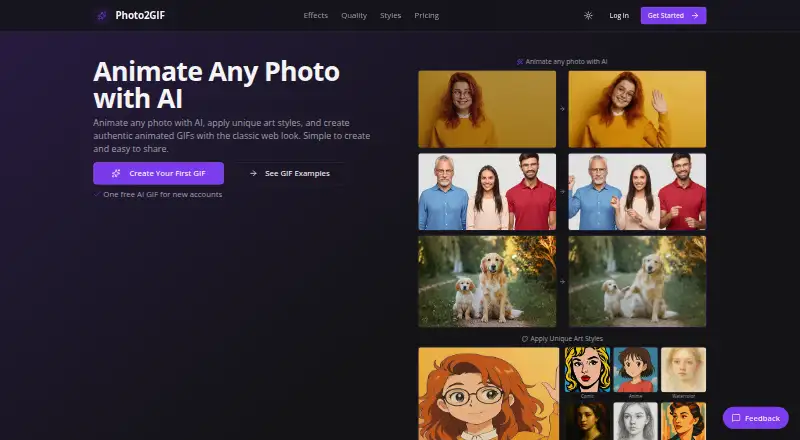
Photo2GIF is a web tool that uses AI to animate photos into loopable GIFs. Users can start with an image or type an instruction describing the motion they want the AI to create. The resulting GIFs are described as lightweight and easy to share, and can be downloaded or posted to social media, messaging apps, and communities. Available styles include Anime, Comic, Watercolor, Oil, Sketch, Vintage, Cyberpunk, Pixel, and Glass. The tool also offers 12 CSS effects, including Ken Burns, Pan, Bounce, Fade, Shake, Rotate, and Zoom Out. Each new account includes one free AI GIF, but the Free plan adds a Photo2GIF watermark. Starter Pack makes five AI GIFs and includes watermark-free output. Creator Pack makes 20 AI GIFs, while Power Pack makes 100; credits for both of those packs never expire. The listed prices are free, 1.99 USD per month for Starter Pack, 6.99 USD per month for Creator Pack, and 29.99 USD per month for Power Pack. Photo2GIF runs on the web.
Who it is for
Photo2GIF suits people who want to animate photos with described motion or apply a listed visual style or effect. It may fit users who want to download or share loopable GIFs from a web tool.
What is good
- Accepts motion instructions for AI animation.
- Offers nine listed art styles.
- GIFs can be downloaded or shared.
- Starter Pack includes watermark-free output.
What to know first
- Free output carries a Photo2GIF watermark.
- Free plan includes one AI GIF.
- Starter Pack includes five AI GIFs.
Verdict
Photo2GIF specifies its free watermark, paid GIF allowances, and available effects. Check the monthly plan limits against how many AI GIFs you need.
Photo2GIF plans and pricing
All plansCompared on AI GIF makers
- Free plan
- Yesphoto2gif.com
- Prompt to GIF
- Yesphoto2gif.com
- Image to GIF
- Yesphoto2gif.com
- Watermark-free export
- Yesphoto2gif.com
Facts
- Purpose
- Photo2GIF animates photos with AI and creates authentic animated GIFs.photo2gif.com · 1 Oct 2026
- Prompted motion
- Users can type a motion instruction, and AI creates the motion in the GIF.photo2gif.com · 1 Oct 2026
- GIF format
- The resulting GIFs are lightweight, loopable, and easy to share.photo2gif.com · 1 Oct 2026
- Art styles
- Available styles include Anime, Comic, Watercolor, Oil, Sketch, Vintage, Cyberpunk, Pixel, and Glass.photo2gif.com · 1 Oct 2026
- CSS effects
- Photo2GIF provides 12 CSS effects, including Ken Burns, Pan, Bounce, Fade, Shake, Rotate, and Zoom Out.photo2gif.com · 1 Oct 2026
- Sharing
- Users can download GIFs or share them on social media, messaging apps, and communities.photo2gif.com · 1 Oct 2026
- Free allowance
- Every new account includes one free AI GIF.photo2gif.com · 1 Oct 2026
- Free watermark
- The Free plan applies a Photo2GIF watermark.photo2gif.com · 1 Oct 2026
- Starter limit
- Starter Pack creates five AI GIFs and includes watermark-free output.photo2gif.com · 1 Oct 2026
- Creator limit
- Creator Pack creates 20 AI GIFs and its credits never expire.photo2gif.com · 1 Oct 2026
- Power limit
- Power Pack creates 100 AI GIFs and its credits never expire.photo2gif.com · 1 Oct 2026
- Platform
- Photo2GIF runs on the web.techyorker.com · 1 Oct 2026
Best Photo2GIF alternatives
See all 20



Where it ranks on Specifiction
- Best AI GIF Makers in 2026#11 of 22
Is Photo2GIF yours?
Claim it for free: prove the domain, then correct facts, plans and screenshots. An editor reviews every change.
Sources
- photo2gif.com· checked 1 Oct 2026
- techyorker.com/products/photo2gif/· checked 1 Oct 2026