PicWish Photo Colorizer
- 1Runs onAndroid, API, iOS, Mac, Web, Windows
- 2CostsFree plan
- 3℗Commercial usepersonal
- 4Batch processingYes
- 5Image upload formatsjpg, jpeg, bmp, png, webp, tiff, tif, bitmap, raw, rgb, jfif, lzw
- 6Output formatsjpeg, jpg, png, webp
- 7Processing modecloud
Overview
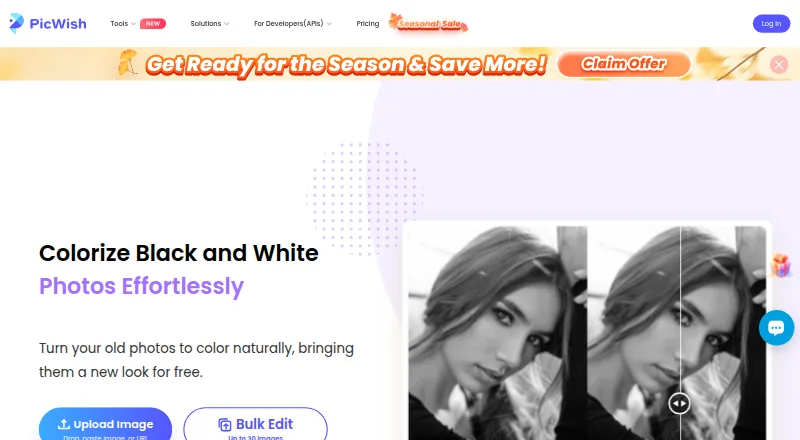
PicWish Photo Colorizer turns black-and-white photos into color. Upload a photo to the online tool and it applies color automatically for download. PicWish says its AI and deep-learning methods add natural-looking colors, and describes the workflow as usable without special skills. Online bulk editing supports up to 30 images, while the desktop version can batch edit up to 10,000. PicWish also offers an API for adding colorization to apps, websites, platforms, and automated business workflows. Its default API limit is two requests per second; support can be contacted about higher concurrency. Online colorization and downloads are free. Supported uploads include JPG, JPEG, BMP, PNG, WEBP, TIFF, TIF, bitmap, RAW, RGB, JFIF, and LZW; outputs include JPEG, JPG, PNG, and WEBP. The tool is cloud-based and lists personal use. PicWish says uploaded images are transferred with SSL/TLS encryption, used for requested processing, and deleted from its server one hour after the user last edits or closes the processing page. It offers live chat 24/7 and ticket support.
Who it is for
It suits people who want to colorize old black-and-white photos online, as well as users who need batch processing or an API for a workflow. The listed use is personal.
What is good
- Online bulk editing supports up to 30 images
- Desktop batch editing supports up to 10,000 images
- Offers an API for automated colorization workflows
- Uploads are deleted one hour after processing activity ends
What to know first
- Default API limit is two requests per second
- Listed use is personal
- Online processing is cloud-based
Specifiction review
PicWish Photo Colorizer: the full review
PicWish specifies a free online colorization workflow, batch limits, supported file types, and an API. The API starts with a two-request-per-second limit, and the listed use is personal.
PicWish Photo Colorizer turns black-and-white photos into color, with an automatic online workflow and options for larger batches and API integration. It is a strong fit for personal restoration and developers adding colorization to a workflow; the personal-use restriction rules it out for commercial image work.
Overview
Upload a photo and the cloud service colorizes it for download. PicWish says its AI algorithms and deep learning are intended to produce natural, realistic color. The hands-off process suits straightforward restoration when speed matters more than manual control, but it is not a local-processing option.
PicWish says uploads travel over SSL/TLS, are used for the requested processing, and are automatically deleted from its server one hour after the user last edits or closes the processing page. The company also states that it is ISO/IEC 27001 and ISO/IEC 27701 certified and GDPR compliant. Support includes 24/7 live chat and tickets.
Key features
- Automatic colorization: The upload-to-download process needs no special skills, making it accessible for occasional photo restoration without a manual editing workflow.
- Batch processing: The online tool handles up to 30 images, while desktop batch editing reaches 10,000. That makes the desktop option more practical for large archives; the online cap is ample for smaller jobs.
- API: Developers can integrate bulk colorization into apps, websites, platforms, and automated business workflows using PicWish's API documentation. The default rate limit is two requests per second; support can be contacted about higher concurrency, so high-throughput projects should account for that constraint.
- File support: Uploads include JPG, JPEG, BMP, PNG, WebP, TIFF, TIF, bitmap, RAW, RGB, JFIF, and LZW; outputs are JPEG, JPG, PNG, or WebP. The range accommodates common formats and several less common ones, though output choices are narrower than input choices.
Pricing
PicWish is freemium, with two free options. Photo Colorizer online is free and includes colorization and downloads plus bulk editing for up to 30 images. It is the clearest fit for personal jobs that stay within the online batch cap.
The broader Free Plan also is free. It provides free previews for most features and access to free tools, but limits non-HD downloads per day. Choose it for trying tools and occasional low-resolution output; it is less suitable when you need regular HD downloads. Neither option changes the personal-use restriction, so commercial projects need another tool.
Platforms
PicWish supports Android, iOS, macOS, Windows, web, and API. Processing is cloud-based, including the online workflow; desktop availability adds a much higher stated batch capacity, but does not make this a local-processing service.
Who it's for
This is a good choice for individuals colorizing personal black-and-white photos, especially when a free online workflow or a large desktop batch is useful. It also suits developers who want to add colorization to an application or automated process and can work within the default API rate. It is a poor fit for commercial image use or for teams requiring local processing.
Pros and cons
- Pro: The online colorizer is free and handles batches up to 30, giving personal users a useful route from upload to download without a paid plan.
- Pro: Desktop batch editing supports up to 10,000 images, a substantial capacity for large personal archives.
- Pro: A documented API path and support for higher concurrency make integration possible beyond one-off web use.
- Con: Use is personal, excluding commercial colorization work.
- Con: The API defaults to two requests per second, a constraint for workloads that need higher throughput.
- Con: Processing happens in the cloud, which may not suit users who require local handling of images.
Alternatives
HitPaw AI Image Colorizer is worth considering if you want a paid plan with a free trial: its one-month plan renews automatically, can be canceled any time, and includes 100 credits, nine AI image enhancement models, and all features.
ImageColorizer is another freemium option across Android, iOS, macOS, web, and Windows. Its free tier offers 50 credits per month with single processing and ads; choose it if a monthly credit allowance matters more than PicWish's stated online batch capacity.
Colorize by Photomyne is a mobile-only alternative for Android and iOS, with limited free colorizations and a yearly membership after a three-day trial. Consider it if you prefer a phone-based option.
Palette offers web, Windows, and API access, with a free trial credit, unlimited previews resized to 500x500px, and a watermark. It is an alternative for preview-led use.
VanceAI Photo Colorizer is a freemium web, Windows, and API option. Its free tier provides 10 credits, with online JPG and PNG uploads capped at 5MB; its Starter plan is 15.00 USD per month, billed at $180 annually, for 260 credits per month.
Molyin Photo Colorizer is a web-only freemium alternative with 10 free credits for new users, seven-day storage, commercial use, and no watermark; it may suit users who need commercial rights.
MyHeritage In Color is available on Android, iOS, and web, with up to 10 photos free and a Complete plan at 299.00 USD per year, including unlimited photo colorization. Consider it if those terms better fit your expected volume.
snapnedit AI Photo Colorizer is a freemium option for Android, iOS, web, and API use; it offers a free browser tier with 14 AI tools, no account requirement, and no watermark.
Browse AI Image Colorizers or AI Photo Colorization Software to compare more options.
Verdict
Choose PicWish for personal photo restoration when free online colorization, sizable batches, or an API matter most. Its combination of an online batch cap of 30 and desktop capacity up to 10,000 is compelling for personal archives; look elsewhere if you need commercial use, local processing, or an API rate above the default without arranging higher concurrency.
PicWish Photo Colorizer plans and pricing
All plansCompared on AI image colorizers
- Free plan
- Yespicwish.com
- Batch processing
- Yespicwish.com
- Image upload formats
- jpg, jpeg, bmp, png, webp, tiff, tif, bitmap, raw, rgb, jfif, lzwpicwish.com
- Output formats
- jpeg, jpg, png, webppicwish.com
- Processing mode
- cloudpicwish.com
- Commercial use
- personalpicwish.com
Facts
- Purpose
- PicWish Photo Colorizer turns old black-and-white photos into color.picwish.com · 29 Sept 2026
- Automatic coloring
- After a photo is uploaded, the tool automatically colorizes it for download.picwish.com · 29 Sept 2026
- AI method
- The maker says the colorizer uses AI image-coloring algorithms and deep learning to add natural, realistic colors.picwish.com · 29 Sept 2026
- No-skill workflow
- The online colorizer is described as usable in seconds without special skills.picwish.com · 29 Sept 2026
- Bulk limit
- The product page offers bulk editing for up to 30 images online and says desktop can batch edit up to 10,000 images.picwish.com · 29 Sept 2026
- API
- PicWish offers a photo-colorization API for adding bulk colorization to an application.picwish.com · 29 Sept 2026
- API integration
- PicWish says its APIs can be integrated with apps, websites, platforms, and automated business workflows using its API documentation.picwish.com · 29 Sept 2026
- API rate limit
- The default API limit is two requests per second, and support can be contacted about higher concurrency.picwish.com · 29 Sept 2026
- Platforms
- PicWish provides downloads for Windows, Mac, iPhone/iPad, and Android, as well as its online colorizer.picwish.com · 29 Sept 2026
- Security certifications
- PicWish states that it is ISO/IEC 27001 and ISO/IEC 27701 certified and GDPR compliant.picwish.com · 29 Sept 2026
- Support
- PicWish offers live chat 24/7 and ticket support.picwish.com · 29 Sept 2026
- Maker and founding year
- PicWish says it was born in 2021; its app terms identify WANGXU TECHNOLOGY (HK) CO., LIMITED as the company operating picwish.com.picwish.com · 29 Sept 2026
- Company address
- The app terms list the company's address as Unit 1003, 10/F, Tower One, Lippo Centre, 89 Queensway, Hong Kong.picwish.com · 29 Sept 2026
Company
- Founded
- 2021picwish.com · 28 Sept 2026
- Headquarters
- Hong Kongpicwish.com · 28 Sept 2026
Best PicWish Photo Colorizer alternatives
See all 20



Where it ranks on Specifiction
Is PicWish Photo Colorizer yours?
Claim it for free: prove the domain, then correct facts, plans and screenshots. An editor reviews every change.
Sources
- picwish.com/photo-colorizer· checked 29 Sept 2026
- picwish.com/api· checked 29 Sept 2026
- picwish.com/download· checked 29 Sept 2026
- picwish.com/about-us· checked 29 Sept 2026
- picwish.com/contact-us· checked 29 Sept 2026
- picwish.com/app-terms· checked 29 Sept 2026
- picwish.com/pricing· checked 29 Sept 2026