
- 1Runs onAPI, Linux, self-hosted, Web
- 2CostsFree plan · free trial · paid from €4.99/mo
- 3Regex flavorsPCRE2 (PHP), JavaScript, Python, Golang, Java, .NET, Rust, POSIX ERE, POSIX BRE, PCRE (Legacy)
- 4Pattern explanationYes
- 5Step-through debuggerYes
- 6Code generationYes
- 7Saved patternsYes
Overview
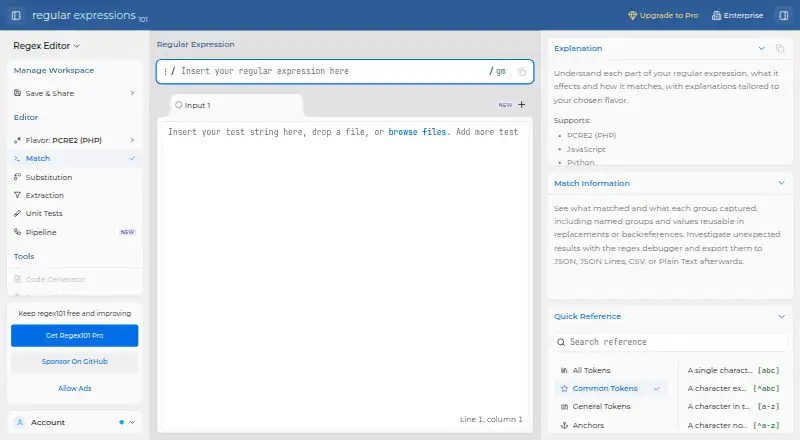
regex101 is an online workspace for building, testing and debugging regular expressions. Its editor supports PCRE2, JavaScript, Python, Golang, Java, .NET 10.0, Rust, POSIX ERE, POSIX BRE and legacy PCRE. Explanations show how parts of a pattern match according to the selected flavor, and a step-through debugger helps follow matching. Match results can be exported as JSON, JSON Lines, CSV or plain text. Developer options include HTTP APIs, an MCP server, editor links and a separately licensed parser package. The workspace API stores editor data but does not provide a remote matching endpoint. File loaders read text, bytes and supported documents locally in the browser; saving or sharing workspace input can send it to the workspace service. Free includes core tools, one test string and saved workspaces with an account. Pro costs 4.99 EUR per month, billed yearly, and adds multiple test strings, substitution pipelines, advanced benchmarking, formatting and an ad-free workspace. Enterprise is a self-hosted option with documented deployment on Linux using Docker Compose, MySQL and Redis.
Who it is for
It suits developers who need to construct and inspect regular expressions across several language flavors. Teams needing self-hosting can consider the Enterprise deployment option.
What is good
- Supports many regex flavors
- Explains pattern matching by selected flavor
- Exports matches in four formats
- Includes a step-through debugger
- Free plan supports saved workspaces with an account
What to know first
- Free plan allows one test string
- Workspace API has no remote matching endpoint
- Pro costs 4.99 EUR per month, billed yearly
Specifiction review
regex101: the full review
regex101 pairs a broad flavor selection with explanations, debugging and result exports. Check the API limitation and how workspace input may be sent when saved or shared.
regex101 is a web-based regular-expression workbench for developers, learners, and anyone who needs to check a pattern against a particular engine. Its strongest case is the combination of broad flavor coverage and pattern explanations; the main caveat is that workspace storage and the API have important boundaries.
Overview
Regex behavior depends on the engine interpreting a pattern, so a checker that lets you choose the target flavor is more useful than one that assumes a single syntax. regex101 pairs that choice with a breakdown of how each part matches, a step-through debugger, code generation, and exportable results. It is well suited to understanding and refining patterns, but teams needing a remote matching service or local-only handling of saved workspace input should consider its limits before adopting it.
Key features
- Engine-specific editing: The editor supports PCRE2, JavaScript, Python, Golang, Java, .NET 10.0, Rust, POSIX ERE, POSIX BRE, and legacy PCRE. That range helps developers check behavior in the intended language or engine instead of assuming a pattern transfers unchanged.
- Explanations and debugging: Explanations are tailored to the selected flavor and describe how each part of a pattern matches. A step-through debugger and code generation add practical help for tracing and applying a pattern, making the tool useful for learning as well as validation.
- Results and integrations: Match results export to JSON, JSON Lines, CSV, or plain text. Developer integrations include HTTP APIs, an MCP server, and editor links; however, the workspace API stores editor data rather than providing a remote matching endpoint. That distinction matters if the goal is to run matching from another application.
- Workspace privacy: File loaders read text, bytes, and supported documents locally in the browser. Saving or sharing the resulting workspace input can send it to the workspace service, so sensitive material calls for care. In self-hosted Enterprise, patterns, test strings, workspaces, and files are processed in the customer deployment, which regex101 ApS says it does not access.
Pricing
regex101 uses a freemium model, with a free plan and a 7-day trial. Free costs 0.00 EUR per free and includes core regex tools, one test string, and saved workspaces with an account. It is a sensible starting point for individual checks, but the single-string cap makes comparing cases in one workspace awkward.
Pro costs 4.99 EUR per month (billed billed yearly). It adds multiple test strings, substitution pipelines, advanced benchmarking, regex formatting, and an ad-free workspace. This is the more practical fit for regular users who need to test several cases together; the stated billing term is yearly despite the monthly price presentation.
Enterprise has custom pricing, billed as an annual license by invoice. A standard license permits one running instance, with user count specified on the invoice and optional feature add-ons. It fits organizations that need self-hosting and deployment-level data handling, rather than individuals seeking a larger hosted workspace.
The documented standard Enterprise setup runs on Linux with Docker Compose and uses MySQL and Redis services. Its agreement sets a reasonable-effort initial support response target of five Danish business days, not a guaranteed SLA.
Platforms
regex101 is available on the web, with API and Linux self-hosted options. The Linux deployment is relevant to Enterprise customers able to run the documented Docker Compose setup; the API should not be mistaken for a remote matching service.
Who it's for
Choose regex101 if you need to build or understand patterns across several regex flavors, inspect matching step by step, or export results into common data formats. Its free tier suits occasional single-string checks, while Pro better fits repeated work with multiple test strings. Enterprise is the relevant route for organizations that require a self-hosted instance and customer-deployment processing. It is a weaker fit when a remote matching endpoint or guaranteed support SLA is essential.
Pros and cons
Pros
- Broad engine coverage: Ten listed flavors, including common language engines and POSIX variants, help avoid treating regex syntax as universal.
- Useful explanation and debugging: Flavor-specific breakdowns and a step-through debugger help users understand why a pattern matches, not just whether it does.
- Flexible result handling: Four export formats make match results easier to use outside the editor.
- Self-hosted Enterprise option: Processing stays in the customer deployment, which is the clearer choice for organizations with workspace-data handling constraints.
Cons
- Free plan allows one test string: Comparing multiple cases requires Pro, limiting the free tier for iterative testing.
- API does not perform remote matching: It stores editor data, so developers seeking a matching endpoint need another solution.
- Saving or sharing changes the data path: Input loaded locally can be sent to the workspace service when the workspace is saved or shared.
- Enterprise support is not an SLA: The five-business-day initial-response target is reasonable effort, not a guaranteed service commitment.
Alternatives
For a broader comparison, see Regular Expression Testers.
- RegexPilot is worth considering if you prefer an extension or macOS app as well as web access, or want a one-time license for its full 21-flavor offering; its free plan covers JavaScript and TypeScript.
- RegexCraft is an option for users seeking a desktop app on Linux, macOS, or Windows, with a free Personal plan for hobby, learning, and side projects.
- Debuggex may suit users who want a web-based regex visualizer and debugger with JavaScript, Python, and PCRE engines; its Python and PCRE engines are free while in beta.
- The Regex Coach is a free choice for Linux or Windows users who prefer a desktop tool.
- RegEx Visualizer & Explainer fits users who want a free, account-free web tool limited to JavaScript RegExp.
- RegexBuddy is a paid Linux and Windows alternative with a single-user one-time license priced at 44.95 GBP.
- RegexStudio is an open-source web workbench for users who prioritize an open-source project.
- Regexo is another free option for Windows, macOS, and Linux users.
Verdict
regex101 is a strong choice for developers and learners who need engine-aware pattern work, clear explanations, and portable match results. Its broad flavor selection and debugging tools make it more useful than a bare match checker. Look elsewhere if you need a remote matching API, must keep saved workspace input out of a hosted service, or require a guaranteed Enterprise support SLA.
regex101 plans and pricing
All plansCompared on regular expression testers
- Free plan
- Yesregex101.com
- Regex flavors
- PCRE2 (PHP), JavaScript, Python, Golang, Java, .NET, Rust, POSIX ERE, POSIX BRE, PCRE (Legacy)regex101.com
- Pattern explanation
- Yesregex101.com
- Step-through debugger
- Yesregex101.com
- Code generation
- Yesregex101.com
- Saved patterns
- Yesregex101.com
Facts
- Purpose
- regex101 is an online tool for building, testing, and debugging regular expressions.regex101.com · 30 Sept 2026
- Explanations
- The site explains each part of a regular expression and how it matches, tailored to the selected flavor.regex101.com · 30 Sept 2026
- Match exports
- Match results can be exported as JSON, JSON Lines, CSV, or plain text.regex101.com · 30 Sept 2026
- Developer integrations
- Developer integrations include HTTP APIs, an MCP server, editor links, and a separately licensed parser package.docs.regex101.com · 30 Sept 2026
- API limitation
- The workspace API stores editor data and does not expose a remote matching endpoint.docs.regex101.com · 30 Sept 2026
- File privacy
- File loaders read text, bytes, and supported documents locally in the browser; saving or sharing the resulting workspace input can send it to the workspace service.docs.regex101.com · 30 Sept 2026
- Enterprise data handling
- For self-hosted Enterprise, patterns, test strings, workspaces, and files are processed in the customer deployment, which regex101 ApS says it does not access.docs.regex101.com · 30 Sept 2026
- Enterprise deployment
- The documented standard setup runs on Linux with Docker Compose and uses MySQL and Redis services.docs.regex101.com · 30 Sept 2026
- Support
- Support includes community discussion, a public issue tracker for reproducible bugs, and email for account, purchase, or private support.docs.regex101.com · 30 Sept 2026
- Enterprise support terms
- The Enterprise agreement states a reasonable-effort initial response target of five Danish business days and says it is not a guaranteed SLA.docs.regex101.com · 30 Sept 2026
- Maker
- The maker is regex101 ApS; its terms list an address at Mimers Plads 2, 6. tv, 2220 Copenhagen.docs.regex101.com · 30 Sept 2026
Best regex101 alternatives
See all 20


Where it ranks on Specifiction
Is regex101 yours?
Claim it for free: prove the domain, then correct facts, plans and screenshots. An editor reviews every change.
Sources
- regex101.com· checked 30 Sept 2026
- docs.regex101.com/developers/· checked 30 Sept 2026
- docs.regex101.com/editor/files/· checked 30 Sept 2026
- docs.regex101.com/enterprise/licenses/legal/privacy-polic· checked 30 Sept 2026
- docs.regex101.com/enterprise/licenses/· checked 30 Sept 2026
- docs.regex101.com/support/· checked 30 Sept 2026
- docs.regex101.com/legal/terms-and-conditions/· checked 30 Sept 2026
- regex101.com/account/mine· checked 30 Sept 2026