Tech riderRev. 10 Oct 2026
Ubuntu Startup Disk Creator
- 1Runs onLinux
- 2CostsFree plan
- 3Windows appNo
- 4macOS appNo
- 5Linux appYes
- 6Persistent storageYes
- 7Image downloadslocal only
7 lines stated Written from the maker's own pages: ubuntu.com
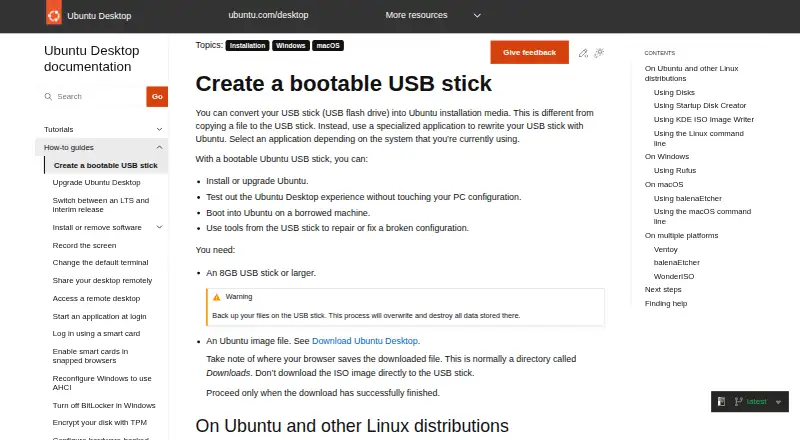
Overview
Ubuntu Startup Disk Creator is ranked #16 of 39 in bootable USB software on Specifiction. It runs on Linux. There is a free plan.
Ubuntu Startup Disk Creator plans and pricing
All plansFree Free Part of the extended Ubuntu Desktop installation · writes Ubuntu and Ubuntu-based images to USB ubuntu.com · 10 Oct 2026
Compared on bootable USB software
- Free plan
- Yesubuntu.com
- Windows app
- Noubuntu.com
- macOS app
- Noubuntu.com
- Linux app
- Yesubuntu.com
- Persistent storage
- Yesubuntu.com
- Image downloads
- local_onlyubuntu.com
Facts
- Purpose
- Startup Disk Creator writes an Ubuntu image to a USB stick to create bootable installation media.ubuntu.com · 9 Oct 2026
- Use cases
- A bootable Ubuntu USB can be used to install or upgrade Ubuntu, try Ubuntu Desktop without changing the PC configuration, boot Ubuntu on a borrowed machine, or run repair tools.ubuntu.com · 9 Oct 2026
- Availability
- Startup Disk Creator is part of the extended Ubuntu Desktop installation and can be installed from App Center or with `sudo apt install usb-creator-gtk`.ubuntu.com · 9 Oct 2026
- Image selection
- The app may detect the Ubuntu image and USB device automatically; otherwise, users can locate the image and select a device from the available list.ubuntu.com · 9 Oct 2026
- Progress
- The app shows a progress bar while writing and announces “Installation Complete” when finished.ubuntu.com · 9 Oct 2026
- Image compatibility
- Startup Disk Creator is intended for Ubuntu images and images of Ubuntu-based distributions, and may not work correctly with other Linux distributions or operating systems.ubuntu.com · 9 Oct 2026
- USB requirement
- The guide says to use a USB stick of at least 8 GB.ubuntu.com · 9 Oct 2026
- Data loss
- Writing the image destroys all data currently stored on the selected USB device.ubuntu.com · 9 Oct 2026
- Support
- The Ubuntu guide links to Canonical support, the Ubuntu Discourse forum, and an online Matrix chat for help.ubuntu.com · 9 Oct 2026
- Maker
- Canonical describes itself as the company behind Ubuntu and says it has helped build the Ubuntu community since 2004.canonical.com · 9 Oct 2026
- Uses
- A bootable USB can install or upgrade Ubuntu, try Ubuntu without changing PC configuration, boot Ubuntu on a borrowed machine, or help repair a broken configuration.ubuntu.com · 10 Oct 2026
- Selection
- The application can detect the Ubuntu image and USB device, or users can locate an image and choose a device from the available list.ubuntu.com · 10 Oct 2026
- Completion
- A progress bar appears during writing, and the application announces “Installation Complete” when it finishes.ubuntu.com · 10 Oct 2026
- Security
- Ubuntu’s platform security page says its pre-built boot binaries, except the initrd, are signed with Canonical’s UEFI certificate.ubuntu.com · 10 Oct 2026
- Free use
- The Ubuntu project says users can download and use Ubuntu free of charge.ubuntu.com · 10 Oct 2026
- Intended users
- Ubuntu Desktop is described as suitable for home users, developers, and enterprise users.ubuntu.com · 10 Oct 2026
Best Ubuntu Startup Disk Creator alternatives
See all 20 All accessCh 01 balenaEtcher Free planLinuxMac from $143.33/mo7.5 All accessCh 02 WinToUSB Free planFree trialWindows Free to start7.3 All accessCh 03 Buddi Free planLinuxMac Free to start7.2 All accessCh 04 SARDU MultiBoot Creator Free planWindowsLinux from €99,246/mo7.2 All accessCh 05 USBImager Free planLinuxMac Free to start7.2 All accessCh 06 Raspberry Pi Imager Free planLinuxMac Free to start7.1


Where it ranks on Specifiction
- Best Bootable USB Software in 2026#16 of 39
Is Ubuntu Startup Disk Creator yours?
Claim it for free: prove the domain, then correct facts, plans and screenshots. An editor reviews every change.
Sources
- ubuntu.com/desktop/docs/en/latest/how-to/create-a-· checked 9 Oct 2026
- canonical.com/company· checked 9 Oct 2026
- ubuntu.com/security/platform-security· checked 10 Oct 2026
- ubuntu.com/about· checked 10 Oct 2026
- ubuntu.com/desktop/docs/en/latest/explanation/abou· checked 10 Oct 2026