Tech riderRev. 11 Oct 2026
- 1Runs onLinux, Mac, Windows
- 2CostsFree plan
- 3Batch watermarkingYes
- 4Logo marksYes
- 5Supported platformsWindows and Linux
- 6API accessYes
6 lines stated Written from the maker's own pages: github.com
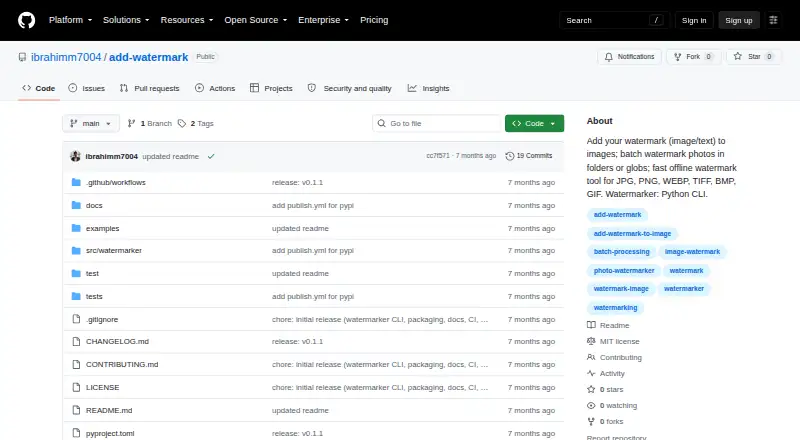
Overview
wmk is ranked #14 of 33 in photo watermarking software on Specifiction. It runs on Linux, macOS, Windows. There is a free plan.
wmk plans and pricing
All plansCompared on photo watermarking software
- Batch watermarking
- Yesgithub.com
- Logo marks
- Yesgithub.com
- Supported platforms
- Windows and Linuxgithub.com
- API access
- Yesgithub.com
Facts
- Purpose
- wmk is a Python command-line tool for adding image or text watermarks to images.github.com · 11 Oct 2026
- Batch processing
- It can process folders recursively or accept glob patterns for batch watermarking.github.com · 11 Oct 2026
- Placement and opacity
- Watermarks can be positioned at the top-left, top-right, bottom-left, bottom-right, or center, with opacity set from 0 to 100.github.com · 11 Oct 2026
- Input formats
- The listed input and output formats are JPG, JPEG, PNG, WEBP, TIFF, BMP, and GIF.github.com · 11 Oct 2026
- GIF limitation
- GIF processing handles only the first frame.github.com · 11 Oct 2026
- Dry run
- A dry-run option prints planned outputs without writing files.github.com · 11 Oct 2026
- Local processing
- The README describes the CLI as offline and says images stay on the user's machine.github.com · 11 Oct 2026
- Install
- The package can be installed with pip or pipx, or from a repository clone.github.com · 11 Oct 2026
- Python requirement
- The package metadata requires Python 3.10 or newer.github.com · 11 Oct 2026
- License
- The repository provides the software under the MIT License, which permits use, copying, modification, distribution, sublicensing, and sale subject to its conditions.github.com · 11 Oct 2026
- Support channel
- The package metadata links to the repository's GitHub Issues page.github.com · 11 Oct 2026
- Testing and checks
- The README lists a pytest suite and Ruff lint and formatting checks as project trust signals.github.com · 11 Oct 2026
- Intended audience
- The package metadata classifies the project for desktop end users and multimedia graphics.github.com · 11 Oct 2026
- Image formats
- It supports JPG, JPEG, PNG, WEBP, TIFF, BMP, and GIF input and output.github.com · 11 Oct 2026
- Privacy
- The README describes wmk as an offline tool and says images stay on the user's machine.github.com · 11 Oct 2026
- Automation
- The CLI is scriptable and the README describes it for repeatable workflows such as product photos and photography delivery.github.com · 11 Oct 2026
- Python library
- The project also provides an optional Python library interface, while identifying the CLI as its primary interface.github.com · 11 Oct 2026
- Installation
- The package can be installed with pip or pipx, or from a cloned source repository.github.com · 11 Oct 2026
- Output behavior
- By default, batch folder output goes into a watermarked directory and preserves the folder's relative structure.github.com · 11 Oct 2026
- Overwrite behavior
- Without the overwrite option, existing destination files are not replaced and a _watermarked suffix is used to avoid collisions.github.com · 11 Oct 2026
Best wmk alternatives
See all 20 All accessCh 01 Watermarkly Free planAndroidiOS from $1.66/mo7.9 All accessCh 02 Visual Watermark Free trialAndroidiOS from $1.66/mo7.7 All accessCh 03 eZy Watermark Free planAndroidiOS from $1.99/mo7.5 All accessCh 04 Folio Free planFree trialWeb from $9.90/mo7.4 All accessCh 05 iWatermark Free trialAndroidiOS 7.4 All accessCh 06 Terma Free planLinuxMac Free to start7.4

Where it ranks on Specifiction
Is wmk yours?
Claim it for free: prove the domain, then correct facts, plans and screenshots. An editor reviews every change.
Sources
- github.com/ibrahimm7004/add-watermark· checked 11 Oct 2026
- github.com/ibrahimm7004/add-watermark/blob/main/py· checked 11 Oct 2026
- github.com/ibrahimm7004/add-watermark/blob/main/LI· checked 11 Oct 2026