Block Shape Generator vs Pixel Circle Generator
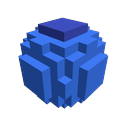
Block Shape Generator
alonsoaliaga.github.io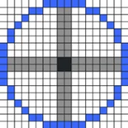
Pixel Circle Generator
pixelcirclegenerator.comSide by side
| Figure | Block Shape Generator | Pixel Circle Generator |
|---|---|---|
| Price from | Free | Free |
| Free plan | Yes | Yes |
| Free trial | — | — |
| Open source | — | — |
| Web | Yes | Yes |
| Plans published | 1 | 1 |
| Spec score · Minecraft Shape Generators | 8.3 (#3) | 6.9 (#20) |
| Preview controls | Users can adjust zoom and toggle grid lines. | The page provides controls for preview pixel size, block color, grid, and axes. |
| Purpose | The maker describes the tool as specially made for builders. | A free Minecraft circle, ellipse, arc, and sphere generator. |
| Shapes | Users can select sphere, cone, dome or cylinder. | The generator offers circle, ellipse, arc, and sphere shapes. |
Plans
In their own words
Block Shape Generator
Block Shape Generator is a free web tool made for builders to create block-based shapes. Users can select a sphere, cone, dome, or cylinder, then set a radius or diameter, height, and color. A hollow-shape control creates a shell. The preview includes zoom controls and a grid-lines toggle, and the interface displays the number of blocks required. Users can inspect the current layer or view the top layer in 2D before using Generate Shape to create the selected form. The page recommends Google Chrome or Opera and reports that Edge is not compatible. It also displays controls labelled Unlock features and Enable Model Movement, each marked with a test-tube symbol, but gives no explanation of their terms. The maker invites users to suggest ideas through its official Discord server and links to a donation page for development support. The listed free plan states no numeric limits. The page does not state security, privacy, or compliance practices, so readers looking for those details will not find them here.
Pixel Circle Generator
Pixel Circle Generator is a free web tool for making Minecraft circles, ellipses, arcs, and spheres. Shapes can be outlined or filled, with configurable outline thickness. Dimensions use radius or diameter controls; ellipses add an Ry setting, and arcs accept start and end angles. Sphere previews show one layer at a time from −R through +R, with an option to copy commands for every layer. Generated designs can be downloaded as PNG or SVG, copied as grid text, or converted to /setblock commands for one layer or all sphere layers. Preview controls adjust pixel size, block color, grid, and axes. The tool provides coordinate output and layer-by-layer viewing, but no 3D preview. It runs in a browser and has a free plan priced at free. The site states that it is not affiliated with Mojang or Microsoft.