Recommended Free Tools
Specifiction is reader-supported. When you buy through links on our site, we may earn an affiliate commission. As an Amazon Associate I earn from qualifying purchases. Learn more
Audjust AI Music Remixer is the clearest fit when you want to set a BPM target for an existing track. For original music, Musiclly AI Latin Generator lets you select tempo and key; TwoShot AI Jazz Generator supports tempo-led jazz arrangements. The other picks accept tempo as part of a remix or image-to-music prompt, with less evidence of precise BPM control.
Best AI Music Generators For BPM And Tempo
| Rank | Tool | What The Tempo Evidence Establishes | Best Starting Point |
|---|---|---|---|
| 1 | Audjust AI Music Remixer | Set a goal from 60 to 200 BPM; the measured result may be near rather than exactly at the target. | Changing the tempo of an existing track |
| 2 | Musiclly AI Latin Generator | Select tempo and key; examples span 94 BPM reggaeton, 128 BPM bachata, and 186 BPM salsa. | Latin music with a chosen tempo and key |
| 3 | TwoShot AI Jazz Generator | Specify or change tempo for jazz arrangements and backing tracks. | Jazz practice tracks and arrangement changes |
| 4 | AI Remix Music Generator | Pick a tempo for a remix; exact BPM range and measurement tolerance are not stated. | Steering the tempo and energy of a remix |
| 5 | SunoPrompt Image to Music | A tempo can be included as a text hint; exact tempo control is not established. | Giving an image-led track a tempo direction |
1. Audjust AI Music Remixer
Choose this when you have an audio track and a clear target tempo in mind. Its stated goal range is 60–200 BPM, but the measured result can land near the number you enter. Treat BPM, genre, vocal direction, and strength as creative guidance: they influence generation without guaranteeing an exact tempo or a particular voice.
As an Amazon Associate I earn from qualifying purchases.
For example, set a goal of 120 BPM and describe the intended genre and energy. Then check the generated audio with a BPM analyzer; if the pulse is off, adjust the prompt or target and regenerate. Each generation costs 30 credits. Supported uploads are MP3, WAV, M4A, AAC, OGG, and FLAC, up to 50 MB.
2. Musiclly AI Latin Generator
For Latin styles, this is the strongest option here for choosing a tempo alongside a key. Its examples include 94 BPM reggaeton, 128 BPM romantic bachata, and 186 BPM salsa dura, making it useful when you want to explore how a style feels at different speeds.
Shopping ad
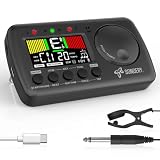
- 3 in 1 metrotuner. The MetroTune combines a tuner, a metronome and a tone generator in a pocket size device. Equipped with beautiful colors screen, 3 indicators, loud speaker, Mic and cable jack detections, earphone output, volume wheel and folding kickstand to make operation super easy.
- English vocal metronome with tap tempo. A broad range of tempo 30-260bpm, setting self tempo by tap, beats from 0 to 9, and various 8 rhythms. English vocal counting greatly helps follow the timing under a correct beat.
- Versatile tuner. The fast and accurate tuner features various tuning items for chromatic, guitar, bass, ukulele, acoustic guitar, electric guitar, violin, mandolin, piano, saxophone, trumpet, and other wind instruments, and also 12 different tuning keys, with pitch calibration from 410Hz to 450Hz, by tuning method using internal mic or enclosed pickup cord.
- Jog dial designed to easily use. The JOG Dial allows you to easily and quickly get a desired tempo for metronome, and to swift to a pitch in the Tone Generator and the Tuner.
- Power rechargeable. Plug to 5V USB power source with enclosed type C USB cord to charge the device. Equipped with a large LCD color screen and LED indicator, making it very user-friendly, especially in dark environments. MetroTune comes with instructions in seven languages, making it easy for musicians around the world to use.
Try a prompt such as “Latin, 95 BPM, E minor, full rhythm section groove,” then compare the two generated takes for the pulse and feel you want. Generating Latin music costs 2 credits and produces Take A and Take B; new users receive 10 free credits upon registration. Downloads are 24-bit WAV or 320 kbps MP3. The product states that generated music has commercial clearance; check its terms for details relevant to your use.
3. TwoShot AI Jazz Generator
TwoShot is a good fit for jazz arrangements and practice backing tracks where tempo is one part of the musical direction. Its prompt guidance supports specifying tempo, key, mood, or era, and it describes custom backing tracks in any key, tempo, and style. You can also request a tempo change while revising an arrangement.
Free tools Windows power users keep installed
One-click scans. No signup required.
Shopping ad

- Improved Display and Battery Life: 30% larger display with beat visuals, louder buzzer for clarity, tap tempo, timer, sound out mode, and up to 400 hours of use on alkaline batteries.
- Enhanced volume and crisp sound: Equipped with a newly designed electronic buzzer, it provided easily audible sound that won’t be buried by high-volume instruments or high frequencies.
- Three Tempo Settings: The MA-2 offers Pendulum, Full Step, and Tap Tempo modes, along with time signatures from 0–9 beats and 8 rhythm types -perfect for flexible, personalized rhythm training.
- Timer Mode and Sound Out Mode: Provides basic metronome function, but also includes a “timer mode” and a “sound out mode” that are useful for daily practicing. Use the MODE button to switch between these at a touch.
- Long Battery Life: When using alkaline batteries, the unit provides approximately 400 hours of continuous operation. As the remaining battery power runs low, a battery indicator appears in the display indicating battery replacement.
For a practical starting prompt, name the tempo, key, and mood, then describe the ensemble or solo section you want. If the result feels too busy or too relaxed, request a tempo change and compare the new take. The service describes finished jazz tracks as high-quality audio and royalty-free; check its terms for the scope of that permission.
4. AI Remix Music Generator
Use this when the source should remain recognizable while its tempo, genre, or energy changes. You can pick the direction for all three, and style weight, weirdness, and audio weight each run from 0 to 1 with a starting value of 0.5. An example on the product page describes a sung topline rebuilt over a 136 BPM breakdown.
Shopping ad

- Accurate Tempo Control: M50 for MINI Metronome Clip-on LCD Digital Rhythm Metronome for Guitar Violin Bass Stringed instruments helps musicians stay on beat with a versatile tempo range of 30–280 for beats per minute and selectable 0–9 beat settings.
- Clear LCD Readout: Bright, easy-to-read LCD screen displays rhythm type, tempo, beat, and volume, allowing quick adjustments during practice or performance for better timing and consistency.
- Tap-to-Set Function: Integrated TAP feature lets you tap along with music to match the current tempo, supporting rhythm training, melody testing, and skill development for ACROSS different styles.
- Portable Clip: Compact 5.5*3.3*2cm size with clip and lanyard hole enables secure attachment to instruments or clothing, making it convenient to carry and practice anywhere.
- Long Lasting Build: Made from sturdy plastic in black, white, yellow, blue, or pink, designed to withstand regular use while offering reliable performance session after session.
Describe the target BPM and genre, and say what should remain recognizable. Then listen for whether the new pulse supports the source material without losing its identity. The page does not establish an exact BPM range or guarantee that an output will measure precisely at the requested value, so verify it with an audio BPM analyzer if timing matters. Aimusicis does not currently issue a commercial-use license or certificate.
5. SunoPrompt Image to Music
This is a looser choice for tempo-led work: it generates music from an image, with an optional text hint such as a genre or tempo. Use it when the image is the main creative input and a BPM direction is secondary, for example, “slow ambient pulse” or “upbeat dance tempo.” Those examples are prompt ideas, not evidence of an exact BPM control.
Shopping ad

- 【Clear display】Clear LCD display and indicator with "select" and "up" or "down" adjusters, adjustable from 0 to 9, multiple rhythms, 30 to 280bpm rhythm. The built-in TAP function allows you to test rhythms and melodies
- 【Easy to carry】The design has a small clip and a rope hole, this design makes the metronome can be clipped on the clothes, easy to carry and fix
- 【Headphone jack design】3.5mm stereo headphone jack, suitable for guitar, ukulele, violin, or piano and other instruments
- 【Musical gift】This metronome is perfect for your band friends to use, and its small body and multiple functions are the best witness
- 【Service】If you have any questions about our products, please do not hesitate and let us know. We will get back to you and give you a satisfactory answer
If a specific measured tempo is essential, the available information does not establish a BPM target range or an exact-tempo guarantee for this tool. Check its site for current controls and terms before relying on them.
Independent reader supportYour contribution helps us test, update, and keep practical guides available for everyone.How To Prompt For A Tempo You Can Use
- Decide whether you are creating or remixing. A new track and a remix have different constraints: a remix may need to retain recognizable source material, while an original arrangement can be shaped around the pulse from the start.
- Write the number with its musical role. Pair the BPM with style, energy, and, where supported, key or arrangement details. For example: “Latin, 95 BPM, E minor, full rhythm section groove.”
- Ask for changes one at a time. If the rhythm feels wrong, adjust tempo first; then refine genre, energy, or arrangement. This makes it easier to hear which direction helped.
- Measure the audio when timing must be dependable. A requested BPM can be a generation hint rather than a locked result. Use an audio BPM analyzer on the rendered track, especially before syncing it to video, a loop, or another track.
What To Check Before You Use The Track
Tempo instructions do not establish every feature you may need. The available information does not confirm detailed BPM controls for every tool, nor does it establish common platform availability, supported languages, or genre coverage beyond the stated examples. Check each vendor’s site for the current controls and any requirements for your device or workflow.
Shopping ad

- - PULSE — Finally a metronome you'll love using. Designed for all musicians.
- - VIBRATING METRONOME — Silence the click and feel the beat. Free your ears so you can focus on the music. Experience vibrations 7x stronger than the average smartphone.
- - LED LIGHTS — See the rhythm and engage all senses. Precisely synced with vibrations. Turn them off or change colors in the app.
- - INTUITIVE CONTROLS — Tap twice to play or pause the metronome. Make fine tempo adjustments by twisting the outer wheel. Tap your fingers and the tempo will follow. It's not magic. But it feels like it.
- - COMPANION APP — Set time signature, subdivision and accents with our mobile app for iOS and Android. Save presets of your rhyhms and build setlists. Add sounds. And much more! Used by over 600,000 musicians every month.
If you remix audio, use material you have permission to use and check the platform’s terms. For generated vocals, covers, samples, or commercial use, check the relevant platform terms and obtain consent where needed; the evidence here does not establish general permissions. AI Remix Music Generator explicitly says it does not issue a commercial-use license or certificate, while Musiclly states commercial clearance for its generated music.
Quick Recap
Product prices and availability are accurate as of the date/time indicated and are subject to change. Any price and availability information displayed on Amazon at the time of purchase will apply.
What’s actually slowing this PC down?
Pick the symptom - the matching free tool is one click away.




