
Certify The Web
- 1Runs onAPI, Linux, Mac, self-hosted, Web, Windows
- 2CostsFree plan · free trial · paid from $4.92/mo
- 3Certificate discoveryYes
- 4Automatic renewalYes
- 5Deployment automationYes
- 6Revocation workflowsYes
- 7Certificate typestls
- 8CA integrationsYes
Overview
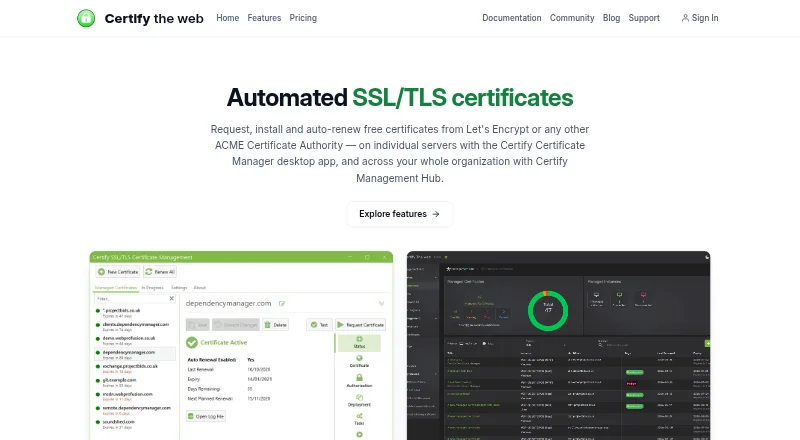
Certify The Web provides products for requesting, deploying, and renewing TLS certificates. Certificate Manager is intended for Windows servers or desktops, Management Agent for headless Linux and macOS systems, and Management Hub for central administration of multiple instances. The tools support ACME authorities including Let's Encrypt, Google Trust Services, ZeroSSL, Actalis, and private or enterprise CAs. Domain checks can use HTTP or DNS, with options ranging from built-in providers and Certify DNS to manual TXT records or custom scripts. Deployment tasks cover IIS, Apache, nginx, Tomcat, Exchange, ADFS, RDP, Azure App Service, Azure Key Vault, HashiCorp Vault, and IIS Centralized Certificate Store. Other deployments can use scripts, webhooks, SSH/SFTP, or UNC shares. Hub offers a web interface, API, role-based access, managed DNS challenges, and certificate monitoring across instances. A free evaluation has no feature limits or time limit. Cloud-managed licensing starts at 4.99 USD per month per install; other plans have annual or longer billing terms. Licenses do not bypass certificate authority rate limits.
Who it is for
It suits administrators managing TLS certificates on Windows servers or desktops, headless Linux or macOS machines, or multiple instances centrally. Teams needing deployment automation across the listed services and certificate authorities can use its integrations.
What is good
- Free evaluation has no time or feature limits.
- Supports multiple ACME and private certificate authorities.
- Includes automated renewal and deployment tasks.
- Hub monitors certificate status across instances.
- Email support tickets are included with every license.
What to know first
- Licenses do not exceed certificate authority rate limits.
- Hub requires a quantity of 10 or more on the cloud-managed license.
- Some plans are billed for two or three years.
Specifiction review
Certify The Web: the full review
Certify The Web covers certificate requests, validation, deployment, renewal, and multi-instance monitoring. Review the intended role of each component and the billing term that matches the number of servers.
Overview
Certify The Web is a TLS certificate lifecycle toolkit for administrators managing certificates across Windows, Linux, or macOS. Its clearest advantage is the combination of flexible deployment automation and plans that allow unlimited certificates within a server cap; choose another tool if you need to exceed a certificate authority’s rate limits.
Key features
Validation and certificate authorities
ACME support includes Let’s Encrypt, Google Trust Services, ZeroSSL, Actalis, and private or enterprise certificate authorities. Domain validation can use HTTP or DNS challenges, with DNS options ranging from built-in providers and Certify DNS to acme-dns, manual TXT records, or custom scripts. This breadth accommodates varied DNS setups, but a license does not raise the selected authority’s own rate limits. Certificate discovery, automatic renewal, and revocation workflows round out lifecycle management.
Deployment and administration
Built-in deployment tasks cover IIS, Apache, nginx, Tomcat, Exchange, ADFS, RDP, Azure App Service, Azure Key Vault, HashiCorp Vault, and IIS Centralized Certificate Store. For other services, deployment can use PowerShell or Bash scripts, webhooks, SSH/SFTP, or UNC shares. That range makes the product useful where certificates must reach a mix of infrastructure rather than a single web server.
Certificate Manager is aimed at Windows servers or desktops; Management Agent is for headless Linux and macOS systems. Management Hub adds a web interface, API, role-based access, managed DNS challenges, and coordination across Manager and Agent instances. Hub and Certify Dashboard aggregate certificate status, expiry, renewal failures, notifications, and renewal history; Hub and Agent can also monitor Certbot, acme.sh, win-acme, simple-acme, and Posh-ACME.
Security and support
Credentials are encrypted at rest, using Windows DPAPI or .NET key-based encryption in Certificate Manager. Hub adds role-based controls and scoped API authentication. Webprofusion says its security practices align with ISO/IEC 27001 principles, but it is not ISO/IEC 27001 certified. Every license includes email support tickets, and the free evaluation includes helpdesk guidance.
Pricing
The Free evaluation costs 0.00 USD per free, has no time limit, and carries no feature limitations. It is a useful way to start without a deadline or feature gate. The cloud-managed Certificate Manager license costs 4.99 USD per month, billed per install per month through Microsoft Azure; Management Hub requires a quantity of 10 or more, so this entry price is not a general low-cost route to Hub.
Starter costs 59.00 USD per year, billed for one year, and covers one server with unlimited certificates plus Certificate Manager and Management Agent. It fits a single-server deployment, but offers no room to add a second server under the same plan. Professional costs 149.00 USD per year, billed for one year, and raises the cap to three servers while retaining unlimited certificates and both Manager and Agent. It is the more suitable step up for small multi-server estates.
Certify DNS (Standard) costs 60.00 USD per year, billed for one year, for a hosted acme-dns service and CNAME delegation of ACME DNS challenges. It addresses DNS challenge delegation rather than adding server capacity. Power Pro costs 1199.00 USD per year, billed for two years, and covers up to 50 servers with unlimited certificates and Management Hub. Enterprise costs 5499.00 USD per year, billed for three years, and extends that model to 250 servers. Those tiers suit larger estates that need central coordination, but their longer billing terms and sizable server commitments make them poor fits for small deployments.
Platforms
The product spans Windows, Linux, and macOS, with API, web, and self-hosted options. That aligns the Windows-focused Certificate Manager and headless Unix-like Management Agent with centralized web and API administration.
Who it's for
Certify The Web suits administrators who want to automate TLS issuance, deployment, and renewal across a small server setup or coordinate many instances centrally. The unlimited-certificate allowance in the Starter and Professional tiers is useful when server count, rather than certificate count, is the main sizing question. Teams that need Hub should weigh the 10-install minimum on the cloud-managed license or the higher-capacity Power Pro and Enterprise commitments.
Pros and cons
- Broad deployment coverage: Built-in integrations and script, webhook, SSH/SFTP, and UNC options support varied destinations.
- Unlimited certificates on server plans: Starter and Professional scale certificate count without changing tiers, subject to CA rate limits.
- Central monitoring: Hub and Dashboard consolidate expiry, renewal failures, notifications, and history across instances, including several third-party ACME clients.
- Server caps and long terms: Larger plans cover more servers but require two- or three-year billing, while the cloud-managed Hub route has a 10-install minimum.
- Certification caveat: Security practices align with ISO/IEC 27001 principles, but the company is not certified to that standard.
Alternatives
Certificate Management Software is the category directory for comparing other certificate-management choices. KeyTalk CKMS is worth considering when S/MIME management for up to 250 participants, multiple devices, and a per-user monthly price is the priority. Qualys External Attack Surface Management offers a 30-day, no-cost CSAM with EASM period for readers evaluating that security-management option.
ManageEngine Key Manager Plus may suit teams focused on managing keys, with a free plan and a 25-managed-key on-premises license priced at 59.00 USD per month. Certbot is the alternative to consider when free, open-source certificate tooling is the priority and centralized management is not the deciding requirement. Entrust Certificate Manager is another paid certificate-management option, with custom pricing.
Keyfactor Platform may fit large certificate-lifecycle deployments where no per-certificate fees and support for deployments tested at 500 million-plus certificates matter. Oracle Cloud Infrastructure Secret Management is a free alternative for API and web users looking for secret management rather than this TLS-focused workflow. Sectigo Certificate Manager is a paid alternative with monthly tiers, including a Basic plan for approximately 2–10 certificates and three FQDNs with manual issuance and management.
Verdict
Choose Certify The Web if you need flexible TLS deployment and renewal across a defined number of servers, especially when unlimited certificates and eventual central monitoring matter. Its practical strengths are broad integrations and a free, unrestricted evaluation; look elsewhere if your server count or billing commitment does not fit its tiers, or if you need certificate issuance beyond the CA’s rate limits.
Certify The Web plans and pricing
All plansCompared on certificate management software
- Free plan
- Yescertifytheweb.com
- Paid from
- $4.99/mocertifytheweb.com
- Certificate discovery
- Yescertifytheweb.com
- Automatic renewal
- Yescertifytheweb.com
- Deployment automation
- Yescertifytheweb.com
- Revocation workflows
- Yescertifytheweb.com
- Certificate types
- tlscertifytheweb.com
- CA integrations
- Yescertifytheweb.com
Facts
- Purpose
- Certify The Web products request, deploy, and renew TLS certificates.docs.certifytheweb.com · 28 Sept 2026
- Certificate authorities
- It supports ACME certificate authorities including Let's Encrypt, Google Trust Services, ZeroSSL, Actalis, and private or enterprise CAs.docs.certifytheweb.com · 28 Sept 2026
- Certificate validation
- Domain validation can use HTTP or DNS, including built-in DNS providers, Certify DNS, acme-dns, manual TXT records, or custom DNS scripts.docs.certifytheweb.com · 28 Sept 2026
- Deployment integrations
- Built-in deployment tasks cover IIS, Apache, nginx, Tomcat, Exchange, ADFS, RDP, Azure App Service, Azure Key Vault, HashiCorp Vault, and IIS Centralized Certificate Store.docs.certifytheweb.com · 28 Sept 2026
- Custom deployment
- Other services can use PowerShell or Bash scripts, webhooks, SSH/SFTP, or UNC shares for deployment.docs.certifytheweb.com · 28 Sept 2026
- Central management
- Management Hub provides a web UI, API, role-based access, managed DNS challenges, and coordination for Certificate Manager and Management Agent instances.docs.certifytheweb.com · 28 Sept 2026
- Monitoring
- Hub and Certify Dashboard aggregate certificate status, expiry, renewal failures, notifications, and renewal history across instances.docs.certifytheweb.com · 28 Sept 2026
- Third-party clients
- Hub and Management Agent can monitor Certbot, acme.sh, win-acme, simple-acme, and Posh-ACME.docs.certifytheweb.com · 28 Sept 2026
- Security
- Credentials are encrypted at rest; Certificate Manager uses Windows DPAPI or .NET key-based encryption, while Hub adds role-based access controls and scoped API authentication.docs.certifytheweb.com · 28 Sept 2026
- Trust and compliance
- Webprofusion says its security practices align with ISO/IEC 27001 principles, while stating it is not currently ISO/IEC 27001 certified.docs.certifytheweb.com · 28 Sept 2026
- Support
- Every license includes email support tickets, and the free evaluation includes helpdesk guidance.certifytheweb.com · 28 Sept 2026
- Limits
- A license does not let customers exceed their certificate authority's own rate limits.certifytheweb.com · 28 Sept 2026
- Intended use
- Certificate Manager is for Windows servers or desktops, Management Agent is for headless Linux and macOS systems, and Management Hub centrally administers multiple instances.docs.certifytheweb.com · 28 Sept 2026
Company
- Headquarters
- Wembley, Western Australia, Australiacertifytheweb.com · 28 Sept 2026
Best Certify The Web alternatives
See all 20


Where it ranks on Specifiction
Is Certify The Web yours?
Claim it for free: prove the domain, then correct facts, plans and screenshots. An editor reviews every change.
Sources
- docs.certifytheweb.com/docs/features/· checked 28 Sept 2026
- docs.certifytheweb.com/docs/trust-center/· checked 28 Sept 2026
- certifytheweb.com/register· checked 28 Sept 2026
- certifytheweb.com· checked 28 Sept 2026