- 1Runs onMac, Web, Windows
- 2CostsFree plan
- 3Court coverageU.S. federal appellate, district, and bankruptcy courts
- 4Filing status trackingYes
- 5Electronic serviceYes
- 6Supported platformsweb
Overview
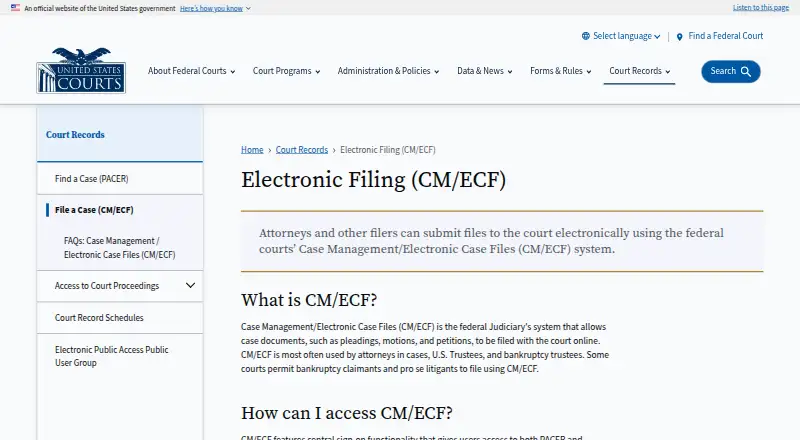
CM/ECF is the U.S. federal courts' electronic case filing system, used by courts to maintain case files and accept documents filed over the Internet. Its coverage includes appellate, district, and bankruptcy courts. Attorneys and the public can view and download case information, docket sheets, and filed documents through PACER, subject to court restrictions. A central sign-on account provides access to both PACER and electronic filing, but filing also requires a PACER account and access issued by an individual court. Where a court enables it, registered attorneys can file online at any time. Electronic submissions create docket entries and update docket sheets immediately; the system emails a filing notice with links to the document and docket sheet to the filer and registered case participants. Documents are accepted in PDF format, and filers must acknowledge their responsibility to redact personal identifier information each login. CM/ECF is free for filing over the Internet, though existing court filing fees still apply. Viewing additional records through PACER is charged at ten cents per page, with most documents capped at $3.00; transcripts and docket sheets are excluded from that cap.
Who it is for
CM/ECF suits attorneys, U.S. Trustees, and bankruptcy trustees filing in covered federal courts. Some courts also allow bankruptcy claimants and self-represented litigants to file.
What is good
- Electronic filings update docket sheets immediately
- Filing notices include document and docket links
- Filing over the Internet has no added fee
- PACER and filing share central sign-on
What to know first
- Filing access must be issued by an individual court
- Documents must be submitted in PDF format
- PACER record access costs ten cents per page
- Filers must redact personal identifiers
Specifiction review
CM/ECF: the full review
CM/ECF handles filing and related docket updates for the listed federal courts, with court-issued access required to submit documents. Filing itself has no added fee, but PACER charges for viewing additional records.
CM/ECF is the federal judiciary’s system for managing electronic case files and accepting filings online. It suits attorneys and trustees handling matters in covered federal courts, plus claimants and self-represented litigants where a court permits them to file. Its appeal is a connected filing-and-docket workflow with no added filing-system fee; court authorization and PACER access costs are the key trade-offs.
Overview
CM/ECF covers U.S. federal appellate, district and bankruptcy courts. A central sign-on account connects PACER with electronic filing, but submitting documents requires both a PACER account and access granted by the individual court. That court-by-court gate makes CM/ECF a targeted choice for federal cases, not a general e-filing service.
Where a court enables the option, registered attorneys can file online 24 hours a day, seven days a week. The system accepts PDF documents and creates docket entries and updates docket sheets immediately after filing. It also emails the filer and registered case participants a Notice of Electronic Filing with links to the filed document and docket sheet. These updates make filing activity visible promptly, though filing availability is determined by each court.
Attorneys and the public can view and download case information, docket sheets and filed documents through PACER, subject to court restrictions. PACER charges ten cents per page; most documents are capped at the equivalent of 30 pages ($3.00). Transcripts and docket sheets are excluded from that cap, so record-viewing costs remain separate from filing.
Key features
Filing and docket updates
Electronic submissions automatically become docket entries, with docket sheets updated immediately. Email notices link participants to both the filing and its docket record. This is useful when attorneys need a timely shared record of case activity, but it does not remove the need to obtain filing access from the court handling the case.
Privacy and support
Filers must acknowledge their responsibility to redact personal identifier information at each login. Each court provides CM/ECF training, while PACER offers learning aids and FAQs. That division gives users court-specific training alongside general PACER resources, but redaction remains the filer’s responsibility.
Pricing
The CM/ECF electronic filing plan costs 0.00 USD per free. There is no added fee for filing documents over the Internet, although existing court filing fees still apply. The free filing price is a meaningful advantage for regular filers, but it does not make record access free: PACER charges for viewing additional case records at ten cents per page, with most documents capped at the equivalent of 30 pages ($3.00), excluding transcripts and docket sheets. There is no free trial.
Platforms
CM/ECF is available on the web. Filing requirements include a personal computer running Windows or Mac OS X, internet service and a web browser. The system accepts PDFs, so users whose filing workflow depends on other document formats will need to submit in PDF.
Who it's for
Attorneys are the most frequent users, along with U.S. Trustees and bankruptcy trustees. Some courts also allow bankruptcy claimants and self-represented litigants to file. CM/ECF is the right fit when a matter is in a covered federal court and that court has issued filing access; it is not a fit for users seeking a single service that works without court-specific authorization.
Pros and cons
- Pro: Filing itself has no added system fee, keeping the online submission layer free apart from existing court fees.
- Pro: Immediate docket updates and email notices help filers and registered participants follow activity without waiting for a separate docket update.
- Pro: Coverage includes federal appellate, district and bankruptcy courts, with court training and PACER learning resources.
- Con: Filing access must come from the individual court, so a PACER account alone is not enough to submit documents.
- Con: PACER viewing fees apply, and transcripts and docket sheets do not receive the 30-page-equivalent cap.
- Con: PDF is the accepted document format, and filers bear responsibility for redacting personal identifiers.
Alternatives
For broader legal e-filing options, browse Legal E-Filing Software. Consider LegalAtoms if you want a freemium service with web, mobile and browser-extension platforms, including a free domestic-violence application and collaboration tools. MyFileRunner may suit users who want free full-service eService or self-service eFiling options. Court File America offers free e-filing with self-administration, though an EFSP fee may apply in addition to court filing fees. iDocket eFile is another no-iDocket-fee e-filing service, with statutory court fees and a 2.89% state e-filing credit-card transaction fee potentially applying. LegalConnect is a paid option with a turnkey system and state-priced e-filing. eLawServices has a free basic plan, but it cannot submit word processor files and has no fax service. eFileTexas.gov provides basic state e-filing and e-service, though transaction and service fees may apply. eLodgment is a free-to-use service where court fees may apply to particular document types.
Verdict
Choose CM/ECF if you file in a covered federal court and want filing, docket updates and participant notices tied together without an added filing-system fee. Look elsewhere if you need access that does not depend on a court-issued account or want to avoid PACER charges for viewing records.
CM/ECF plans and pricing
All plansCompared on legal e-filing software
- Free plan
- Yesuscourts.gov
- Court coverage
- U.S. federal appellate, district, and bankruptcy courtsuscourts.gov
- Filing status tracking
- Yesuscourts.gov
- Electronic service
- Yesuscourts.gov
- Supported platforms
- webuscourts.gov
Facts
- Purpose
- CM/ECF lets federal courts maintain electronic case files and accept court documents filed over the Internet.uscourts.gov · 5 Oct 2026
- Users
- It is used most often by attorneys, U.S. Trustees, and bankruptcy trustees; some courts allow bankruptcy claimants and self-represented litigants to file.uscourts.gov · 5 Oct 2026
- Document access
- Attorneys and the public can view and download case information, docket sheets, and filed documents through PACER, subject to court restrictions.uscourts.gov · 5 Oct 2026
- Central sign-on
- A central sign-on account provides access to both PACER and electronic filing, while filing requires a PACER account and access issued by an individual court.uscourts.gov · 5 Oct 2026
- Filing availability
- At a court's option, registered attorneys can file online 24 hours a day, seven days a week.uscourts.gov · 5 Oct 2026
- Docket updates
- Electronic filings automatically create docket entries and update docket sheets immediately.uscourts.gov · 5 Oct 2026
- Notifications
- After an electronic filing, the system emails a Notice of Electronic Filing with links to the filed document and docket sheet to the filer and registered case participants.uscourts.gov · 5 Oct 2026
- File format
- CM/ECF accepts documents in PDF format.uscourts.gov · 5 Oct 2026
- Privacy responsibility
- Filers must acknowledge their responsibility to redact personal identifier information each time they log in.uscourts.gov · 5 Oct 2026
- Computer requirements
- The FAQ lists a personal computer running Windows or Mac OS X, internet service, and a web browser among filing requirements.uscourts.gov · 5 Oct 2026
- Training and support
- Each court offers CM/ECF training, and PACER provides learning aids and FAQs.uscourts.gov · 5 Oct 2026
- PACER access fees
- PACER record access is listed at ten cents per page, with most documents capped at the equivalent of 30 pages ($3.00); transcripts and docket sheets are excluded from the cap.uscourts.gov · 5 Oct 2026
- Modernization
- The Judiciary says it is modernizing its case management system and describes plans for PACER unified search and other improvements.uscourts.gov · 5 Oct 2026
Company
- Founded
- 2001uscourts.gov · 23 Sept 2026
Best CM/ECF alternatives
See all 20Where it ranks on Specifiction
Is CM/ECF yours?
Claim it for free: prove the domain, then correct facts, plans and screenshots. An editor reviews every change.
Sources
- uscourts.gov/court-records/file-a-case-cm-ecf/faqs-c· checked 5 Oct 2026
- uscourts.gov/court-records/electronic-filing-cm-ecf· checked 5 Oct 2026