
ColorUI Prompt Palette Studio
- 1Runs onAndroid, API, Browser, iOS, self-hosted, Web
- 2CostsFree plan
- 3Image color extractionYes
- 4Accessibility checkerYes
- 5Export formatsCSS variables, Tailwind, SCSS, JSON, W3C DTCG, Style Dictionary, Swift UIColor, Android XML
- 6Harmony modes7 modes
Overview
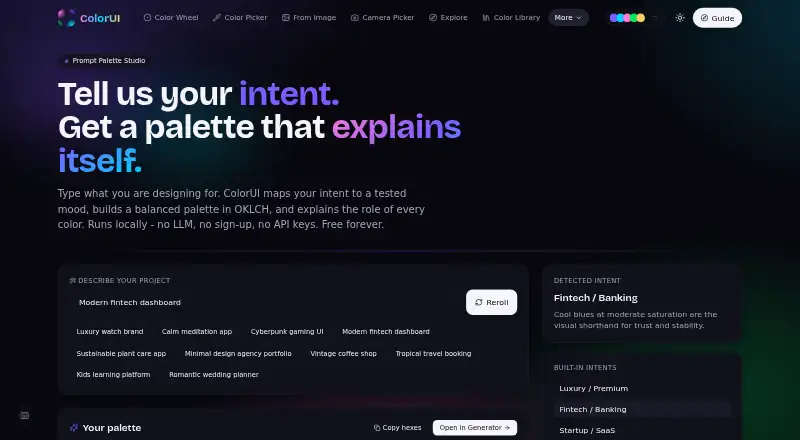
ColorUI Prompt Palette Studio turns natural-language design requests into color palettes and explains each color's role. It maps mood, temperature and context to OKLCH properties, arranging colors as primary brand tones, secondary accents and neutral backgrounds. You can give it color names or exact hex codes, lock those choices and generate matching tones around them. Exports include CSS custom properties, W3C design tokens and Tailwind themes, alongside SCSS, JSON, Style Dictionary, Swift UIColor and Android XML. The public API needs no signup or API key, supports CORS and allows 60 requests per minute; it accepts prompt-based generation, harmony rules or random mode, with random counts from 2 to 8. Prompts are evaluated statelessly and are not stored or tied to personal accounts. Palettes may be used personally or commercially without attribution. Integrations include Figma, VS Code, CLI, GitHub, Raycast and MCP. ColorUI also lists image color extraction, an accessibility checker and seven harmony modes. The free plan is available without signup.
Who it is for
It suits designers and developers who want to generate, refine and export palettes for design systems or code. Its API and integrations also suit workflows that need palette generation across tools.
What is good
- Explains colors in generated palettes
- Locks named colors or exact hex codes
- Exports CSS, W3C tokens and Tailwind themes
- Personal and commercial use without attribution
What to know first
- API allows 60 requests per minute
- Random mode generates 2 to 8 colors
Specifiction review
ColorUI Prompt Palette Studio: the full review
ColorUI combines prompt-led palette creation with color locking and formats for design and development workflows. Its stateless prompt handling and no-signup API are useful specifics, while API throughput is capped at 60 requests per minute.
Overview
ColorUI Prompt Palette Studio is a prompt-driven palette generator for designers and developers who want to take color direction from a brief into working formats. It is most compelling when you need a no-sign-up workflow and control over colors that must stay fixed; the API’s 60-requests-per-minute cap is a practical constraint for heavier automation.
It turns natural-language descriptions into coordinated palettes and explains the colors it chooses. ColorUI says prompts are evaluated statelessly through its backend API, without being stored or associated with personal accounts. Generated palettes can be used in personal and commercial projects without attribution.
ColorUI positions the generator within a toolkit of more than 40 free tools, also offered without sign-ups. For a broader comparison, see AI Color Palette Generators.
Key features
The generator maps a prompt’s mood, temperature, and context to OKLCH color properties, then builds a palette with primary brand tones, secondary accents, and neutral backgrounds. That structure is useful when a project needs a coordinated starting point rather than a single suggested color. Users can name colors or supply exact hex codes and lock them while matching tones are generated, a meaningful control when an existing brand color cannot change.
Seven harmony modes provide another way to shape results; random mode accepts counts from two to eight. Exports include CSS variables, Tailwind, SCSS, JSON, W3C DTCG, Style Dictionary, Swift UIColor, and Android XML. AI-generated palettes can also be exported as CSS custom properties, W3C design tokens, or a Tailwind theme. The breadth suits both design handoff and implementation, though the palette generator remains one part of a larger toolkit rather than a full design system.
ColorUI also offers image color extraction and an accessibility checker. Integrations cover Figma, VS Code, CLI, GitHub, Raycast, and MCP. The public API needs no key or signup, supports CORS, and accepts prompt-based generation, harmony rules, or random mode. Its 60 requests per minute limit makes it useful for modest integrations, but a constraint for high-volume generation.
The CLI has no dependencies, runs wherever Node 18 or later runs, has no telemetry, and supports self-hosted deployments through COLORUI_API. ColorUI says it uses strict CSP, HSTS preload, COOP, frame-ancestors none, SSRF guards, per-IP rate limits, and weekly CodeQL scans. Support is offered by email at [email protected] and through a Discord community.
Pricing
The Free plan is free forever. It requires no signup and has no LLM or API keys; personal and commercial use without attribution are included. That removes account setup and licensing friction, while the API’s 60-requests-per-minute ceiling is the stated throughput limit. There are no paid tiers in the plan information provided.
Platforms
ColorUI lists Android, iOS, web, API, extension, and self-hosted availability. Its integrations include Figma, VS Code, CLI, GitHub, Raycast, and MCP, and the CLI runs on Node 18 or later. The range supports both browser-based palette work and development workflows, with self-hosting available through the CLI’s COLORUI_API configuration.
Who it's for
This is a strong fit for designers and developers who want prompt-based palette ideas, need to preserve named or exact colors, and value exports that travel into code or design-token workflows. Its no-sign-up API and stateless prompt handling also suit users who want to avoid account-linked prompt storage. Look elsewhere if your integration needs more than 60 API requests per minute.
Pros and cons
- Pros: Locked color names or hex codes let users keep an existing brand color while generating complementary tones.
- Pros: A broad set of code and token exports covers common paths from palette creation to implementation.
- Pros: Free forever, no signup, no API key, and commercial use without attribution lower the barriers to adoption.
- Pros: Stateless prompt handling and a CLI with no telemetry offer clear privacy-oriented choices.
- Cons: The public API is capped at 60 requests per minute, which may not suit high-throughput use.
- Cons: ColorUI is a palette and color toolkit, not a complete design system.
Alternatives
Choose Pantone Connect Palette Generator if access to a 15,000-plus-color library and its Search, Pick, and Measure tools matters more than ColorUI’s prompt and code-export workflow; its free plan requires an account.
Chromos is worth considering for a web-based workflow whose free plan combines one project and five palettes with color tools, explanations, advanced reasoning, and ADA optimization.
Perception may suit readers who want a web-based reference workflow: its Lite plan offers three AI-generated palettes at a time, color-reference pages, and limits on saved palettes and bookmarks.
ColorBrew is another free option for web and extension users.
HanoDecor Color Palette Generator is an alternative for readers seeking a paid design workflow; its Starter plan is 19.00 USD per month, billed yearly at $228/year, and includes credits, designs, styles, HD exports, and projects.
10015.io AI Color Palette Generator is a free web tool for AI-generated palettes and CSS-variable or hexadecimal text export.
AIColors offers unlimited palette generation without an account, according to its free plan.
Color Palette Generator AI is a free web and API alternative with unlimited generations, all export formats, shareable links, and no account required.
Verdict
Choose ColorUI Prompt Palette Studio if you want prompt-led palettes with meaningful color locking, broad implementation exports, and a no-sign-up path from generation to API or CLI use. Its free forever terms and privacy-oriented prompt handling are persuasive strengths. For high-volume API workloads or a complete design system, its rate cap and focused palette scope point toward another tool.
ColorUI Prompt Palette Studio plans and pricing
All plansCompared on AI color palette generators
- Free plan
- Yescolorui.io
- Image color extraction
- Yescolorui.io
- Accessibility checker
- Yescolorui.io
- Export formats
- CSS variables, Tailwind, SCSS, JSON, W3C DTCG, Style Dictionary, Swift UIColor, Android XMLcolorui.io
- Harmony modes
- 7 modescolorui.io
Facts
- Prompt generation
- It translates natural-language design prompts into cohesive color palettes with per-color explanations.colorui.io · 30 Sept 2026
- Color model
- The generator maps mood, temperature, and context to OKLCH color properties.colorui.io · 30 Sept 2026
- Palette structure
- Generated palettes include primary brand tones, secondary accents, and neutral background colors.colorui.io · 30 Sept 2026
- Color control
- Users can specify color names or exact hex codes and lock those colors while matching tones are generated.colorui.io · 30 Sept 2026
- Exports
- AI-generated palettes can be exported as CSS custom properties, W3C design tokens, or a Tailwind theme.colorui.io · 30 Sept 2026
- Prompt privacy
- Prompts are evaluated statelessly through the backend API and are not stored or associated with personal accounts.colorui.io · 30 Sept 2026
- Commercial rights
- Generated color palettes may be used in personal and commercial projects without attribution.colorui.io · 30 Sept 2026
- Integrations
- ColorUI provides integrations for Figma, VS Code, CLI, GitHub, Raycast, and MCP.colorui.io · 30 Sept 2026
- API access
- The public API requires no API key or signup, supports CORS, and allows 60 requests per minute.colorui.io · 30 Sept 2026
- API limits
- The palette endpoint accepts prompt-based generation, harmony rules, or random mode, with random counts from 2 to 8.colorui.io · 30 Sept 2026
- Security controls
- ColorUI states that it uses strict CSP, HSTS preload, COOP, frame-ancestors none, SSRF guards, per-IP rate limits, and weekly CodeQL scans.colorui.io · 30 Sept 2026
- Support
- Support is provided through [email protected] and a Discord community link.colorui.io · 30 Sept 2026
- CLI deployment
- The CLI has zero dependencies, runs wherever Node 18+ runs, has no telemetry, and supports self-hosted deployments through COLORUI_API.colorui.io · 30 Sept 2026
- Audience
- ColorUI describes itself as a toolkit for designers and developers, with more than 40 free tools and no sign-ups.colorui.io · 30 Sept 2026
Best ColorUI Prompt Palette Studio alternatives
See all 20


Where it ranks on Specifiction
Is ColorUI Prompt Palette Studio yours?
Claim it for free: prove the domain, then correct facts, plans and screenshots. An editor reviews every change.
Sources
- colorui.io/ai· checked 30 Sept 2026
- colorui.io/guide· checked 30 Sept 2026
- colorui.io/api· checked 30 Sept 2026
- colorui.io/security· checked 30 Sept 2026
- colorui.io/cli· checked 30 Sept 2026
- colorui.io/about· checked 30 Sept 2026