Tech riderRev. 30 Sept 2026
- 1Runs onLinux, Mac, Web, Windows
- 2CostsFree plan
- 3Keyboard/mouse outputYes
- 4Virtual-controller outputYes
- 5Profile switchingYes
- 6Platform supportmultiplatform
- 7Controller input typesgamepad, joystick, keyboard, mouse, phone browser
7 lines stated Written from the maker's own pages: github.com
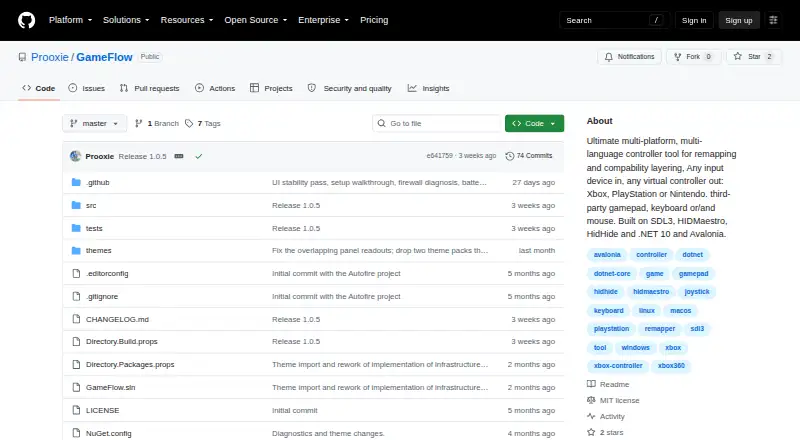
Overview
GameFlow is ranked #1 of 27 in game controller mapper software on Specifiction. It runs on Linux, macOS, Web, Windows. There is a free plan.
GameFlow plans and pricing
All plansCompared on game controller mapper software
- Free plan
- Yesgithub.com
- Keyboard/mouse output
- Yesgithub.com
- Virtual-controller output
- Yesgithub.com
- Profile switching
- Yesgithub.com
- Platform support
- multiplatformgithub.com
- Controller input types
- gamepad, joystick, keyboard, mouse, phone browsergithub.com
Facts
- Purpose
- GameFlow is cross-platform gamepad tooling that transforms gamepad, keyboard, mouse or phone input through saved profiles into virtual-controller output.github.com · 30 Sept 2026
- Audience
- The project describes itself as cross-platform gamepad tooling for anyone.github.com · 30 Sept 2026
- Mapping
- Features include autofire, button remapping, shift layers, SOCD cleaning, stick trim, multi-source rows, gyro aiming, touchpad mapping, button combos and freeze macros.github.com · 30 Sept 2026
- Scripting
- Custom control logic uses sandboxed Lua through MoonSharp.raw.githubusercontent.com · 30 Sept 2026
- Phone controller
- A phone browser on the same LAN can act as a controller without installing an app, with support for up to 16 phones.github.com · 30 Sept 2026
- Motion integration
- The motion server exposes DSU/Cemuhook over UDP for Cemu, Dolphin, Yuzu and Ryujinx; the protocol supports four pads.github.com · 30 Sept 2026
- OBS integration
- GameFlow can generate a transparent controller-overlay URL for use as an OBS Browser source.github.com · 30 Sept 2026
- Profiles
- Profiles are human-editable JSON documents that can be created, duplicated, renamed, imported and exported.github.com · 30 Sept 2026
- Platform requirements
- The application requires .NET SDK 10.0 or later and uses SDL3 for gamepad and joystick input on Windows, Linux and macOS.github.com · 30 Sept 2026
- Virtual output
- Windows virtual-controller output uses HIDMaestro in user mode without a kernel driver or reboot; Linux and macOS virtual gamepad output are not built yet.github.com · 30 Sept 2026
- Security and licensing
- GameFlow is MIT licensed, and the license states that the software is provided as-is without warranties.github.com · 30 Sept 2026
- Physical-device limitation
- GameFlow does not hide physical controllers from games and has no integration with HidHide or an equivalent tool.github.com · 30 Sept 2026
- Support and contribution
- The project invites contributions through forks, focused commits and pull requests.github.com · 30 Sept 2026
Best GameFlow alternatives
See all 20 All accessCh 02 LEA Extended Input Free planAndroidiOS Free to start7.3 All accessCh 03 Monect PC Remote Play Free planAndroidiOS Free to start7.3 All accessCh 04 reWASD Free trialAndroidiOS from $14.99/mo7.2 All accessCh 05 AntiMicroX Free planLinuxWindows Free to start7.1 All accessCh 06 ControllerBuddy Free planLinuxWindows Free to start7.0 All accessCh 07 JoyToKey Free trialWindows from $7.50/mo7.0

Where it ranks on Specifiction
Is GameFlow yours?
Claim it for free: prove the domain, then correct facts, plans and screenshots. An editor reviews every change.
Sources
- github.com/Prooxie/GameFlow· checked 30 Sept 2026
- raw.githubusercontent.com/Prooxie/GameFlow/master/WIKI.md· checked 30 Sept 2026
- github.com/Prooxie/GameFlow/blob/master/LICENSE· checked 30 Sept 2026
- github.com/Prooxie/GameFlow/releases· checked 30 Sept 2026