Tech riderRev. 2 Oct 2026

- 1Runs onWindows
- 2CostsFree plan
- 3Keyboard/mouse outputYes
- 4Virtual-controller outputYes
- 5Profile switchingYes
- 6Per-app profilesYes
- 7Platform supportwindows
- 8Controller input typesgamepads, joysticks, keyboards, mice, touchpads, MIDI devices, wheels, HOTAS, arcade sticks, and VR controllers
8 lines stated Written from the maker's own pages: padforge.org
Overview
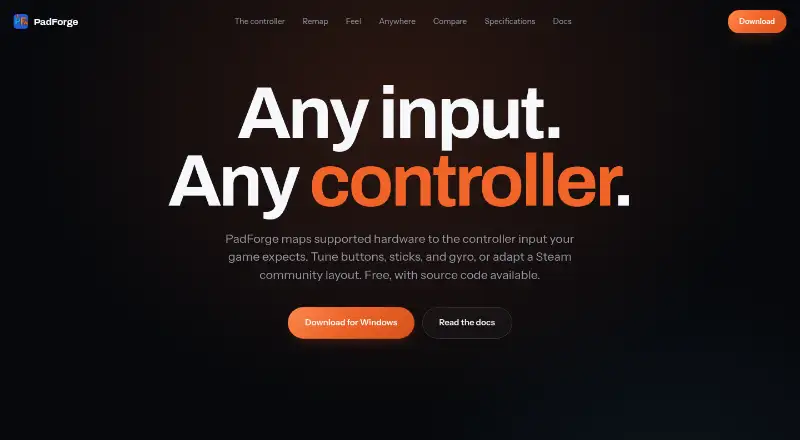
PadForge is ranked #13 of 27 in game controller mapper software on Specifiction. It runs on Windows. There is a free plan.
PadForge plans and pricing
All plansFree Free $0 forever No paywall · no subscriptions · no paid feature packs padforge.org · 2 Oct 2026
Compared on game controller mapper software
- Free plan
- Yespadforge.org
- Keyboard/mouse output
- Yespadforge.org
- Virtual-controller output
- Yespadforge.org
- Profile switching
- Yespadforge.org
- Per-app profiles
- Yespadforge.org
- Platform support
- windowspadforge.org
- Controller input types
- gamepads, joysticks, keyboards, mice, touchpads, MIDI devices, wheels, HOTAS, arcade sticks, and VR controllerspadforge.org
Facts
- Purpose
- PadForge maps supported input devices to the virtual controller input a game expects.padforge.org · 2 Oct 2026
- Remapping
- It maps gamepads, wheels, flight sticks, keyboards, and mice to virtual controllers.padforge.org · 2 Oct 2026
- Virtual controllers
- It supports up to 16 virtual controllers at once, including Xbox, PlayStation, Nintendo, Steam, VR, MIDI, and keyboard-and-mouse shapes.padforge.org · 2 Oct 2026
- Profiles
- Profiles can switch automatically when a game takes focus, and the app includes 13 starter profiles for different kinds of games.padforge.org · 2 Oct 2026
- Motion
- Gyro features include calibration, smoothing, and gyro-to-stick or gyro-to-mouse mapping.padforge.org · 2 Oct 2026
- Steam layouts
- PadForge imports supported Steam community layouts.padforge.org · 2 Oct 2026
- Integrations
- It supports Razer Chroma and Logitech LIGHTSYNC lighting, using the local Razer Synapse server and Logitech G HUB LED engine.padforge.org · 2 Oct 2026
- Phone controller
- A browser on the same Wi-Fi network can act as a controller, with up to 16 phones connected at once and no app installation.padforge.org · 2 Oct 2026
- PC linking
- Remote Link shares controllers and other input devices between PadForge PCs over a network or the internet, with feedback routed back to the physical device.padforge.org · 2 Oct 2026
- Security
- The maker says the app has no telemetry and that its phone controller uses HTTPS with a self-signed certificate whenever possible.padforge.org · 2 Oct 2026
- Anti-cheat limitation
- The maker says anti-cheat vendors set their own rules for virtual input devices and advises users to use judgment with games that have aggressive anti-cheat.padforge.org · 2 Oct 2026
- License
- The source code is available under the CC BY-NC-SA 4.0 license.padforge.org · 2 Oct 2026
- System requirements
- The maker lists Windows 10 or 11 on x64 and Windows 11 on ARM64; the press page identifies ARM64 as preview.padforge.org · 2 Oct 2026
- Intended users
- The maker identifies sim racers, DualSense owners seeking trigger and lightbar effects, accessibility users, and players whose controller does not match a game's expected input as intended users.github.com · 2 Oct 2026
Best PadForge alternatives
See all 20 All accessCh 01 GameFlow Free planLinuxMac Free to start7.5 All accessCh 02 LEA Extended Input Free planAndroidiOS Free to start7.3 All accessCh 03 Monect PC Remote Play Free planAndroidiOS Free to start7.3 All accessCh 04 reWASD Free trialAndroidiOS from $14.99/mo7.2 All accessCh 05 AntiMicroX Free planLinuxWindows Free to start7.1 All accessCh 06 ControllerBuddy Free planLinuxWindows Free to start7.0
Where it ranks on Specifiction
Is PadForge yours?
Claim it for free: prove the domain, then correct facts, plans and screenshots. An editor reviews every change.
Sources
- padforge.org· checked 2 Oct 2026
- padforge.org/press/· checked 2 Oct 2026
- github.com/hifihedgehog/PadForge· checked 2 Oct 2026